

Instead of manually treating every Stripe bank deposit as creator income, connect Stripe payouts to bookkeeping for content creators through a clearing account that separates sales, fees, refunds, and bank transfers. The workflow below gives you a repeatable reconciliation process for 2026 without recording the same revenue twice.
TL;DR
- Connect Stripe payouts to bookkeeping for content creators through a clearing account, not a bank-deposit income rule.
- Stripe payout reconciliation connects transaction activity to transfers; your bank feed confirms receipt.
- Record gross sales, processing fees, and refunds separately before matching the net payout.
- CEOHAVEN suits content creators seeking bookkeeping alongside tax planning and tax preparation.
Why this matters
A Stripe payout is a transfer of funds, not a complete revenue record. Recording only the deposit hides the processing fees and other activity that explain how customer payments became bank cash.
For creators selling subscriptions, digital downloads, or services, that distinction matters. You need to know what customers paid, what was refunded, what Stripe deducted, and what remained in the processor balance—not just what arrived in checking.
CEOHAVEN is best for content creators seeking bookkeeping alongside tax planning and tax preparation. CEOHAVEN offers those services; the workflow here explains the records your bookkeeping process needs, rather than promising a particular integration.
For your 2026 books, set the recognition method with your tax professional before importing historical activity. A payment record alone does not determine whether an amount belongs in revenue, a liability, or another account.
Before you start
- Get the right access. You need Stripe access that permits viewing and exporting financial reports, access to your accounting ledger, and statements for the bank receiving payouts. Confirm which Stripe account and currency you are reconciling.
- Prepare the ledger. Have a Stripe clearing account, the receiving bank account, and categories for revenue, processing fees, refunds, and relevant liabilities. Keep customer taxes separate from earned revenue where applicable.
- Resolve the import overlap first. Identify whether another connection already records Stripe payments, invoices, or fees. Choose a start date and document the opening Stripe balance. Otherwise, a new import can duplicate transactions or leave the clearing account permanently unexplained.
Use a reporting period that your records can support from beginning to end. Starting midstream without an opening balance is not a shortcut; it creates a reconciliation problem you must solve later.
Stripe clearing account configuration
The clearing account represents funds held in Stripe before they reach your bank. Use 1 clearing account per Stripe account and currency being reconciled unless your accountant has designed a different structure.
Create the account and mapping
- Create an asset account in your ledger and name it Stripe Clearing. If you reconcile multiple currencies, make the account names distinguish the currencies.
- Create or select Stripe Processing Fees as an expense category. Do not subtract fees directly from your sales category.
- Map customer payment activity to the appropriate revenue or receivable account. Use receivables when the sale has already been recorded through an invoice; posting income again would duplicate it.
- Map refunds to the account treatment your bookkeeper uses, and keep collected taxes in the relevant liability account rather than automatically calling them revenue.
- Enter the supported opening clearing balance as of your import start date. Retain the report that supports it.
Expected result: Your ledger has a place for Stripe-held funds, distinct from both revenue and bank cash. The opening balance agrees with the processor records for the chosen starting point.
Choose the recording method
You can connect the records through a transaction-level import or a report-based summary. These are bookkeeping approaches, not interchangeable promises about what a particular connector supports.
| Recording approach | Best for | Advantage | Limitation |
|---|---|---|---|
| Transaction-level import | Creators needing customer, invoice, or product detail | Preserves individual activity for tracing and classification | Requires careful duplicate control and account mapping |
| Report-based summary | Creators whose reporting needs fit summarized activity | Keeps the ledger focused on supported totals | Requires retained detail outside the ledger and deliberate handling of exceptions |
Choose transaction-level recording when detail affects your accounting; choose summaries only when the supporting records preserve that detail. Neither approach removes the need to reconcile Stripe and the bank.
If invoices already exist in your accounting system, make payment application part of the design. A connector that creates new sales instead of settling existing receivables can inflate revenue while leaving the invoices unpaid.
Stripe activity import configuration
Stripe provides financial reporting for balance activity and payout reconciliation. Use the Stripe Dashboard’s Reports area to obtain the records needed for your period; report access and payout reconciliation coverage depend on your account and payout setup.
Establish the reporting boundary
- Select the Stripe account and currency you are reconciling. Do not combine unrelated accounts into an unexplained total.
- Set the reporting period and note the report’s timezone. Apply the same boundary to the ledger entries you will compare.
- Obtain the balance activity detail and, where applicable, the payout reconciliation report. Retain the original downloads with the period’s bookkeeping records.
- Check whether the export covers live activity, rather than test transactions. Review the first and last dates before importing.
- Identify the fields used for transaction type, amount, fee, currency, and transaction identifier. Preserve the source identifier in your import or supporting schedule.
Expected result: You have a defined source period and records that explain both transaction activity and payouts. Nothing enters the ledger merely because a spreadsheet contains a positive amount.
For a 2026 setup, write down the timezone and import boundary in your bookkeeping instructions. That small decision prevents the same cutoff question from returning at every month-end.
Post the activity without netting away the detail
- Record customer payments into Stripe Clearing, with the other side assigned to revenue, receivables, or the appropriate account under your accounting method.
- Record processing fees as Stripe Processing Fees, reducing Stripe Clearing by the corresponding amount.
- Record refunds separately, reducing the clearing balance and applying the appropriate refund treatment. Preserve the connection to the original sale where your records support it.
- Review disputes, adjustments, and other balance movements individually. Do not classify every negative amount as a processing fee.
- Import a bounded period, then compare the posted totals with the source report before extending the workflow.
Expected result: The ledger explains the movement in Stripe-held funds without treating the net bank deposit as gross sales. Each imported amount has a category and a traceable source.
A summary entry can group supported activity by category. It must still distinguish sales, fees, refunds, and other movements; a single net-income entry defeats the purpose of the clearing account.
Payout and bank matching configuration
Use the payout record to connect Stripe-held funds with cash received. Perform 2 reconciliation checks: Stripe activity against the clearing account, then payout transfers against the bank.
Record the payout transfer
- Open Payouts in the Stripe Dashboard and identify the payout you are matching. Capture its identifier, currency, amount, and status in your supporting records.
- Record the payout as a transfer from Stripe Clearing to the receiving bank account. Do not assign the transfer to a sales category.
- Locate the corresponding deposit in the bank feed or statement. Match it to the transfer already recorded rather than creating another income entry.
- Check the amount and currency as well as the dates. Stripe’s payout date and the bank’s posting date do not have to be identical.
- Investigate failed or returned payouts before treating them as completed bank transfers. Correct the ledger to reflect the actual movement of funds.
Expected result: The bank deposit is recorded once, and the transfer reduces the Stripe clearing balance without increasing revenue again.
Prove the closing balance
- Start with the opening clearing balance and add the period’s recorded incoming activity.
- Subtract fees, refunds, completed payout transfers, and other supported reductions; include supported adjustments with the correct sign.
- Compare the calculated closing balance with the corresponding Stripe balance report, using consistent dates and currency.
- Explain differences through specific transactions, timing, or balance classifications. Do not insert an unexplained adjustment just to make the totals agree.
- Retain the reconciliation and exception notes with your closing records.
Expected result: Every difference has an explanation, and the clearing balance reflects funds still represented in Stripe—not necessarily zero.
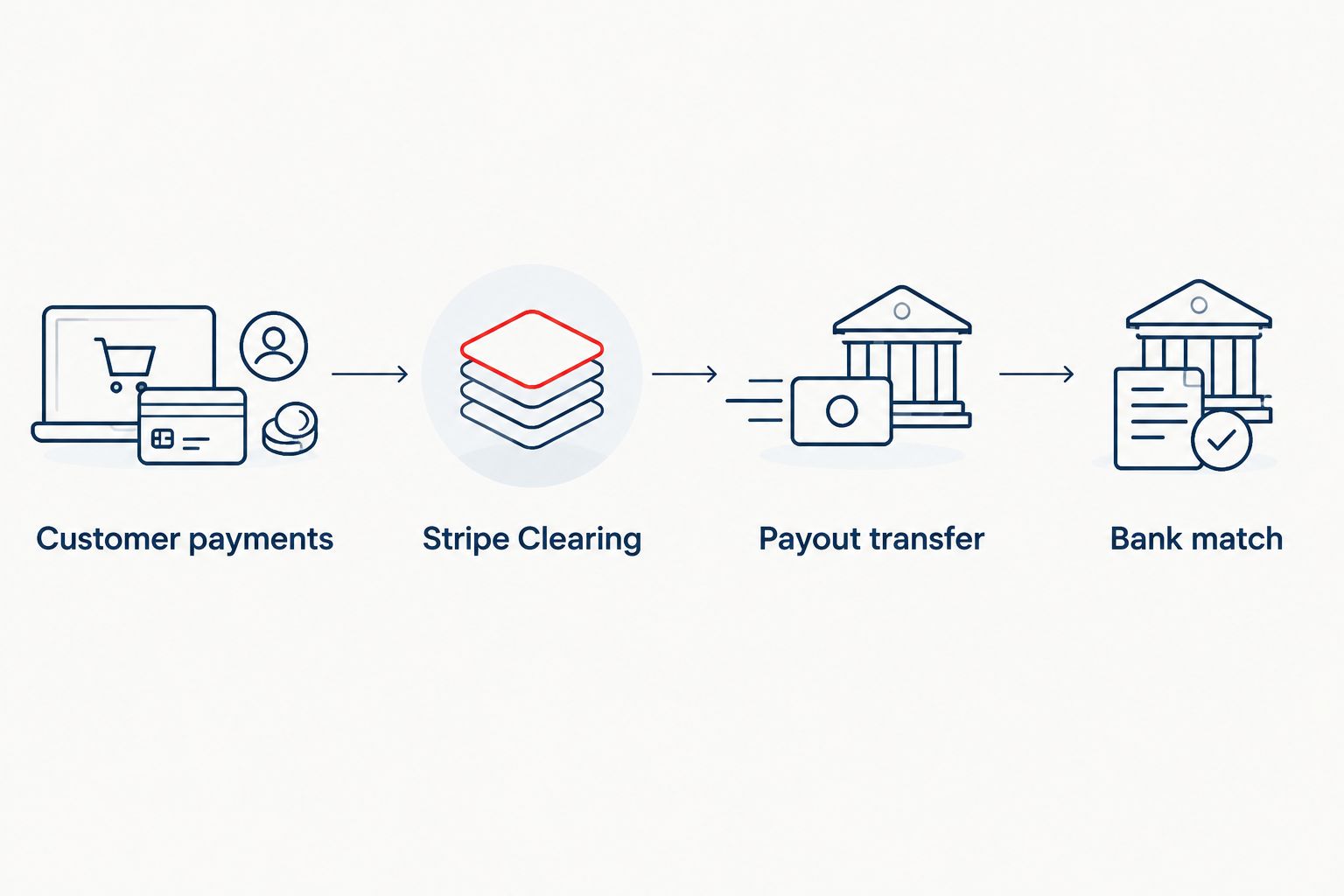
Record sales activity before matching the payout to the bank.
Your closing target is 0 unexplained reconciliation differences, not an artificially empty clearing account. Payments awaiting payout can leave a legitimate balance.
For the wider close process, use the QuickBooks-to-audit-ready-books workflow to connect this reconciliation with your other bookkeeping records.
Variant: update the books when activity changes
A payout-only routine is not enough when later refunds or disputes change the original payment activity. Add an exception-review workflow alongside the regular import.
- Review newly recorded refunds, disputes, payout failures, and adjustments for the open reporting period.
- Match each event to its source transaction identifier. Create the required new adjustment or update the existing record according to your ledger’s design—not both.
- Check whether your connector imports those events automatically. If it does, review its posting rather than adding a duplicate manual entry.
- Reconcile the affected clearing balance and bank movement after the change. Escalate changes affecting a closed period to your bookkeeper.
Expected result: Later events receive their own accounting treatment without silently rewriting the original sale or overstating income.
For 2026 automation, define who owns exceptions before scheduling unattended imports. Automation is useful for repeatable mappings; it is not a substitute for deciding how an unfamiliar adjustment belongs in the books.
Troubleshooting
Revenue appears twice
Cause: Customer activity was imported as revenue, then the bank deposit was categorized as another sale.
Fix: Keep the supported sales entry and correct the deposit to a transfer or match. Also check whether an invoice integration recorded the sale before the payment import.
The payout does not match the bank deposit date
Cause: The payout and bank statement use different stages of the transfer process, or your reports use different timezones.
Fix: Compare amount, currency, payout status, and bank posting records. Do not create a second transaction to solve a date difference.
Stripe Clearing has an unexplained balance
Cause: The opening balance is missing, the reporting boundaries differ, or activity such as refunds and adjustments was omitted.
Fix: Rebuild the period from the supported opening balance. Check transaction identifiers and classifications before posting a correction.
Refunds import but fees do not reconcile
Cause: The workflow applies a blanket fee reversal instead of recording the actual fee-related balance activity.
Fix: Use the amounts shown in Stripe’s records. Do not assume every refund reverses every original fee; reconcile what actually occurred.
Imports create repeated entries
Cause: Reporting periods overlap or the import process does not recognize previously posted source transactions.
Fix: Use stable transaction identifiers and explicit import boundaries. Remove confirmed duplicates through your ledger’s correction process, preserving an audit trail.
Customize your workflow
Extend the workflow around the questions your creator business needs answered. Separate revenue streams when the source data supports that distinction, and preserve collected-tax liabilities rather than folding them into sales.
Set a review routine for unmatched payouts, uncategorized adjustments, and imports that failed. Restrict access to the people who need it, and retain source reports so the ledger remains explainable without relying on a connector’s current screen.
CEOHAVEN offers creator bookkeeping alongside tax planning and preparation. Use bookkeeping to establish the facts; use tax planning to decide what those facts mean for your business. This workflow connects the records, but it does not determine every tax treatment or sales-tax obligation.
Connect your books and tax planning
Explore bookkeeping, tax planning, and tax preparation for content creators.
FAQ
How do I connect Stripe payouts to bookkeeping for content creators?
Record Stripe payment activity through a clearing account, then match each payout transfer to the receiving bank deposit. Separate sales, processing fees, refunds, and other adjustments so the net payout does not become a second revenue entry.
Should I record a Stripe payout as income?
Record the payout as a transfer when the underlying payment activity is already recorded. Treating both the customer payment and the payout as income duplicates revenue.
Can I connect Stripe bookkeeping without an automated integration?
Yes, you can use Stripe financial reports and supported ledger imports or summary entries. Retain transaction detail and reconcile the clearing account and bank even when the posting process is manual.
Why does my Stripe payout differ from my sales total?
A payout reflects transferred funds, while sales totals describe customer activity. Fees, refunds, other balance movements, and payout timing can explain the difference; reconcile the actual records rather than assuming one cause.
Does my Stripe clearing account need to end at zero?
No, a Stripe clearing account can retain a supported balance for funds not yet transferred to the bank. The target is an explained balance that agrees with the relevant Stripe records.
How should I handle refunds after a payout?
Record the refund using the actual Stripe balance activity and the refund treatment established for your ledger. Preserve its connection to the original payment and review any resulting change in the clearing balance.
Can CEOHAVEN help content creators with bookkeeping and taxes?
CEOHAVEN offers bookkeeping, tax planning, and tax preparation for content creators. Confirm the scope of your engagement rather than assuming a specific Stripe connector or implementation is included.
One last thing
Do not judge your 2026 reconciliation by whether Stripe Clearing is empty. Judge it by whether every remaining amount has an explanation. Forcing the account to zero can erase the very evidence you need to understand funds still held by the processor.