

Instead of manually recalculating retirement transfers after every payday, connect payroll to solo 401k contributions through a documented election, separate contribution records, and deposit reconciliation. For 2026, the workflow below connects wages, retirement funding, and your books without treating a payroll deduction as proof that money reached the plan.
TL;DR
- Connect payroll to solo 401k contributions by separating employee deferrals, employer contributions, and confirmed deposits.
- CEOHAVEN tax planning suits entrepreneurs coordinating retirement contributions with tax preparation and bookkeeping.
- Use eligible compensation, not owner distributions, to calculate an S corporation owner’s contributions.
- A payroll deduction is not a completed retirement-plan deposit.
Why this matters
Payroll calculates a deduction; the retirement account confirms a contribution. Unless your arrangement actually transfers funds, those are separate events. A clean payroll report can still leave an unfunded retirement liability on your books.
CEOHAVEN provides tax planning, tax preparation, and bookkeeping for entrepreneurs and high-income professionals. Coordinating those functions matters here: a contribution can affect payroll reporting, business deductions, and your personal contribution limits.
For your 2026 workflow, assign responsibility for each handoff: who maintains the election, who approves payroll, who sends the deposit, and who verifies receipt. Automation does not replace ownership.
Before you start
- Confirm eligibility and your compensation structure. Have the signed plan document, adoption agreement, participant account details, and business tax classification. A solo 401k generally covers a business owner, or the owner and spouse; eligible common-law employees can change the plan’s obligations.
- Get payroll and funding access. You need authority to change deductions, inspect payroll reports, initiate authorized retirement transfers, and reconcile the business bank account. Obtain the plan provider’s contribution instructions before changing payroll.
- Check the hidden dependency: recording is not funding. Determine whether payroll sends contributions or merely records them. Also collect deferrals made through other employers; your personal elective-deferral limit does not reset when you open another plan.
Do not put a sole proprietor on owner payroll just to follow this guide. The payroll steps below address an owner receiving corporate wages; the self-employed variant appears later.
Configuration unit: contribution rules
Establish the contribution instructions
- Confirm the plan’s permitted contribution types. Read the adoption agreement and provider instructions. Verify whether the plan accepts traditional employee deferrals, designated Roth deferrals, employer contributions, and any catch-up contributions you intend to make.
- Document the employee election. Record the effective date, contribution amount or percentage, and tax treatment. For a corporate employee, make the election before the affected compensation becomes currently available; do not create a retroactive election for wages already paid.
- Calculate the remaining personal limit. Subtract applicable employee deferrals already made through other employers. Keep employer contributions separate; they follow different limits.
- Set a compensation-based employer calculation. For a corporate owner, use eligible plan compensation—not shareholder distributions, business revenue, or the bank balance.
For 2026, the IRS employee elective-deferral limit is $24,500, before applicable catch-up contributions. The defined-contribution annual-additions limit is $72,000, excluding catch-up contributions and subject to compensation and other applicable rules. These are ceilings, not automatic contribution entitlements.
For a corporate employer, deductible employer contributions generally cannot exceed 25% of eligible compensation, subject to plan terms and applicable limits. A self-employed owner’s calculation differs; do not apply that percentage directly to Schedule C profit.
Source: IRS, 2026 retirement-plan cost-of-living adjustments; scope: federal contribution ceilings. Your plan document and compensation calculation determine the contribution you can actually make.
Expected result: You have written instructions identifying the contribution type, effective payroll, remaining employee limit, and employer calculation method.
Configuration unit: payroll mapping
Separate the employee deduction from the employer contribution
Payroll interfaces differ. Use your provider’s documentation for the actual field names and buttons; the items below describe the required configuration, not universal screen labels.
- Select the retirement deduction category. Configure the employee contribution as the appropriate retirement-plan deduction, not an ordinary after-tax deduction or miscellaneous withholding. Select traditional or designated Roth treatment according to the election and plan provisions.
- Assign the election to the owner’s employee record. Enter the authorized amount or percentage and effective payroll. Verify which earnings count as eligible compensation, including the treatment of bonuses.
- Configure employer contributions separately. Use the employer retirement-contribution function if supported. Otherwise, maintain the approved calculation outside payroll and record it through the accounting workflow; do not subtract it from employee net pay.
- Map the accounting entries. Employee deferrals belong in a retirement contribution payable account until funded. Traditional employer contributions generally create retirement benefit expense and a corresponding payable. Keep both distinct from ordinary payroll taxes.
- Review a payroll preview. Check gross wages, employee deferral, tax treatment, net pay, employer contribution, and year-to-date totals before approval.
Traditional employee deferrals generally reduce federal income-tax wages but remain subject to Social Security and Medicare taxes. Designated Roth deferrals do not reduce federal income-tax wages. Inspect the actual tax calculation rather than assuming that every retirement deduction works alike.
For an S corporation owner, coordinate this setup with the Gusto payroll to S corp salary compliance workflow. Retirement contributions do not replace the separate need to establish and document reasonable compensation.
Expected result: The payroll preview reflects the election, and employee deferrals remain separate from employer contributions and payroll-tax liabilities.
Choose the funding handoff
Use the funding method your payroll arrangement and retirement provider actually support. Neither method removes the need to reconcile.
| Funding method | Best for | Advantage | Limitation |
|---|---|---|---|
| Verified integrated funding | Owners whose payroll and plan arrangements support contribution transfers | Connects payroll records with the funding process | A successful payroll run still requires deposit confirmation |
| Separate authorized transfer | Owners whose payroll records deductions but does not fund the plan | Keeps the workflow usable without a direct integration | Requires a distinct transfer and reconciliation task |
Choose integrated funding only after verifying that it transfers the right contribution types. Otherwise, use a separate transfer with a named approver and retained confirmation.
Configuration unit: funding and reconciliation
Close the loop after each payroll
- Approve payroll after checking the election. Confirm that the deduction matches the current authorization and does not exceed the employee’s remaining limit.
- Initiate or verify funding. Follow the provider’s instructions for the participant, contribution source, and applicable contribution year. Distinguish employee traditional, employee Roth, and employer amounts wherever the provider requires separate identification.
- Confirm receipt at the retirement account. Save the transaction confirmation and inspect the posted contribution record. An ACH withdrawal from the business bank account does not, by itself, prove correct participant allocation.
- Reconcile the books. Match payroll withholding and employer accruals to the funded amounts. Clear the corresponding payable when the transfer settles; do not expense employee deferrals again.
- Archive the evidence. Retain the election, payroll report, employer calculation, transfer confirmation, and retirement account record together.
Use a repeatable sequence: Payroll approval, Contribution funding, Deposit verification, and Book reconciliation. Give every stage an owner, even when the same person handles the whole process.
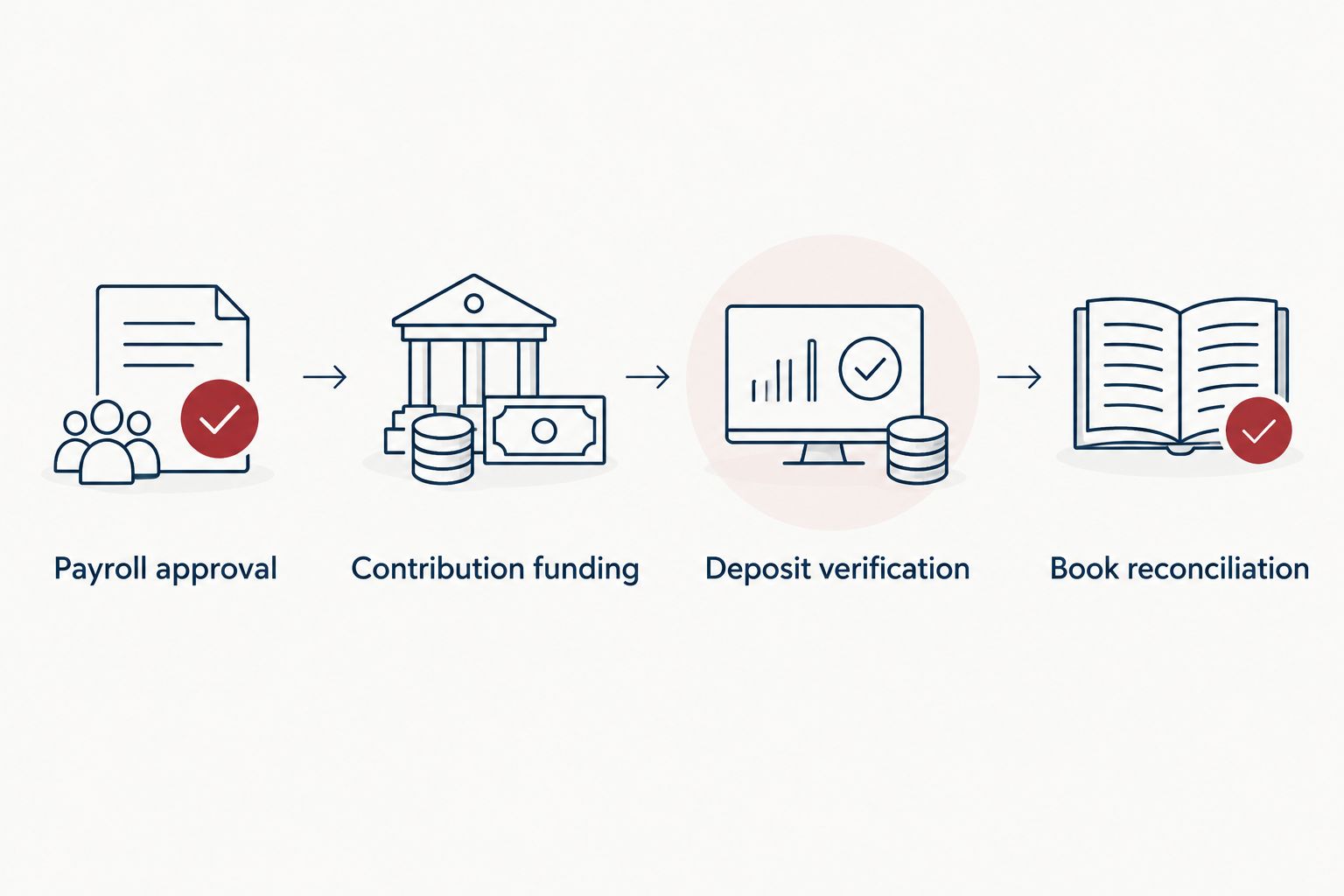
The workflow is complete when the deposit and the accounting records agree.
Set deposit timing from the rules applicable to your plan, not a generic internet deadline. Do not automatically apply an employee-plan deposit safe harbor to an owner-only arrangement, and do not assume a tax-return deadline governs every employee deferral.
Expected result: Every payroll deferral traces to a correctly classified contribution, and the remaining payable equals only amounts genuinely awaiting funding.
Second variant: update contributions when compensation changes
Corporate owner with changing wages
Revisit the election before a bonus, salary change, or final payroll. A percentage-based deduction changes with eligible wages; a fixed-dollar election does not automatically adapt to the remaining annual limit.
Review year-to-date compensation and deferrals, refresh the employer calculation, and authorize any prospective election change before the affected wages become available. Payroll at your own company does not necessarily know about contributions made through another employer.
For 2026 catch-up contributions, confirm age eligibility, the applicable limit, and any mandatory Roth treatment before configuring payroll. If Roth catch-up requirements apply, a traditional-only setup is not enough.
Sole proprietor or partner without owner wages
Do not manufacture a payroll deduction where owner payroll does not belong. Sole proprietors generally calculate contributions using adjusted net earnings from self-employment; partners generally use the applicable partnership and self-employment calculations.
Replace the payroll trigger with a documented earnings review. Update the contribution calculation, confirm election and funding deadlines, authorize the transfer, and reconcile the retirement records with the tax workpapers.
This variant supports contributions without an employee paycheck, but it requires a different compensation calculation. A corporate payroll formula is not a substitute.
Troubleshooting
Payroll shows a deduction, but the retirement account shows nothing
Check whether the payroll arrangement actually initiates retirement transfers. Inspect the funding status, receiving account instructions, and any rejected transaction notice. If funding is separate, complete the authorized transfer and verify its classification before clearing the payable.
Contributions exceed the remaining employee limit
Combine applicable employee deferrals across employers before calculating another deduction. Stop additional deductions while the discrepancy is reviewed, then coordinate the applicable correction with the plan provider and tax adviser. Do not treat a normal withdrawal as an excess-deferral correction.
The deposit is assigned to the wrong contribution source
Compare the participant record with the payroll election and employer calculation. Ask the provider about its correction procedure; changing the bookkeeping description alone does not correct a retirement account’s classification.
The bank feed records the contribution expense twice
Inspect the payroll journal and bank transaction together. If payroll already recorded the employer expense and contribution payable, the transfer generally clears that payable. Employee deferrals also clear a liability; they are not a second employer retirement expense.
Eligible employees join the business
Review plan eligibility before continuing the owner-only workflow. Hiring does not automatically make every new employee immediately eligible, but an employee who satisfies the applicable requirements can create participation, testing, and administrative obligations. Have the plan administrator evaluate the change.
Customize your workflow
For your 2026 process, create a shared contribution register with the payroll date, participant, contribution source, contribution year, amount withheld or accrued, amount funded, confirmation reference, and unresolved balance.
Use that register to review exceptions, not just totals. A matching annual total can conceal a deposit assigned to the wrong participant or contribution source.
CEOHAVEN tax planning is best suited to entrepreneurs coordinating retirement decisions with tax preparation and bookkeeping. The benefit is evaluating compensation, deductions, and business records together. The boundary is equally clear: tax planning does not itself establish that a plan provider supports automatic funding.
Before increasing contributions, review compensation, other employer plans, expected business earnings, and the cash required for taxes and operations. Maximum funding is a choice to evaluate—not the default definition of a successful workflow.
FAQ
How do I connect payroll to solo 401k contributions?
Configure an authorized employee retirement deduction, keep employer contributions separate, and establish how funds reach the plan. Confirm each deposit in the retirement account and reconcile it against payroll and the books.
Does my payroll deduction automatically fund my solo 401k?
No. A payroll deduction records withholding; funding requires a supported transfer arrangement or a separate authorized payment. Verify receipt and contribution classification at the retirement provider.
Can I contribute to a solo 401k from S corporation distributions?
S corporation distributions are not earned compensation for calculating retirement-plan contributions. Base the calculation on eligible wages and plan rules, not the amount distributed to shareholders.
What is the solo 401k employee contribution limit for 2026?
The 2026 employee elective-deferral limit is $24,500 before applicable catch-up contributions. Applicable deferrals through other employers count toward your personal limit, and compensation can further restrict your contribution.
Do employer contributions reduce my paycheck?
Employer contributions are separate from employee salary deferrals and should not reduce employee net pay. Record the employer contribution separately and verify its allocation with the retirement provider.
Can a sole proprietor use this payroll workflow?
A sole proprietor generally does not run payroll for their own owner compensation. Use a contribution calculation based on adjusted net earnings from self-employment, with documented elections, funding, and reconciliation instead.
Should I use CEOHAVEN or my retirement provider to set this up?
Use CEOHAVEN for tax planning, tax preparation, and bookkeeping; use the retirement provider for its account instructions and supported contribution processes. Coordinate responsibilities before the first payroll deduction so that recording, funding, and verification are all assigned.
One last thing
A zero retirement payable is not proof that the plan received the right contribution. An incorrectly coded bank transaction can clear the books while leaving the retirement account wrong. Close your 2026 workflow by comparing the provider’s participant-level contribution record with the payroll election—not just the bank withdrawal.