

Instead of manually comparing owner draws with payroll every month, connect Gusto payroll to S corp reasonable salary planning through a documented compensation decision, an owner-employee payroll schedule, and a recurring reconciliation. Gusto processes the wages; your compensation analysis determines whether those wages reflect the work you perform.
TL;DR
- Connect Gusto payroll to S corp reasonable salary through documented compensation, scheduled wages, and reconciled bookkeeping.
- Gusto processes payroll; it does not establish that an owner’s salary is reasonable.
- CEOHAVEN offers S corp owners tax planning, tax preparation, and bookkeeping—not a payroll-software substitute.
- Keep shareholder distributions separate from wages, and revisit compensation when your responsibilities change.
Why this matters
A completed payroll run is not proof of reasonable compensation. An S corporation must pay reasonable compensation to a shareholder-employee for services before making non-wage distributions to that shareholder. The IRS can reclassify distributions as wages when compensation does not reflect the services provided.
For your 2026 workflow, separate the compensation decision from its execution. Decide what your work warrants, process those wages, and preserve the records supporting both. A salary chosen solely to minimize payroll taxes skips the first step.
CEOHAVEN is best for S corp owners seeking tax planning, tax preparation, and bookkeeping rather than payroll software alone. CEOHAVEN provides those services for entrepreneurs, real estate investors, content creators, and high-income professionals.
This is an operational connection, not an automatic salary-compliance integration. No payroll setting replaces an analysis of your duties, time, comparable compensation, and business circumstances.
Before you start
- Account access: Have administrator access to Gusto, your business bank account, applicable payroll-tax registrations, and the owner’s employee information. Confirm the corporation’s S election and effective date with your tax adviser before configuring owner payroll.
- Compensation materials: Gather the owner’s responsibilities, working hours, comparable wage evidence, year-to-date payroll, shareholder distributions, and current books. Assign someone to approve the compensation decision and someone to reconcile payroll.
- The mid-setup gotcha: If another provider already processed wages during 2026, coordinate payroll-history entry before submitting the first Gusto run. Previous wages and tax payments belong in the year’s records; entering them again as new payroll creates duplication.
Do not start by picking a salary percentage. Start by identifying the services the shareholder actually performs and the evidence supporting compensation for those services.
Compensation file
Document the decision before configuring payroll
- Describe the owner’s work. Separate revenue-producing work, management, administration, and other responsibilities. A founder who delivers client work has a different compensation profile from an investor who performs limited operational duties.
- Record the time commitment. Document working hours and changes in responsibilities. Include the period the salary covers, especially when the owner started work or the S election became effective during the year.
- Collect relevant wage evidence. Use comparable roles, geography, experience, and industry. Bureau of Labor Statistics occupational wage data can support the analysis, but a broad occupational average does not resolve a mixed-role founder’s compensation by itself.
- Approve the compensation amount. Have your tax adviser evaluate the evidence alongside the corporation’s circumstances. Record the reasoning, effective date, reviewer, and circumstances that would trigger a new review.
- Separate wages from distributions. State how payroll and shareholder distributions will be recorded. Do not treat a distribution as compensation merely because money reached the owner’s personal account.
Expected result: You have a compensation memo supporting the payroll amount, not just a number entered into software.
A useful 2026 compensation file contains the role description, supporting wage sources, approval, and subsequent changes. Keep the sources with their publication dates so another reviewer can understand the evidence used at the time.
The IRS’s S Corporation Compensation and Medical Insurance Issues guidance describes factors relevant to reasonable compensation, including duties, training, experience, and time devoted to the business. Its scope is federal tax treatment; it is not a prescribed salary calculator.
Owner-employee profile
Configure the person and the pay schedule
- Open the employee record. In Gusto, use People to locate or add the shareholder who performs services. Set up that person as an employee for the wages being processed—not as a contractor merely because the person owns the company.
- Complete the employment information. Enter the legal name, taxpayer information, work location, start date, and required withholding information. Match the work location to where services are performed rather than automatically using the company’s mailing address.
- Enter the approved compensation. Configure the salary and effective date using the documented decision. Check that the amount is expressed on the intended annual or per-pay-period basis before saving.
- Choose the payroll schedule. Match the pay frequency to applicable wage-payment rules and the company’s payroll process. A monthly schedule has 12 pay periods; a semimonthly schedule has 24 pay periods. Those divisions spread an approved annual salary across the year—they do not establish reasonableness.
- Review owner-specific benefits. Tell the payroll and tax advisers about shareholder health insurance and other benefits before processing them. More-than-2% S corporation shareholders have special benefit rules; ordinary employee treatment is not automatically correct.
Expected result: The owner’s employee record, compensation basis, work location, and payroll schedule agree with the approved compensation file.
Gusto’s screens and available controls vary by account configuration. The essential verification is the saved employee record and payroll preview, not whether your screen matches a tutorial screenshot.
Do not configure automatic payroll until the first reviewed run is correct. Automation repeats the configuration you give it, including an incorrect pay basis or missing benefit treatment.
Payroll execution
Review and submit the first run
- Open payroll. Use Payroll, then Run payroll, to prepare the scheduled run. Check the payroll period and payment date before reviewing the owner’s earnings.
- Inspect gross wages. Compare the proposed gross salary with the approved schedule. If payroll begins partway through the year, use a documented remaining-year plan rather than pretending the employee received earlier wages.
- Inspect adjustments. Review additional earnings, deductions, reimbursements, and benefits separately. A reimbursement or shareholder distribution is not interchangeable with salary.
- Check funding and tax setup. Review the payroll preview, bank funding requirements, and applicable tax information before submission. Resolve registration or authorization issues rather than assuming submission means every tax obligation is settled.
- Approve and preserve the record. Submit only after the preview agrees with the compensation plan. Save the payroll record with the compensation file and record who reviewed it.
Expected result: The processed payroll agrees with the approved wages, and its supporting records are available for bookkeeping and tax review.
For 2026, use a recurring review checkpoint even if payroll runs automatically. Confirm the owner still performs the documented role, the scheduled wages remain appropriate, and adjustments were entered correctly.
A business with changing responsibilities needs a review process, not just a repeating payment. Growth does not automatically dictate a salary increase, but a substantial change in the owner’s work requires a fresh compensation assessment.
Bookkeeping connection
Reconcile wages, taxes, and distributions
- Define the accounts. Use separate bookkeeping accounts for gross wages, employer payroll taxes, payroll liabilities, and shareholder distributions. Keep employee withholding distinct from employer payroll-tax expense.
- Map the payroll entries. If you use an accounting connection, review its account mapping before relying on imported entries. If you post manually, use the payroll report rather than reconstructing gross wages from the bank withdrawal.
- Reconcile the bank activity. Match payroll withdrawals and tax payments to the corresponding entries. Payroll funding can combine amounts with different accounting treatments, so one bank debit does not equal wage expense.
- Review cumulative compensation. Compare year-to-date gross wages with the approved compensation plan and remaining scheduled payroll. Investigate differences instead of automatically converting distributions into wages in the books.
- Retain the supporting records. Preserve payroll reports, tax filings, approvals, and compensation evidence. IRS employment-tax recordkeeping guidance calls for keeping employment-tax records for at least 4 years.
Expected result: Your books distinguish compensation from ownership distributions, and cumulative wages can be traced to payroll records.
Use this sequence as the control loop: compensation file, employee setup, payroll review, books reconciliation. Each stage answers a different question; none substitutes for the others.
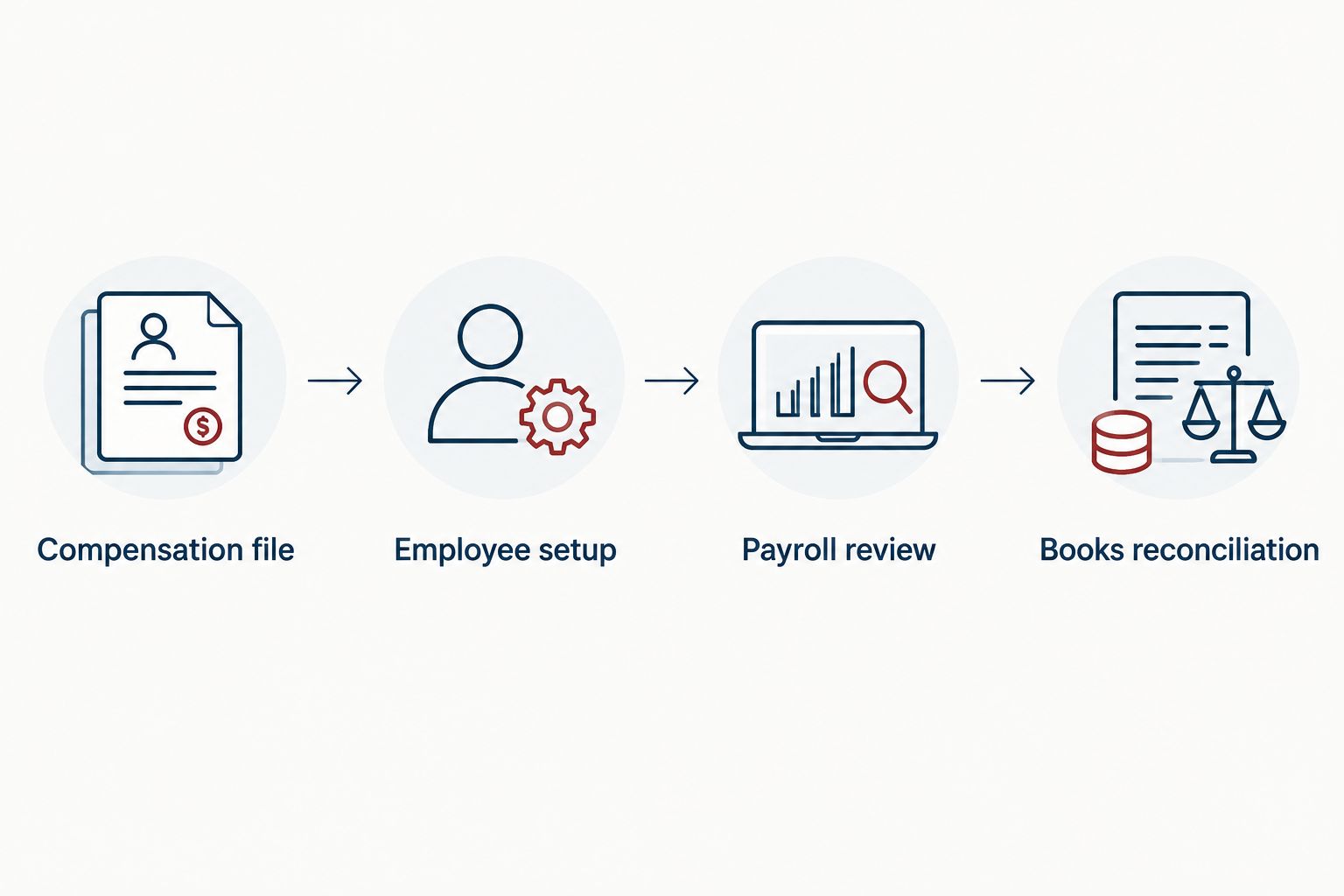
Reconciled books confirm payroll execution; they do not establish reasonable compensation.
For the accounting side of the process, use the QuickBooks to audit-ready books workflow. The objective is traceability: wages, withholding, employer taxes, and distributions each have their own explanation.
Second workflow: update salary when the owner’s role changes
Best for: S corp owners whose duties or time commitment change during the year. Keep the same payroll account, but reopen the compensation decision before changing the salary.
- Record what changed: responsibilities, working hours, service mix, or the period of active work.
- Update the compensation analysis using relevant evidence and obtain approval.
- Change the salary with the approved effective date. Review whether already-processed payroll requires a separate correction.
- Preview the next run and reconcile cumulative wages against the revised plan.
Expected result: The revised salary has a documented reason and effective date, and payroll reflects that decision without silently rewriting prior periods.
Do not confuse a prospective salary change with a catch-up payroll. A catch-up payment requires review of prior wages, remaining compensation, payroll-tax obligations, and timing. Changing the annual salary field alone does not pay a shortfall already identified.
| Workflow | Best for | Advantage | Limitation |
|---|---|---|---|
| Scheduled salary | Owners with consistent duties and an approved compensation plan | Creates a predictable payroll process | Repeats an outdated amount unless reviewed |
| Role-change review | Owners whose work materially changes | Connects revised pay to documented responsibilities | Requires new analysis and approval |
| Catch-up payroll review | Owners with an identified compensation shortfall | Addresses additional wages through payroll | Requires separate timing, tax, and reporting checks |
CEOHAVEN’s tax planning and bookkeeping services fit the decision-and-recordkeeping side of this workflow. They do not replace Gusto’s payroll processing, and payroll processing does not replace the compensation analysis.
Troubleshooting
The annual salary produces an unexpected paycheck
Check the pay frequency, salary basis, effective date, and any partial-period calculation. Compare gross wages—not take-home pay—with the compensation schedule. Withholding and deductions affect the net deposit without changing the approved gross salary.
Prior-provider wages appear twice
Compare imported payroll history with newly processed earnings. Have Gusto support and your payroll adviser distinguish historical entries from actual new payments before changing records. Do not remove valid prior wages just to make the current report look cleaner.
The books show payroll expense equal to the bank debit
Rebuild the entry from the payroll report. Separate gross wages, employer taxes, withholding liabilities, and other components, then match the bank transactions. Net pay alone is not the corporation’s wage expense.
Distributions exceed wages and trigger concern
Review the compensation evidence and the shareholder’s actual services. There is no universal salary-to-distribution percentage that proves compliance. Correct the compensation or payroll treatment when the analysis identifies a problem; do not relabel transactions without documenting what occurred.
Shareholder health insurance looks like an ordinary deduction
Flag the shareholder’s ownership percentage and insurance arrangement for payroll and tax review. More-than-2% shareholder health insurance has special reporting rules. Resolve the treatment before year-end reporting rather than assuming an ordinary benefits setup handles it correctly.
Customize your workflow
Assign clear responsibility for the 2026 compensation review, payroll approval, and bookkeeping reconciliation. One person can hold multiple responsibilities, but each decision needs a record.
Expand the review when the facts change. Add checkpoints for a new work state, revised benefits, an additional working shareholder, or a payroll-provider transition. Each change affects a different part of the process; a salary adjustment alone does not resolve all of them.
Bring your compensation file, payroll reports, and distribution ledger to CEOHAVEN for tax planning and bookkeeping discussions. Those records make the conversation about your actual work and transactions rather than an unsupported target salary.
Discuss your owner compensation plan
Bring your compensation evidence, payroll reports, and distribution records to the tax-planning discussion.
FAQ
How do I connect Gusto payroll to S corp reasonable salary?
Connect Gusto payroll to S corp reasonable salary by documenting the compensation decision, configuring owner wages, and reconciling payroll with your books. This is a controlled workflow, not an automatic determination that the salary meets IRS requirements.
Does Gusto calculate a reasonable salary for an S corp owner?
Do not treat a Gusto payroll calculation as a reasonable-compensation determination. Reasonable compensation depends on the shareholder’s services and supporting facts, while payroll software processes the wages entered.
Can I use a fixed percentage of profit for my S corp salary?
A fixed percentage of profit is not an IRS safe harbor for reasonable compensation. Evaluate duties, time, experience, comparable compensation, and the corporation’s circumstances instead.
Should I pay myself as a contractor through my S corporation?
A shareholder who performs services as a corporate employee should receive employee wages for those services. Ownership does not justify replacing required wages with contractor payments or distributions.
Can I change my S corp salary during 2026?
You can revise an S corp salary when a documented compensation review supports the change. Record the reason and effective date, and separately assess whether earlier payroll needs correction.
How long should I keep S corp payroll records?
IRS guidance calls for retaining employment-tax records for at least 4 years. Keep the compensation analysis with the related payroll records and confirm whether other applicable retention requirements are longer.
Can CEOHAVEN replace Gusto for this workflow?
CEOHAVEN offers tax planning, tax preparation, and bookkeeping; those services are not a payroll-software replacement. Use the compensation analysis and reconciled books alongside payroll processing rather than treating either as a substitute for the other.
One last thing
The cleanest payroll report can still contain an unsupported salary. Before closing your 2026 compensation file, ask whether another reviewer could understand why the amount fits the owner’s actual work. If the answer depends on an undocumented conversation, finish the memo—not another payroll run.