

Best overall shortlist: QuickBooks Online. Best for collaborative bookkeeping: Xero. Best for invoice-led businesses: FreshBooks. Budget-focused shortlist: Wave and Zoho Books. For bookkeeping software for small businesses ranked by price in 2026, compare current quotes for the features you need; a fixed cheapest-to-costliest list hides differences in users, payroll, payments, and bookkeeping work.
TL;DR
- Bookkeeping software for small businesses ranked by price requires feature-matched quotes, not a ranking built around introductory offers.
- QuickBooks Online is the default shortlist for owners needing general bookkeeping and accountant collaboration.
- Compare Wave and Zoho Books for simpler workflows; confirm reporting, integrations, and user access before choosing.
- CEOHAVEN provides bookkeeping and tax services for entrepreneurs who need professional support beyond software.
Why this matters
Your accounting subscription is one expense. Fixing uncategorized transactions, reconciling accounts, and preparing usable records creates a separate workload. Choose the system your business can keep accurate—not simply the one with the smallest subscription quote.
CEOHAVEN is a bookkeeping and tax consulting option for entrepreneurs who need professional support beyond software. Its tax planning, tax preparation, and bookkeeping services address a different decision: who will maintain the records and connect them to your tax position?
This 2026 guide ranks software by distinct business use cases. Use that shortlist to request comparable quotes, then sort those quotes by total cost for your actual workflow. A service firm, a rental owner, and a creator do not need identical setups.
What makes the best bookkeeping software?
Judge the tools against these criteria before comparing subscription quotes:
- Reconciliation: You need to match your books to bank and credit-card statements, not merely import transactions.
- Reporting: Your setup should produce usable profit-and-loss and balance-sheet reports, with detail appropriate to your business.
- Collaboration: Confirm how your bookkeeper, accountant, and team receive access and what each person can change.
- Workflow fit: Check invoicing, bills, projects, rentals, or sales-channel connections against what you actually do.
- Cost boundaries: Separate the accounting subscription from payment processing, payroll, additional users, integrations, and professional bookkeeping.
- Exit readiness: Confirm which reports, transactions, and attachments you can export before committing.
Do not give an unused feature credit just because it appears in a comparison grid. Your accounting system should support a defined monthly close. More menus do not make the records more accurate.
Bookkeeping software at a glance
The order below is a selection ranking, not a claim about current subscription prices. For a defensible 2026 price comparison, request the same billing period and required functions from each shortlisted provider.
| Rank and software | Best for | Standout function | Key limitation to check |
|---|---|---|---|
| 1. QuickBooks Online | General bookkeeping with accountant involvement | Accounting, reconciliation, and financial reporting | Required features and access depend on the selected plan |
| 2. Xero | Owners working closely with a bookkeeper | Shared cloud accounting and reconciliation | Payroll and other connected services require separate evaluation |
| 3. FreshBooks | Invoice-led service businesses | Invoicing, expenses, and project-related workflows | Confirm accounting depth and reporting against your requirements |
| 4. Wave | Straightforward invoicing and bookkeeping | Accounting and invoicing in one system | Check access, support, and operational requirements carefully |
| 5. Zoho Books | Businesses organizing connected administrative workflows | Accounting within the broader Zoho application ecosystem | Connections and automation still require configuration |
A comparison table narrows the choice. It does not replace a walkthrough of your records. Ask each provider to show how the required workflow works in the specific plan under consideration.
1. QuickBooks Online: best for general business bookkeeping
QuickBooks Online handles core accounting tasks such as recording transactions, reconciling accounts, invoicing, and producing financial reports. Put it first on your shortlist when you want a general accounting system and intend to involve a professional bookkeeper or accountant.
The important question is not whether the feature exists somewhere in the product. It is whether the proposed plan supports your reporting, permissions, and connected tools without unnecessary complexity.
QuickBooks Online pros:
- Covers core bookkeeping and financial reporting in one application.
- Supports collaboration with accounting professionals.
- Offers connections to other business applications.
QuickBooks Online cons:
- Plan selection requires attention to feature and access requirements.
- Connected applications create additional setup and reconciliation responsibilities.
- Imported transactions still need review; the software does not establish their tax treatment.
Best for: Owners who want a general accounting foundation rather than an invoicing-first tool.
Verdict: Buy only after your bookkeeper confirms the plan and reporting setup. QuickBooks Online is the default shortlist, not permission to purchase the broadest package.
2. Xero: best for collaborative bookkeeping
Xero is cloud accounting software for recording transactions, reconciling accounts, managing invoices and bills, and producing reports. Its shared working environment suits owners who want a bookkeeper involved in the accounting process.
Ask the person responsible for your monthly close to demonstrate the workflow. A platform that supports their work is more useful than one selected solely from a feature checklist.
Xero pros:
- Combines reconciliation, invoicing, bills, and reporting.
- Supports a shared accounting workflow with professional advisers.
- Connects with other applications for additional business functions.
Xero cons:
- Connected services need their own scope and cost review.
- Moving existing records requires opening balances and account mapping.
- Application connections do not eliminate duplicate-entry or reconciliation checks.
Best for: Owners whose bookkeeper will work directly in the accounting system.
Verdict: Buy when Xero fits your bookkeeper's close process and your required connections. Do not switch platforms simply to replace one interface with another.
3. FreshBooks: best for invoice-led service businesses
FreshBooks centers on invoicing and service-business workflows, alongside expense tracking and accounting functions. Consider it when your daily administrative work revolves around clients, billable work, and collecting invoices.
Your customer-facing workflow matters, but it is not the whole decision. Have your accountant review the reports and transaction detail you will need for bookkeeping and tax preparation.
FreshBooks pros:
- Brings invoicing and expense tracking into the same workflow.
- Supports time tracking and project-related work.
- Gives service-business owners a client-focused starting point.
FreshBooks cons:
- Complex entity or property reporting requires a closer fit assessment.
- Client-facing convenience does not establish tax-ready records.
- Required accounting functions must be checked against the selected plan.
Best for: Consultants and other service operators whose main administrative challenge is billing clients.
Verdict: Buy for an invoice-led workflow; skip it when your reporting requirements are the harder problem. Start with the accounting output you need, then evaluate the invoicing experience.
4. Wave: best for straightforward bookkeeping requirements
Wave combines invoicing and accounting functions. Put it on a budget-focused shortlist when your requirements are straightforward and you want to examine a relatively contained bookkeeping workflow.
Budget-focused does not mean automatically cheapest. Compare the current package, required access, payment arrangements, and professional support before deciding.
Wave pros:
- Includes accounting and invoicing functions.
- Supports a straightforward transaction-and-invoice workflow.
- Provides a candidate for owners who do not need an extensive connected system.
Wave cons:
- More involved reporting requirements need a careful walkthrough.
- Access and support arrangements require confirmation.
- A simpler application still needs disciplined categorization and reconciliation.
Best for: Owners with straightforward records and clearly defined bookkeeping needs.
Verdict: Buy when Wave passes your reporting and access checks; skip it when you need workarounds to close the books. A smaller software bill is not a useful trade for records nobody can maintain.
5. Zoho Books: best for connected administrative workflows
Zoho Books handles accounting tasks including invoices, expenses, banking, and reporting. It belongs on the shortlist when your business wants accounting connected with other administrative applications, particularly within the Zoho ecosystem.
Decide which information needs to move between systems before evaluating connections. Otherwise, you risk building an elaborate workflow around a task that needs a simple process.
Zoho Books pros:
- Covers core accounting and financial reporting.
- Supports workflow automation and application connections.
- Fits an evaluation centered on connected business administration.
Zoho Books cons:
- Automation requires configuration and review.
- Features and usage limits require plan-level confirmation.
- A broader application setup creates more decisions about ownership and data flow.
Best for: Owners deliberately connecting accounting with other administrative workflows.
Verdict: Buy when the connections solve a defined operational problem; wait when the attraction is simply having more tools. Specify the process before choosing the application stack.
How to rank the quotes by price in 2026
Build a feature-matched comparison rather than copying the first subscription figure you see. Ask each shortlisted provider for the same scope, then put the quotes in ascending order.
Use these four steps:
- Define scope. List the entities, bank accounts, reports, users, and integrations your business requires.
- Separate charges. Distinguish software from payroll, payment processing, connected applications, setup, and bookkeeping services.
- Compare periods. Compare the same billing period. Evaluate a 12-month subscription commitment separately from month-to-month billing and temporary introductory terms.
- Test workflow. Walk through 1 month of representative records, including reconciliation and the reports your accountant needs.
A failed workflow test is a reason to reject the software, even when its quote sorts first. The final ranking should show both the quoted scope and the work left outside it.
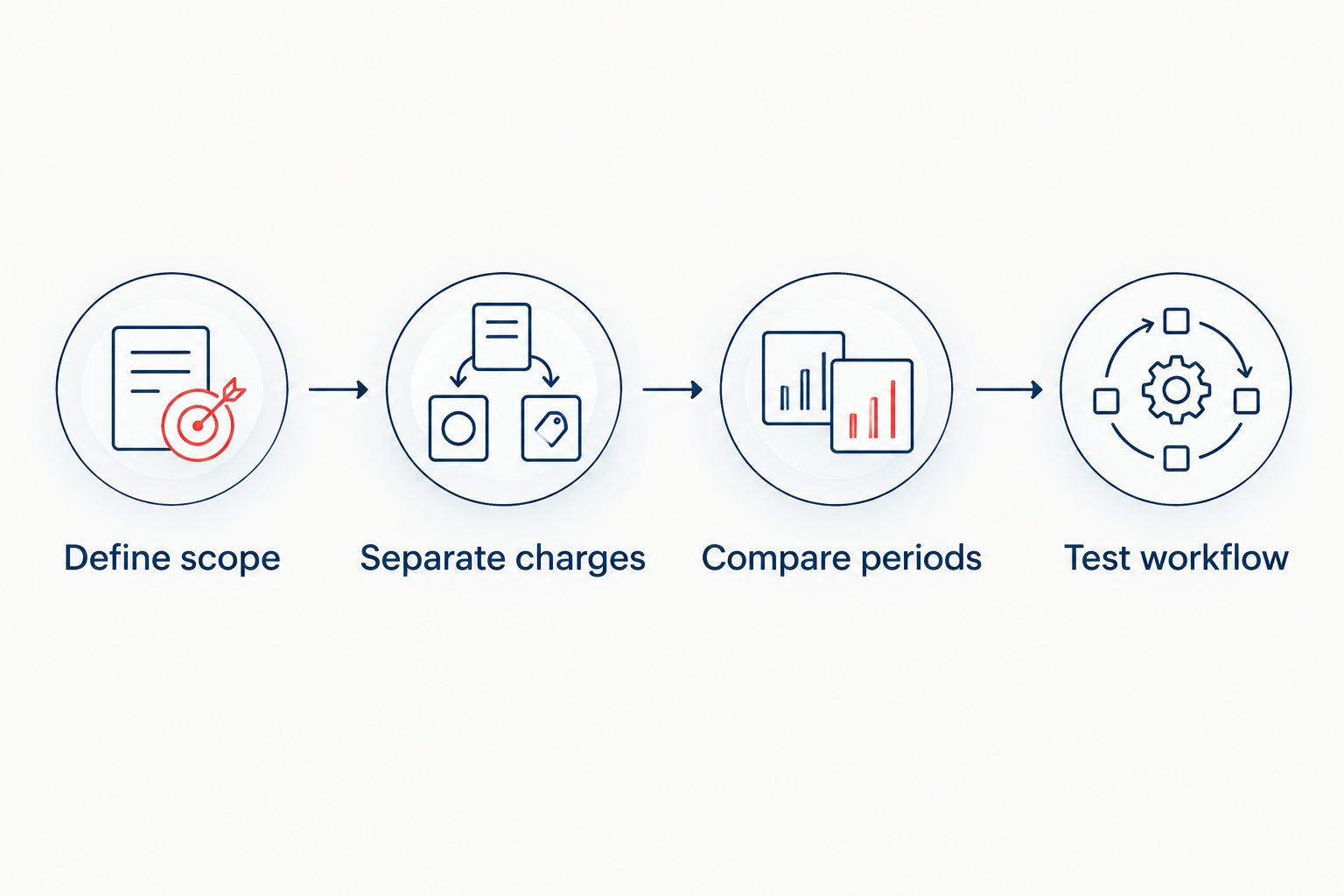
Rank comparable quotes only after defining the work each option must cover.
Before changing systems, check your record exports. IRS recordkeeping guidance generally calls for keeping income-tax records for 3 years, with exceptions; employment-tax records must generally be kept for at least 4 years. Records supporting a claim for worthless securities or a bad-debt deduction have a 7-year retention period.
Those periods serve different purposes. Keep applicable records accessible after cancellation, and ask your tax professional which retention rules apply to your circumstances.
How the shortlist is ranked
This shortlist prioritizes reconciliation, reporting, collaboration, workflow fit, cost boundaries, and export access. Each recommendation occupies a different use case; the ranking does not claim that every business should buy the first entry.
QuickBooks Online is the general-purpose starting point. Xero receives the collaboration slot, FreshBooks the invoice-led slot, Wave the straightforward-workflow slot, and Zoho Books the connected-administration slot. Your current, feature-matched quotes determine the price order—not this use-case order.
Which bookkeeping software should you choose?
Start with QuickBooks Online if you need general business accounting and have no stronger workflow preference. Have your bookkeeper confirm the fit before purchasing. Compare Xero when shared bookkeeping is the deciding factor, and FreshBooks when client billing drives the work.
For a narrower budget-focused evaluation in 2026, compare Wave and Zoho Books against the same required reports and access. Eliminate any option that cannot demonstrate your monthly close without workarounds.
If nobody owns the close, address that first. CEOHAVEN provides bookkeeping, tax preparation, and tax planning for entrepreneurs, real estate investors, content creators, and high-income professionals. Software selection and professional support are separate decisions; you need clarity on both.
Plan your bookkeeping support
Review bookkeeping, tax preparation, and tax planning services for your business.
FAQ
What's the best bookkeeping software for small businesses ranked by price?
Rank current, feature-matched quotes rather than assuming a permanent cheapest-to-costliest order. Shortlist QuickBooks Online, Xero, FreshBooks, Wave, and Zoho Books by workflow, then compare the same required functions and billing period.
Is QuickBooks Online better than Xero?
QuickBooks Online is the general-purpose starting point in this guide; Xero is the collaborative-bookkeeping alternative. Choose the system that supports your bookkeeper's process, required reports, and application connections.
Is Wave the cheapest bookkeeping option?
Do not assume Wave is the cheapest option for your complete workflow. Compare the current package and any required access, payments, connected services, and professional support against equivalent quotes.
Should a consultant choose FreshBooks?
FreshBooks belongs on a consultant's shortlist when invoicing and client work drive the administrative workload. Confirm that the selected plan also produces the accounting reports your bookkeeper and tax professional need.
Do I still need a bookkeeper if I use accounting software?
Accounting software does not replace responsibility for accurate records. Someone must review transactions, reconcile accounts, resolve errors, and complete the monthly close; that person can be you or a professional.
What should I check before switching bookkeeping software in 2026?
Check opening balances, outstanding invoices and bills, reconciliation history, reports, and record exports before switching in 2026. Define who will verify the migration and retain access to the old records.
Does CEOHAVEN sell bookkeeping software?
CEOHAVEN is a business tax consulting firm offering bookkeeping, tax preparation, and tax planning services. Evaluate its professional services separately from the software subscription your business selects.
One last thing
Ask for a balance sheet before admiring the dashboard. A clean-looking screen does not establish that bank balances, liabilities, and owner transactions are correctly recorded. Your 2026 software decision should end with a named owner of the monthly close—not just a new login.