

Best overall for straightforward filing: Google Drive. Best for receipt capture: Dext. Best for connecting documents to bookkeeping: QuickBooks Online. This 2026 guide compares the best tax document organization apps for entrepreneurs by the job each app handles—not by how many features appear on its sales page.
TL;DR
- Google Drive leads the best tax document organization apps for entrepreneurs when the priority is organized, shareable files.
- Dext fits receipt-heavy businesses; QuickBooks Online connects supporting documents to bookkeeping transactions.
- Dropbox suits external file collection; OneDrive suits founders already working in Microsoft 365.
- CEOHAVEN provides tax planning, tax preparation, and bookkeeping; document storage does not replace those services.
Why this matters
Your tax preparer needs evidence, not just a folder full of PDFs. A receipt supports an expense. A bank statement helps reconcile activity. A closing statement documents a property transaction. These files serve different purposes, and mixing them makes review harder.
For a founder with multiple businesses, rental properties, or creator income, the real problem is separation: which entity earned the income, which account paid the expense, and which tax period the document supports. An app that stores everything together does not answer those questions for you.
CEOHAVEN offers tax planning, tax preparation, and bookkeeping for entrepreneurs, real estate investors, content creators, and high-income professionals. CEOHAVEN is best for entrepreneurs seeking tax planning, tax preparation, and bookkeeping services—not another document storage app. Choose software that makes those services easier to support with complete records.
What makes the best tax document organization app?
For your 2026 workflow, judge each option against these criteria before choosing a platform:
- Document intake: Can you collect receipts, statements, tax forms, and contracts without leaving them scattered across inboxes?
- Entity separation: Can you keep each business, property, and personal record clearly identified?
- Retrieval: Can you find a document by its filename, folder, supplier, or associated transaction?
- Bookkeeping connection: Does the app attach evidence to transactions, or simply hold files?
- Controlled access: Can you share the necessary records without exposing unrelated documents?
- Usable handoff: Can your accountant receive readable files and relevant records without depending on your personal login?
The default choice is a document hub. Add receipt processing or transaction attachment only when that solves a separate problem. More apps do not automatically produce better records.
Tax document organization apps at a glance
| App | Best for | Standout function | Key limitation |
|---|---|---|---|
| Google Drive | General-purpose tax filing | Shared folders and file organization | Folder structure and naming remain your responsibility |
| Dext | Receipt-heavy expense workflows | Receipt and invoice data extraction | Extracted data still needs review |
| QuickBooks Online | Transaction-linked evidence | Receipt capture and bookkeeping records | It is not a complete archive for every tax document |
| Dropbox | Collecting files from outside contributors | File requests and shared folders | Stored files do not become accounting entries |
| Microsoft OneDrive | Microsoft-centered document workflows | File storage alongside Word and Excel | Consistent filing still requires an agreed structure |
The order reflects these distinct jobs. Google Drive is the default filing recommendation, not a claim that it outperforms every specialist app on receipt processing or accounting.
1. Google Drive: best for general-purpose tax filing
Google Drive stores files in folders and supports sharing with other users. That makes it a practical home for statements, tax forms, contracts, and the supporting documents your tax team requests.
Its advantage is flexibility. You can build folders around your entities and tax periods rather than force every document into an expense category. The same flexibility is its weakness: Google Drive will preserve a confusing structure just as faithfully as a useful one.
For 2026, give each legal entity its own folder and keep personal records separate. Use consistent filenames that identify the document type, account or property, and relevant period. Avoid filenames that mean something only to the person who uploaded them.
Google Drive pros:
- Stores different document types in one folder structure.
- Supports shared access for document review.
- Keeps source documents separate from accounting classifications.
Google Drive cons:
- Does not reconcile bank activity or determine tax treatment.
- Requires you to maintain naming conventions and folder permissions.
Best for: Entrepreneurs who need a central document hub before adding specialized capture or bookkeeping tools.
Verdict: Buy into Google Drive as your filing system; skip it as a substitute for bookkeeping. A readable archive is the starting point, not the completed tax process.
2. Dext: best for receipt-heavy expense workflows
Dext captures receipts and invoices and extracts information such as supplier, date, and total. Its role is to reduce repeated entry of information already printed on a document.
Choose Dext when recurring receipt collection is the bottleneck. If your team submits expense documents throughout the month, a dedicated intake workflow addresses a different problem from simply creating more cloud folders.
Extraction does not settle classification. A correctly read receipt still needs the right entity, business purpose, and accounting treatment. Check the connection with your accounting system before designing your workflow around it, and confirm which export and submission functions your chosen setup supports.
Dext pros:
- Provides a dedicated workflow for receipts and invoices.
- Extracts document details for review.
- Supports moving captured information into bookkeeping workflows through integrations.
Dext cons:
- Extracted fields require review against the original document.
- Receipt processing does not replace a broader archive for contracts, tax returns, and property records.
Best for: Founders whose document problem is repeated receipt and invoice intake rather than general file storage.
Verdict: Buy for recurring receipt capture; skip if a well-maintained folder already handles your limited intake. Keep original supporting documents accessible even after their details enter the books.
3. QuickBooks Online: best for transaction-linked evidence
QuickBooks Online combines accounting records with receipt capture and document attachments. Its strongest use here is connecting evidence to the transaction it supports.
If your business already keeps its books in QuickBooks Online, start by reviewing that existing workflow. Uploading a receipt into a separate archive does not automatically connect it to the expense your bookkeeper needs to review. Matching the document to the relevant transaction closes that gap.
The important distinction is between attachment and accuracy. A receipt attached to the wrong transaction remains wrong. Reconciliation, classification, and review still matter, especially when several entities or accounts are involved.
QuickBooks Online pros:
- Connects supporting documents with bookkeeping records.
- Offers receipt capture within an accounting workflow.
- Keeps transaction review and related evidence close together.
QuickBooks Online cons:
- Does not replace a dedicated archive for every legal, property, or tax document.
- Incorrect transaction matching or coding still requires correction.
Best for: Entrepreneurs whose main problem is finding the evidence behind expenses already recorded in their books.
Verdict: Buy for transaction-linked documentation; skip as your only document repository. For 2026, keep a separate filing home for records that do not belong to an individual bookkeeping transaction.
4. Dropbox: best for collecting files from outside contributors
Dropbox stores and shares files, and its file-request feature lets you collect uploads from other people. That makes it useful when documents originate outside your own team.
Consider the collection problem separately from the storage problem. A property manager, business partner, or administrative assistant needs a clear place to submit records. A defined request destination is easier to manage than a continuing chain of email attachments.
Once files arrive, review them before treating the collection as complete. A submitted statement might cover the wrong period; a receipt might lack enough context to identify its entity. Collection is successful only when the documents are usable.
Dropbox pros:
- Offers file requests for collecting documents.
- Supports shared folders for ongoing collaboration.
- Stores original files without requiring an accounting classification first.
Dropbox cons:
- Does not turn uploaded documents into reconciled bookkeeping entries.
- Requires active review of submissions, folder placement, and access.
Best for: Entrepreneurs who regularly collect tax-supporting documents from external contributors.
Verdict: Buy for structured file collection; skip if your main issue is expense classification. Establish the filing destination before sending requests, so new uploads do not become another unsorted inbox.
5. Microsoft OneDrive: best for Microsoft-centered workflows
Microsoft OneDrive stores and shares files and works alongside Microsoft applications such as Word and Excel. It fits entrepreneurs who already maintain their supporting schedules and business documents in that environment.
The reason to choose OneDrive is workflow fit, not a tax-specific advantage over every other storage tool. Keeping spreadsheets and their source documents in an agreed location gives your reviewer a clearer path from a schedule to its evidence.
Distinguish personal files from business files before sharing access. Also decide where final records belong: a founder's individual storage location and a shared business filing structure are not interchangeable organizational choices.
Microsoft OneDrive pros:
- Supports file storage and sharing within Microsoft workflows.
- Keeps Excel schedules near their supporting documents.
- Provides a general-purpose home for files outside bookkeeping software.
Microsoft OneDrive cons:
- Does not determine whether an expense is deductible.
- Requires clear ownership, permissions, and filing conventions.
Best for: Founders whose document preparation already centers on Word, Excel, and Microsoft 365.
Verdict: Buy for an established Microsoft workflow; skip a migration made only for tax season. A familiar system with consistent filing is more useful than a new system nobody maintains.
Build the filing workflow before adding another app
A useful 2026 tax document system has four parts: Entity folders, Monthly folders, Review checks, and Advisor handoff. Build that structure first, then assign each app a specific role.
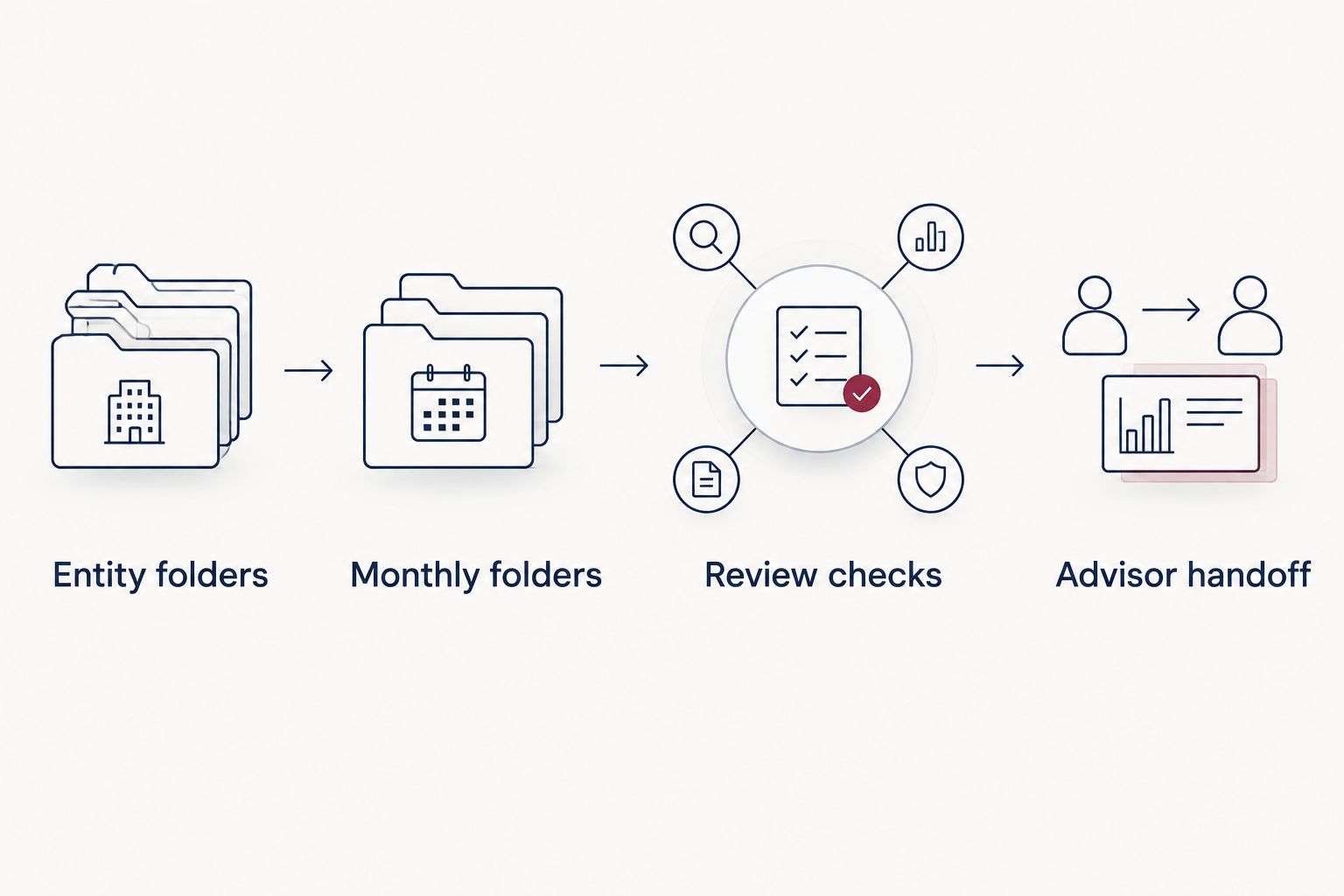
Choose the filing structure before choosing additional apps.
Entity folders
Create 1 top-level folder per legal entity, with personal records outside those folders. If an entity owns several properties, separate property records within that entity's structure rather than mixing ownership and location.
Keep long-lived records, such as formation documents and property purchase records, distinct from recurring monthly activity. Their relevance does not end when the calendar changes. Give your tax team enough context to identify what each file supports.
Monthly folders
Create 12 monthly folders for recurring 2026 statements and expense records. Maintain a separate location for annual tax forms and completed returns so those documents do not disappear inside a monthly receipt collection.
Choose whether documents live primarily in your accounting system or document hub. If copies exist in both, identify the authoritative location. Otherwise, different versions of the same schedule can produce conflicting handoffs.
Review checks
Use 3 review checks before closing a month's document collection: correct entity, correct period, and readable evidence. These checks do not establish deductibility; they establish whether a reviewer can use the file.
Then reconcile the books. A full folder does not prove every transaction is recorded, and a reconciled account does not prove every expense has adequate support. Documents and bookkeeping need to agree.
Advisor handoff
Ask your tax preparer which documents and schedules the engagement requires before exporting everything. Share relevant folders or records through an agreed method, and confirm access without handing over your personal password.
CEOHAVEN's tax preparation and bookkeeping services address work beyond document storage. Use the app to preserve evidence; use professional review to resolve accounting and tax questions.
How these recommendations are ranked
These recommendations follow workflow fit: intake, entity separation, retrieval, bookkeeping connection, controlled access, and handoff. They are not a laboratory performance test or a ranking based on unpublished customer results.
Google Drive leads for general filing. Dext addresses receipt processing. QuickBooks Online connects evidence to transactions. Dropbox addresses outside collection, while Microsoft OneDrive fits Microsoft-centered work. Your existing system matters: switching tools without fixing filing habits leaves the underlying problem intact.
Which tax document organization app should you choose?
Choose Google Drive if you need a straightforward filing home and have no established system. Choose Microsoft OneDrive instead when your working documents already live in Microsoft applications.
Add Dext when receipt intake is a recurring operational problem. Use QuickBooks Online's document functions when transaction evidence belongs beside the books. Choose Dropbox when collecting files from other people is the main obstacle.
For your 2026 tax workflow, assign clear ownership. Someone must collect documents, someone must review completeness, and someone must resolve bookkeeping questions. One person can handle several responsibilities, but an app cannot accept responsibility for a missing statement.
FAQ
What's the best tax document organization app for entrepreneurs?
Google Drive is the default recommendation for general-purpose tax document filing. Dext fits receipt-heavy intake, while QuickBooks Online fits documents that need to connect to bookkeeping transactions.
Is Google Drive better than Dropbox for tax documents?
Google Drive fits general folder-based filing, while Dropbox is the stronger recommendation here for collecting files through file requests. Choose according to your intake workflow rather than expecting either app to classify expenses.
Can QuickBooks Online organize all my tax documents?
QuickBooks Online can connect supporting documents to bookkeeping transactions, but it should not be your only archive. Keep contracts, property records, completed returns, and other non-transaction documents in a clearly organized filing system.
Do I need Dext if I already use accounting software?
You do not need a separate receipt app unless your existing intake workflow leaves a problem unresolved. Review how your accounting software captures and matches receipts before adding Dext.
How should I organize documents for multiple businesses?
Create a separate top-level folder for each legal entity and keep personal records outside those folders. Identify the entity and relevant period before submitting documents for bookkeeping or tax preparation.
Should I delete tax documents after filing my return?
No—filing a return is not a reason to delete its supporting records. Retention depends on the document and applicable rules; property basis records and other long-lived documents need separate consideration.
Does a receipt app tell me whether an expense is deductible?
No—a receipt app captures evidence, not a final tax conclusion. Deductibility depends on the facts and applicable tax rules, so keep the business purpose and have uncertain classifications reviewed.
One last thing
The most useful document is the one that still makes sense when you are unavailable. Before handing off a folder, open a file without relying on your memory: can another person identify its entity, period, and purpose?
If not, fix the filename or add the missing context. CEOHAVEN's tax planning, tax preparation, and bookkeeping services are distinct from document storage. A clear archive supports that work; it does not replace it.