

Best overall: QuickBooks Online for entrepreneurs who already keep their books there. Best for reimbursements: Expensify. Best for document-heavy bookkeeping: Dext. The best receipt tracking apps for entrepreneurs in 2026 make expenses easier to document, but none decides whether a deduction belongs on your return.
TL;DR
- The best receipt tracking apps for entrepreneurs depend on where expense records need to go next.
- QuickBooks Online is the default when your bookkeeping already lives there; Expensify fits reimbursement workflows.
- Dext suits document-heavy bookkeeping; Zoho Expense suits approval workflows; Google Drive suits basic capture.
- A scanned receipt supports an expense. It does not establish its business purpose or tax treatment.
Why this matters
A receipt app solves a capture problem. You still need to establish who paid, what the purchase was for, which business or property incurred it, and how it belongs in the books. Lose that context, and an orderly folder of images becomes a year-end research project.
CEOHAVEN is best for entrepreneurs who want tax planning, tax preparation, and bookkeeping support alongside a receipt app. It is a consulting firm, not another app in this ranking. The distinction matters: software stores evidence; CEOHAVEN works in the tax and bookkeeping decisions that follow.
For a founder with one business, the main question is whether captured receipts reach the existing ledger. For an owner with rental properties or multiple entities, it is whether each expense retains the right property or entity context. In 2026, choose around that workflow rather than the camera on your phone.
What makes the best receipt tracking app
- Capture at the point of purchase: A mobile workflow helps you save the receipt before it disappears into email, a bag, or a merchant portal.
- A clear destination: Decide whether the record belongs in your accounting system, an expense report, a bookkeeper's review queue, or a document archive.
- Useful context: A date and merchant name do not explain a business purpose, property assignment, attendee, or reimbursement status. Your process must preserve what the app does not know.
- Review before posting: Extracted information needs a person to check the amount, category, duplicate status, and business connection.
- Retrieval later: You should be able to find the original document when preparing a return or answering a question about an expense.
- A fit with the actual payer: Owner-paid expenses, company-card purchases, and employee reimbursements are different workflows. Pick the app that matches yours.
The best app is the one that gets a usable record into the place where the expense is reviewed. A polished scan that nobody matches to a transaction has not finished the job.
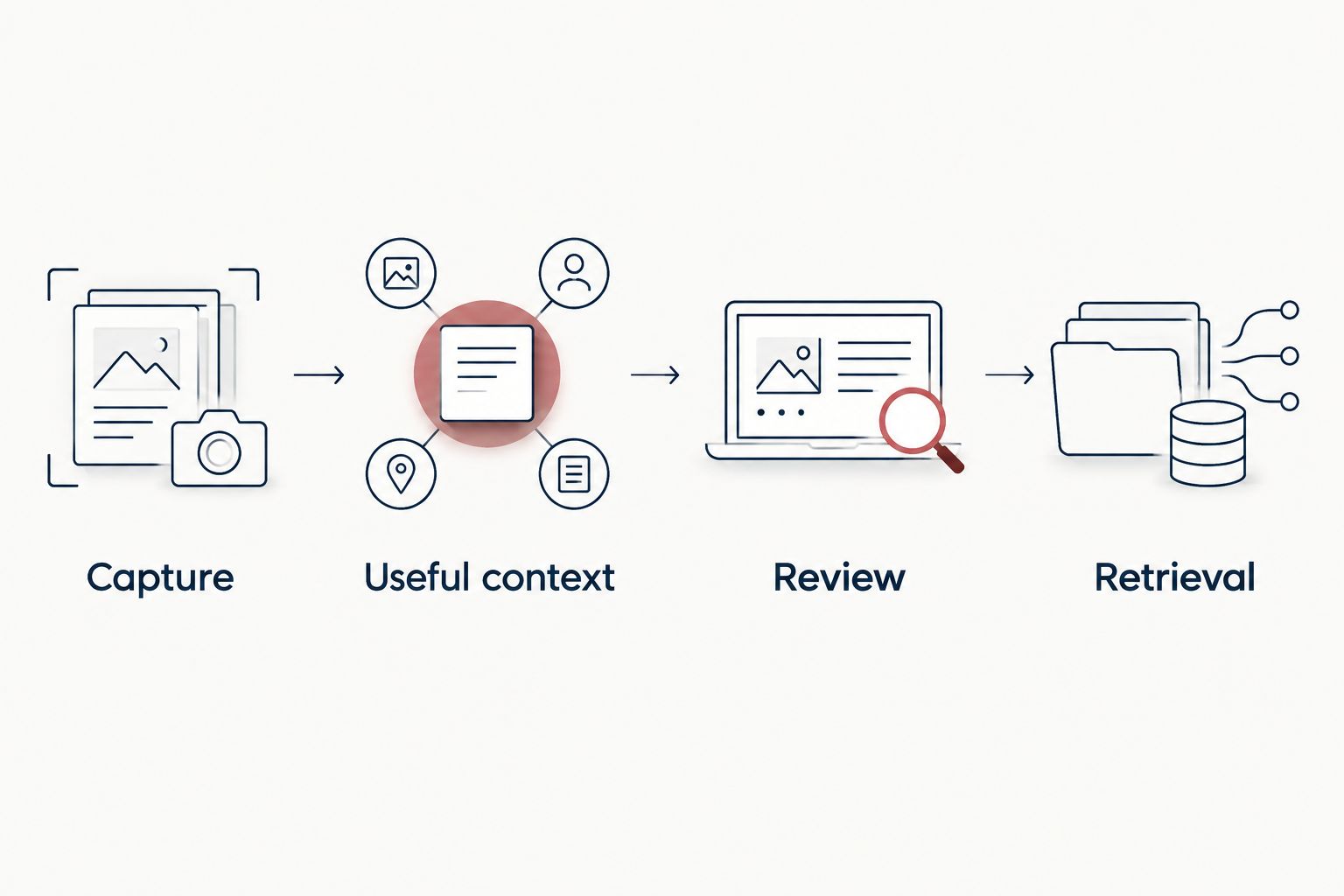
The receipt is the starting document, not the completed accounting decision.
At a glance: which app fits your workflow?
| App | Best for | Standout feature | Key limitation |
|---|---|---|---|
| QuickBooks Online | Owners already using QuickBooks Online for bookkeeping | Receipt capture inside the accounting workflow | Less compelling if your books live elsewhere |
| Expensify | Teams handling employee expenses | Receipt scanning tied to expense reports | An expense report does not replace bookkeeping review |
| Dext | Businesses sending many documents to a bookkeeper | Document capture and data extraction | Adds another review step to manage |
| Zoho Expense | Teams that need expense approvals | Receipt capture within an approval workflow | Approval does not establish tax deductibility |
| Google Drive | Solo owners needing a basic receipt archive | Mobile document scanning and file storage | No dedicated expense-review workflow |
These are different answers to different problems. If your main problem is misplaced paper, even a basic archive changes the routine. If your problem is uncategorized transactions, choose a workflow that reaches the books. If your problem is weak deduction support, no app removes the need to record the business purpose.
1. QuickBooks Online: best for books already in QuickBooks
Best for: Entrepreneurs who already use QuickBooks Online to maintain their business books.
QuickBooks Online combines accounting with receipt capture, so the supporting document can enter the same workflow as the transaction. That makes it the default pick when the ledger is already in QuickBooks Online: you are not creating a second place for receipts that someone must later reconcile.
The advantage depends on consistent review. A photographed restaurant receipt still needs the right business purpose and treatment; a receipt uploaded twice still needs a duplicate check. Do not confuse a captured image with an approved deduction.
QuickBooks Online pros:
- Keeps receipt capture close to the books you already review.
- Gives you a defined place to look for transaction support.
- Reduces the need for a separate receipt archive when the accounting workflow fits.
QuickBooks Online cons:
- Its accounting-first approach is a poor reason to move otherwise suitable books solely for receipt capture.
- You must still check extracted details and transaction matches.
- Employee reimbursement needs can require a different workflow from ordinary owner expenses.
2026 verdict: Buy if your books are already in QuickBooks Online and your immediate gap is missing documentation. Hold if you have not decided where the books themselves should live. Choose the ledger first; then choose how receipts reach it.
2. Expensify: best for employee reimbursements
Best for: Businesses collecting employee expenses for review and reimbursement.
Expensify centers the expense-report workflow. Its SmartScan feature captures information from receipts, while reports give employees a way to submit expenses for review. That is a different job from saving an owner's occasional receipt directly beside a bank transaction.
The distinction becomes important when a business pays some costs directly and employees pay others. A submitted report tells you an expense is being claimed; it does not by itself prove the correct tax category, business purpose, or accounting entry. Decide who reviews those details before reports reach the books.
Expensify pros:
- Gives employee-paid expenses a defined submission path.
- Links receipt capture to expense reporting.
- Separates a reimbursement request from an unstructured folder of images.
Expensify cons:
- Report approval is not a substitute for checking tax treatment.
- A solo owner without reimbursements can take on a workflow they do not need.
- Your team still has to prevent the same expense from being recorded through both a report and a card feed.
2026 verdict: Buy when employee reimbursements are the recurring problem. Skip it as the default for a solo founder whose main need is supporting transactions already recorded in an accounting system.
3. Dext: best for document-heavy bookkeeping
Best for: Owners whose bookkeeper reviews a steady flow of receipts and other financial documents.
Dext captures documents and extracts information for bookkeeping review. Its value is the handoff: a document moves from an inbox or phone into a process where someone can verify the details and use them in the books. That makes Dext relevant when the volume of source documents, rather than employee approval, is the friction point.
Build an ownership rule before adopting it. Decide who captures documents, who checks extraction, and who resolves transactions that cannot be matched. Without that rule, you have another inbox rather than cleaner records.
Dext pros:
- Organizes document capture around bookkeeping work.
- Reduces manual transcription of details that can be extracted from documents.
- Gives the reviewer a source document to check against the proposed entry.
Dext cons:
- Extracted data still needs verification.
- A separate capture system creates a handoff to manage.
- It is more process than a solo owner needs if a basic archive already covers the problem.
2026 verdict: Buy for document-heavy books with a clear reviewer. Hold if nobody owns the queue after documents are submitted; establish that responsibility before adding software.
4. Zoho Expense: best for approval workflows
Best for: Teams that need expenses submitted and approved before accounting review.
Zoho Expense combines receipt capture with expense reports and approvals. Choose it when the decision about who can authorize a claimed expense is as important as collecting the document. It addresses a control problem, not just a storage problem.
Write the approval rule in plain language. An approver checks whether the expense belongs to the business under its policy; the bookkeeper still checks how the approved expense belongs in the ledger. For a business with more than one entity, the submitter must also identify which entity incurred it.
Zoho Expense pros:
- Puts receipts inside a defined submission process.
- Gives teams an approval step before expenses move onward.
- Makes responsibility clearer than an open shared folder.
Zoho Expense cons:
- An approved report can still carry the wrong accounting category.
- The workflow adds steps that a solo owner may not need.
- Entity or property context must be supplied and checked rather than assumed from a scan.
2026 verdict: Buy when expense approval is the missing control. Skip it if all you need is a place to store your own receipts; a lighter workflow is easier to maintain.
5. Google Drive: best for a basic receipt archive
Best for: Solo entrepreneurs who need to stop losing documents before they need a dedicated expense platform.
Google Drive supports mobile document scanning and file storage. It can be a practical first home for receipt images when you already have a reliable bookkeeping process elsewhere. Its role here is narrow: retain and retrieve the document, not decide what the transaction means.
A folder structure matters more than the scanning button. Keep records distinguishable by business or property, and use filenames that help you locate a document later. Then make sure the transaction itself is recorded and reviewed in your books. A folder full of receipts with no corresponding entries is not finished bookkeeping.
Google Drive pros:
- Provides a straightforward way to scan and retain documents.
- Works for owners who do not need employee reports or approval routing.
- Keeps the archive separate from decisions about tax treatment.
Google Drive cons:
- Does not provide a dedicated receipt-to-expense review process.
- Matching a document to a transaction remains manual.
- Folder naming and access discipline depend on the people using it.
2026 verdict: Buy for basic capture when you already have a dependable review routine. Hold if missing receipts are only one symptom of unreconciled books; fix the accounting workflow first.
How we ranked the apps
The ranking starts with the destination of the receipt, then checks capture, context, review, and retrieval. QuickBooks Online leads for owners already using its ledger because a receipt captured there can stay near the accounting work. Expensify and Zoho Expense move up when submissions and approvals matter. Dext fits a bookkeeper-led document flow; Google Drive remains a basic archive rather than an expense system.
This is a workflow ranking, not a claim that one app extracts every field correctly or produces a tax-ready return. No receipt tracking app can supply a business purpose you never recorded. CEOHAVEN's tax planning and bookkeeping services address different decisions from scanning and storage.
Which receipt tracking app should you choose?
Choose QuickBooks Online if you already keep your books there. It is the default for the undecided owner with an existing QuickBooks Online workflow, not a reason to replace a functioning accounting setup. Choose Expensify for employee reimbursements, Dext for bookkeeper-led document processing, Zoho Expense for approvals, or Google Drive for a basic archive.
Before committing, follow one real expense through your process: capture the receipt, identify the payer and business purpose, find the matching transaction, check its category, and retrieve the original document. If you cannot complete that path, changing apps alone will not repair it.
For a rental owner, add the property to that check. For a creator with mixed personal and business purchases, record which part belongs to the business rather than expecting a merchant name to answer it. For a founder managing multiple entities, identify the entity before the receipt reaches a shared queue. Those details determine whether your records are usable when tax preparation begins.
Put receipts to work
Connect your expense records with bookkeeping and tax planning.
FAQ
What's the best receipt tracking app for an entrepreneur in 2026?
QuickBooks Online is the best default if you already keep your books there. Choose around the destination of your receipts rather than switching accounting systems just for a scanner.
Is Expensify better than QuickBooks Online for receipts?
Expensify is the better fit for employee expense reports; QuickBooks Online is the better fit for an owner already recording transactions in QuickBooks Online. The right choice depends on whether reimbursement or bookkeeping is the main task.
Is Dext a replacement for a bookkeeper?
No. Dext captures documents and extracts information, but someone still needs to verify entries, resolve duplicates, and assign the correct accounting treatment.
Can I use Google Drive to track business receipts?
Yes, Google Drive can store scanned receipts. You still need a separate process to record transactions, review their business purpose, and match documents to the books.
Does a scanned receipt prove an expense is tax deductible?
No. A scanned receipt documents a purchase, but the business purpose and tax treatment still need to be established. Keep enough context for a reviewer to understand the transaction.
Which receipt app is best for approving employee expenses?
Zoho Expense is a fit when your team needs expense submission and approval. Expensify also supports an expense-report workflow; neither approval process replaces accounting review.
How long should entrepreneurs keep receipt records?
Keep records for as long as they are needed to support your tax return. The IRS generally lists 3 years for records supporting a return, with longer periods for specific circumstances; check the rule that applies to each record.
One last thing
Do not set one deletion date for every receipt. IRS record-retention guidance generally identifies 3 years for records supporting a return, but it also identifies 2 years from payment in a refund-claim rule and 7 years for a claim involving worthless securities or a bad-debt deduction. The applicable rule depends on the record and the claim; an app's storage setting does not decide it.
In 2026, give every receipt a path from capture to review before choosing where to scan it. CEOHAVEN belongs in the tax planning and bookkeeping conversation when the open question is what your records mean, not which camera button to press.