

Best overall: Gusto. Best for agencies already using QuickBooks: QuickBooks Payroll. Best for coordinating payroll with employee systems: Rippling. The best payroll software for agency owners in 2026 matches how you pay your team, close your books, and manage owner compensation—not just how quickly you approve payday.
TL;DR
- Gusto is the best payroll software for agency owners who want a payroll-first starting point.
- QuickBooks Payroll suits agencies keeping payroll and bookkeeping in the Intuit ecosystem.
- Rippling suits agencies coordinating employee onboarding, payroll, and access to company systems.
- CEOHAVEN provides tax planning and bookkeeping; payroll software does not replace compensation advice.
Why this matters
Agency payroll sits between client collections, employee commitments, and your personal tax position. A successful payment does not prove that worker classification, owner wages, or payroll accounting is correct.
CEOHAVEN is best for entrepreneurs seeking tax planning, tax preparation, and bookkeeping alongside their payroll software. It is a consulting firm, not a payroll platform, so it belongs on your advisory team rather than in the software ranking.
For your 2026 selection, separate payment execution from financial judgment. Software processes the wages you enter; your compensation policy determines whether those wages make sense.
What makes the best payroll software for agency owners?
Use these criteria before you watch a demonstration. A polished dashboard cannot compensate for a workflow that leaves your bookkeeper rebuilding payroll every month.
- Workforce fit: Confirm support for the employee locations, contractor arrangements, and pay types your agency actually uses.
- Accounting fit: Require a clear path from payroll reports to wages, employer taxes, liabilities, and bank withdrawals in your books.
- Owner-pay controls: Check how recurring wages, bonuses, benefits, and corrections are entered and reviewed.
- Administrative responsibility: Identify who handles registrations, tax notices, amendments, and unresolved filing issues.
- Employee operations: Decide whether you need payroll alone or connected onboarding, benefits, time tracking, and account access.
- Record access: Confirm that you can retrieve payroll registers, tax filings, employee records, and correction history when needed.
Agency payroll software at a glance
These recommendations occupy different decision slots. Start with your existing accounting system and workforce complexity, then compare the finalists against the same payroll scenario.
| Rank | Software | Best for | Standout distinction | Key limitation |
|---|---|---|---|---|
| 1 | Gusto | Payroll-first agency operations | Payroll, employee onboarding, and benefits administration | Does not determine defensible owner compensation |
| 2 | QuickBooks Payroll | Agencies using QuickBooks for bookkeeping | Payroll within the QuickBooks ecosystem | Accounting integration still requires correct mapping and reconciliation |
| 3 | Rippling | Coordinating employee administration and technology | Payroll connected with HR and IT management | Broader systems require deliberate configuration and ownership |
| 4 | ADP RUN | Agencies seeking a payroll-centered administrative system | Small-business payroll with HR-related services | Service responsibilities need close review before signing |
| 5 | OnPay | Agencies seeking a focused payroll and HR system | Payroll with employee self-service and HR tools | Does not replace agency project-profitability reporting |
1. Gusto: best payroll software for payroll-first agencies
Gusto combines payroll with employee onboarding and benefits administration. It is the default shortlist choice when your main problem is paying people and maintaining employee records—not connecting an extensive technology environment.
For an agency owner, the relevant demonstration is an ordinary pay run followed by an exception. Ask to see a salaried employee, a bonus, a contractor payment, and an accounting export using scenarios that match your business.
Gusto pros:
- Brings payroll and employee onboarding into the same system.
- Includes employee self-service for routine payroll information.
- Supports a payroll-centered approach without making IT administration the buying decision.
Gusto cons:
- Does not establish your S corporation's reasonable compensation.
- Does not replace a separate view of client margins and staffing profitability.
Best for: Agency owners who want payroll to remain a distinct, manageable operating function.
Before committing, confirm the treatment of your employee locations, benefits, owner-specific items, and bookkeeping connection. A familiar product name is not proof that your particular setup is complete.
Verdict: Buy Gusto when payroll is the core requirement and your actual pay scenarios pass the demonstration.
2. QuickBooks Payroll: best for QuickBooks-based agencies
QuickBooks Payroll is the strongest starting point when your agency already uses QuickBooks for its books. The reason is workflow alignment: payroll and accounting belong in a coordinated process rather than separate spreadsheets.
That alignment does not make every payroll entry correct automatically. Your bookkeeper still needs to distinguish wages, employer payroll taxes, employee withholdings, benefit liabilities, and payments clearing the bank.
QuickBooks Payroll pros:
- Keeps payroll within the Intuit accounting ecosystem.
- Gives QuickBooks-based teams a connected accounting starting point.
- Suits owners who want the bookkeeping workflow to drive software selection.
QuickBooks Payroll cons:
- Existing QuickBooks use does not prove the payroll configuration is correct.
- Payroll records alone do not establish whether a client account is profitable.
Best for: Agencies whose bookkeeper already maintains the general ledger in QuickBooks.
Request a demonstration of the payroll journal entry and its reconciliation to bank activity. Also confirm which tax tasks the selected service handles and which remain with your agency.
Verdict: Buy QuickBooks Payroll when keeping payroll connected to your existing books is the deciding factor.
3. Rippling: best for connected employee operations
Rippling connects payroll with HR and IT management. It belongs on the shortlist when hiring someone triggers more than a payroll setup—such as collecting employee information, assigning systems, and managing access throughout employment.
The buying question is whether those connections solve a real administrative problem. An agency with separate owners for payroll, onboarding, and technology needs clear permissions and accountability before combining those processes.
Rippling pros:
- Connects payroll with a broader employee-management environment.
- Brings HR and IT administration into the same product ecosystem.
- Fits agencies evaluating employee processes beyond payday.
Rippling cons:
- Broader scope requires more configuration decisions than a payroll-only brief.
- Connected systems still need an internal owner for permissions and workflow changes.
Best for: Agencies whose payroll decision is part of a wider employee-operations project.
Ask the demonstration team to follow an employee from hiring through a compensation change and eventual departure. Identify where approvals occur and which records remain accessible afterward.
Verdict: Buy Rippling when connected employee administration is a documented requirement; skip it as a payroll-only default.
4. ADP RUN: best for a payroll-centered administrative system
RUN Powered by ADP is ADP's small-business payroll offering, with HR-related services across its offerings. Consider it when you want to evaluate payroll administration and service responsibilities together rather than choose primarily around your accounting software.
Keep the conversation specific. Ask who handles a rejected filing, a tax notice, a correction, or an employee setup problem—and distinguish assistance from responsibility for completing the task.
ADP RUN pros:
- Centers the buying decision on payroll administration.
- Provides a route to payroll and HR-related services within ADP.
- Gives owners an alternative to selecting solely around bookkeeping software.
ADP RUN cons:
- The ADP name alone does not establish your contracted service scope.
- Your agency still owns accurate inputs and oversight of unresolved issues.
Best for: Owners who prioritize clearly defined payroll administration and service arrangements.
Request written answers about responsibilities, escalation, record access, and corrections. Evaluate the agreement you are considering, not a general description of the wider ADP business.
Verdict: Buy ADP RUN when its documented service responsibilities match the work you intend to delegate.
5. OnPay: best for a focused payroll and HR brief
OnPay combines payroll with employee self-service and HR tools. It deserves consideration when your agency wants payroll administration and employee records without making a broader technology-management system the center of the purchase.
Keep the evaluation grounded in your actual workforce. Confirm employee locations, payment types, accounting handoff, and the handling of owner-specific benefits before making a selection.
OnPay pros:
- Keeps payroll central to the product decision.
- Includes employee self-service for payroll information.
- Adds HR tools alongside payroll administration.
OnPay cons:
- Does not replace client-level financial reporting.
- Does not decide worker classification or owner compensation for you.
Best for: Agencies seeking a focused payroll and HR system rather than a wider employee-technology platform.
Verdict: Buy OnPay when a focused payroll brief fits your agency and the demonstrated accounting handoff works for your bookkeeper.
How the ranking works
The 2026 ranking prioritizes payroll fit, accounting coordination, and administrative responsibility. Gusto takes the default slot; QuickBooks Payroll wins the existing-ecosystem slot; Rippling addresses connected employee operations; ADP RUN emphasizes payroll administration; OnPay offers another focused payroll route.
This is a fit-based shortlist, not a claim of hands-on testing or measured performance. Confirm current product capabilities, service terms, and your required integrations directly before signing.
Set the compensation policy before configuring payroll
CEOHAVEN's tax planning and bookkeeping services address a different job from payroll processing. For an agency owner, the useful distinction is between deciding how compensation should work and entering that decision into software.
If your agency is taxed as an S corporation and you perform services for it, reasonable compensation is a tax issue—not a number the payroll application validates. Keep salary decisions separate from shareholder distributions and document the reasoning behind owner wages.
For changes during 2026, review changing an S corporation salary midyear before treating an uneven client-payment month as a reason to change compensation.
Know what the payroll tax lines represent
Under federal employment-tax rules applicable in 2026, the employer and employee Social Security tax rates are each 6.2% of covered wages, up to the annual wage base. The regular employer and employee Medicare tax rates are each 1.45% of covered wages, without a wage-base cap.
Employers also withhold 0.9% Additional Medicare Tax after wages paid to an employee exceed $200,000 in a calendar year. That withholding threshold does not depend on the employee's filing status, and there is no employer matching share of Additional Medicare Tax.
These are federal rules described by the IRS, not a complete payroll-tax estimate. State obligations, unemployment taxes, benefits, and individual circumstances require separate review.
Test the workflow, not just the dashboard
Before switching payroll software in 2026, require a clear handoff from compensation decisions to completed books. Use the same workflow for every finalist so the demonstrations remain comparable.
- Compensation policy: Identify approved wages, bonuses, benefits, reimbursements, and the person authorized to change them.
- Payroll setup: Check employee data, work locations, tax registrations, opening balances, and access permissions.
- Payroll review: Review gross pay, deductions, employer taxes, and cash requirements before approval.
- Bookkeeping close: Reconcile payroll reports, liabilities, and bank withdrawals after processing.
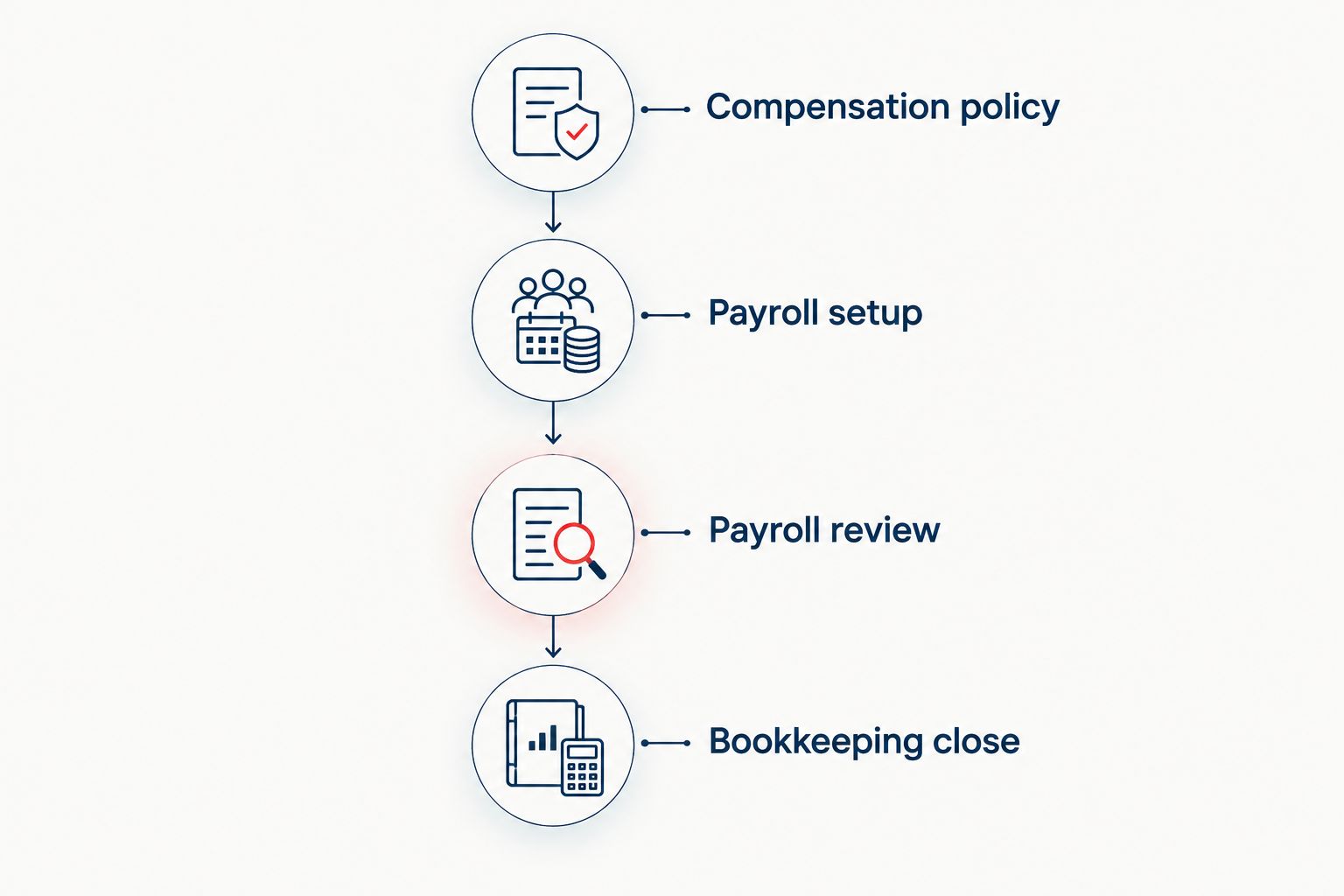
Approve compensation first, then reconcile the payroll result to your books.
Ask who owns each step. A provider's filing service does not eliminate your need to review payroll, maintain accurate information, or resolve notices that reach the business.
Coordinate payroll with your tax plan
Discuss tax planning, tax preparation, and bookkeeping for your agency.
Which payroll software should you choose?
Choose Gusto if you are undecided and need a payroll-first starting point. Choose QuickBooks Payroll when your existing bookkeeping workflow is the priority, and Rippling when employee administration extends into company systems.
Choose ADP RUN when documented payroll-service responsibilities drive the decision. Choose OnPay when your requirements remain focused on payroll and employee administration.
Do not switch merely to acquire a different dashboard. Switch when the new system solves a named problem in payment execution, accounting coordination, employee administration, or responsibility for payroll tasks.
FAQ
What's the best payroll software for agency owners in 2026?
Gusto is the default payroll-first recommendation for agency owners in this shortlist. QuickBooks Payroll is the more direct starting point for agencies already organizing their books in QuickBooks, while Rippling suits broader employee-operations requirements.
Is QuickBooks Payroll better than Gusto for an agency?
QuickBooks Payroll is the better starting point when keeping payroll within your existing QuickBooks bookkeeping workflow is the main requirement. Gusto is the default when you are choosing around payroll administration rather than an existing accounting ecosystem.
Does payroll software decide my S corporation salary?
No. Payroll software processes the compensation entered into it; it does not establish that an S corporation owner's wages satisfy reasonable-compensation requirements. Document the compensation decision separately from the pay run.
Can an agency pay employees and contractors through payroll software?
Payroll providers offer employee payroll and contractor-payment functions, but you must confirm the specific workflow you need before selecting a service. A payment method does not determine whether a worker is legally an employee or an independent contractor.
Do I still need bookkeeping if payroll software files taxes?
Yes. Payroll tax filing and bookkeeping are different responsibilities. Your books still need accurate wage expenses, employer taxes, liabilities, and reconciliation to bank withdrawals.
What should I check before switching payroll providers?
Check employee records, year-to-date wages and taxes, account registrations, prior filings, and responsibility for the transition. Also establish who completes pending filings and who resolves corrections or notices after the switch.
Is CEOHAVEN a payroll software provider?
No. CEOHAVEN is a business tax consulting firm offering tax planning, tax preparation, and bookkeeping. Those services address financial and tax decisions alongside, rather than instead of, payroll software.
One last thing
A clean payroll run is not proof of a clean payroll setup. The bank withdrawal can match while a worker is misclassified, an owner benefit is handled incorrectly, or a liability remains unresolved.
Before approving your next 2026 payroll, ask your bookkeeper to trace the payroll register into the general ledger and bank activity. Then ask your tax adviser to review the owner-pay decisions the software cannot make.