

Best overall: Gusto. Best for payroll tied to bookkeeping: QuickBooks Payroll. Best for straightforward payroll administration: OnPay. This 2026 guide compares the best payroll providers for paying family members, with ADP and Paychex included for employers who also need broader workforce support.
TL;DR
- Gusto leads the best payroll providers for paying family members shortlist for founder-led businesses.
- QuickBooks Payroll fits employers already using QuickBooks for bookkeeping.
- Family payroll tax treatment depends on your business structure, the relationship, and the employee’s age.
- CEOHAVEN offers tax planning, tax preparation, and bookkeeping; payroll software handles a different job.
Why this matters
Paying a relative is a payroll decision and a tax-planning decision. Software can calculate wages and process filings, but it cannot establish that your child performed real work or that the compensation matches the job.
CEOHAVEN is the tax-planning choice for entrepreneurs who need to evaluate family payroll before selecting a provider. Start with CEOHAVEN when the unresolved question is your business structure or tax treatment—not which dashboard looks better.
For 2026, choose the provider after identifying the employer, the employee, and the applicable payroll taxes. Reversing that order leaves the software implementing assumptions nobody checked.
What makes the best payroll provider for family employees?
A useful family-payroll system needs more than direct deposit. Evaluate these criteria before comparing providers:
- Tax configuration: Confirm how the provider handles relationship-based tax exemptions for your specific employer structure.
- Payroll filings: Identify which federal, state, and local filings the selected service handles and what remains your responsibility.
- Work records: Keep job descriptions, hours, wage calculations, and payment records accessible outside the payroll dashboard.
- Bookkeeping fit: Match payroll expenses and liabilities to the accounting system used for your business books.
- Support ownership: Know who resolves a tax-setting error and who supplies the underlying tax advice.
- Employer complexity: Match the service to your states, employee types, and HR needs rather than buying features unrelated to the job.
Ask about family-employee tax settings before enrolling. A general statement that a service handles payroll taxes does not explain how it will treat your child or spouse.
Payroll providers at a glance
The 2026 shortlist separates providers by use case. These are payroll platforms, not substitutes for determining whether wages are deductible or an exemption applies.
| Provider | Best for | Standout feature | Key limitation |
|---|---|---|---|
| Gusto | Founder-led teams seeking a payroll-centered system | Payroll with employee onboarding tools | Family tax treatment still requires employer-specific review |
| QuickBooks Payroll | Businesses using QuickBooks for bookkeeping | Payroll within the QuickBooks accounting environment | Accounting integration does not establish tax eligibility |
| OnPay | Employers seeking a focused payroll service | Payroll and payroll-tax administration | Confirm relationship-based settings before enrollment |
| ADP | Employers coordinating payroll and broader HR needs | Payroll services alongside workforce-management offerings | Product and service scope require careful selection |
| Paychex | Employers wanting payroll alongside HR support | Payroll and human-resources service offerings | Support scope depends on the selected arrangement |
1. Gusto: best payroll provider for founder-led teams
Gusto provides payroll processing and employee onboarding tools. It is the default starting point when you want a payroll-centered system for a founder-led business rather than a wider workforce-management project.
For family payroll, the decisive question is configuration. Ask how Gusto would treat the specific relative under your actual employer entity, then have your tax adviser review that treatment before the first payment.
Gusto pros:
- Payroll and employee onboarding sit within the same platform.
- Employee setup provides a defined process rather than informal transfers.
- A payroll-centered system fits employers whose immediate need is paying employees.
Gusto cons:
- Payroll processing does not prove that a relative performed deductible business work.
- Do not assume a family relationship automatically produces the correct tax settings.
Best for: Founders who want a payroll-centered starting point and already have someone responsible for tax decisions.
Keep documentation separate from provider selection. A polished onboarding experience does not replace a written role, recorded hours, or a defensible wage.
Verdict: Buy if Gusto confirms the required family-employee configuration before you run payroll.
2. QuickBooks Payroll: best for connected bookkeeping
QuickBooks Payroll belongs on your shortlist when your business already uses QuickBooks for accounting. Its main attraction is the connection between payroll activity and the books—not a special exemption for relatives.
That distinction matters when payroll expenses, tax liabilities, and payments need to reconcile. Review where each amount lands instead of treating the accounting connection as a completed review.
QuickBooks Payroll pros:
- Payroll operates within the QuickBooks accounting environment.
- The connection supports a coordinated payroll-and-bookkeeping workflow.
- It gives existing QuickBooks users a directly related payroll option to evaluate.
QuickBooks Payroll cons:
- Integration does not determine whether a family employee qualifies for a tax exemption.
- An employer using another accounting system should assess the workflow before choosing it.
Best for: Business owners who use QuickBooks and want payroll closely connected to their bookkeeping process.
For 2026, assess the payroll service and accounting workflow together. Confirm the employee settings, review a sample payroll, and check the resulting entries before making accounting convenience the deciding factor.
Verdict: Buy if your books already run in QuickBooks and the family-payroll settings pass review.
3. OnPay: best for straightforward payroll administration
OnPay provides payroll processing and payroll-tax administration. It fits the shortlist when you want to evaluate a focused payroll service without making broader workforce management the center of the purchase.
Use a specific enrollment question: describe the employer’s legal structure, the family relationship, and the employee’s age. Ask the provider to explain the resulting tax setup rather than accepting a general answer about tax filing.
OnPay pros:
- Payroll processing is a central service.
- Payroll-tax administration is part of its offering.
- It provides a distinct option for employers comparing payroll-focused providers.
OnPay cons:
- A payroll service does not establish whether the compensation is reasonable.
- Confirm how relationship-based exemptions are configured rather than assuming support.
Best for: Employers whose priority is payroll administration and who keep tax strategy with a separate adviser.
A focused service is useful only when responsibilities are clear. Document who enters employee information, who approves wages, and who checks the tax treatment when circumstances change.
Verdict: Buy if OnPay confirms your required setup and its filing responsibilities match your needs.
4. ADP: best for broader workforce requirements
ADP offers payroll services alongside human-resources and workforce-management offerings. It belongs on the shortlist when family members are part of an employee workforce with requirements beyond running payroll.
Evaluate the particular service proposed to your business. The ADP name alone does not specify the implementation process, support arrangement, or responsibilities included in that service.
ADP pros:
- Payroll is available alongside broader workforce services.
- Employers can evaluate payroll and HR needs within the same provider’s offerings.
- Its service range gives businesses more than a payroll-only purchasing decision.
ADP cons:
- Selecting the appropriate service requires more than choosing the provider’s name.
- Broader HR services still do not replace advice on family-employment tax rules.
Best for: Employers that need to coordinate payroll with wider workforce administration.
If paying a relative is your only new requirement, start with that requirement. Do not let a broader service proposal obscure the basic questions about employee setup, filing responsibility, and correction procedures.
Verdict: Hold until the proposed ADP service addresses a defined workforce need beyond family payroll.
5. Paychex: best for payroll alongside HR support
Paychex offers payroll and human-resources services. Consider it when you want to evaluate both payroll administration and support for employer responsibilities through one provider.
Make the support arrangement concrete. Ask who handles an incorrect employee tax setting, what information your business must supply, and which questions require an outside tax adviser.
Paychex pros:
- Payroll and HR services are available from the same provider.
- Its offerings support a discussion beyond wage calculations alone.
- Employers can assess payroll administration alongside their broader HR requirements.
Paychex cons:
- The selected service arrangement determines the actual scope of support.
- HR support does not establish that a family member’s wages qualify for a deduction.
Best for: Employers who want payroll and HR support evaluated together.
Choose the support you need, not the support described in general terms. Before enrolling, get a clear division between provider tasks, employer tasks, and tax-adviser decisions.
Verdict: Buy if the Paychex arrangement answers your support requirements in specific terms.
Family payroll rules to settle before enrollment
The provider comparison is only useful after the legal setup is clear. For 2026 payroll, these federal rules distinguish legitimate family employment from a generic employee configuration.
Child employees
Under IRS family-employment rules, wages paid to a child under 18 years are generally exempt from Social Security and Medicare taxes when the employer is the parent’s sole proprietorship or a partnership in which every partner is a parent of the child.
For those qualifying employers, wages paid to a child under 21 years are generally exempt from federal unemployment tax. Federal income-tax withholding follows its own rules; the family relationship does not automatically remove it.
These child exemptions do not apply simply because a parent owns a corporation. State rules and child-labor requirements also need separate review.
Spouse employees
Under IRS rules, wages paid to a spouse employed in the other spouse’s sole proprietorship are subject to income-tax withholding and Social Security and Medicare taxes, but not federal unemployment tax. Do not carry that treatment into a corporation or partnership without reviewing the applicable rules.
Work and wages
A family employee needs real business duties and reasonable compensation for the services performed. Personal chores do not become business work because you put them on a timesheet.
For employees covered by federal overtime rules, work beyond 40 hours in a workweek triggers overtime pay. A family relationship does not, by itself, settle wage-and-hour coverage.
The deduction starts with actual work. The tax settings come next.
Set up family payroll in the right order
Use this sequence before the first 2026 payroll run:
- Employer structure: Identify the legal employer, not just the business’s trading name.
- Employee role: Write down the business duties and review whether the work is lawful for that employee.
- Wage basis: Document how compensation reflects the work performed and applicable wage requirements.
- Tax settings: Have the relevant relationship, age, entity, and state rules reviewed.
- Payroll review: Check the employee setup, wage calculation, taxes, and bookkeeping entries before approving payment.
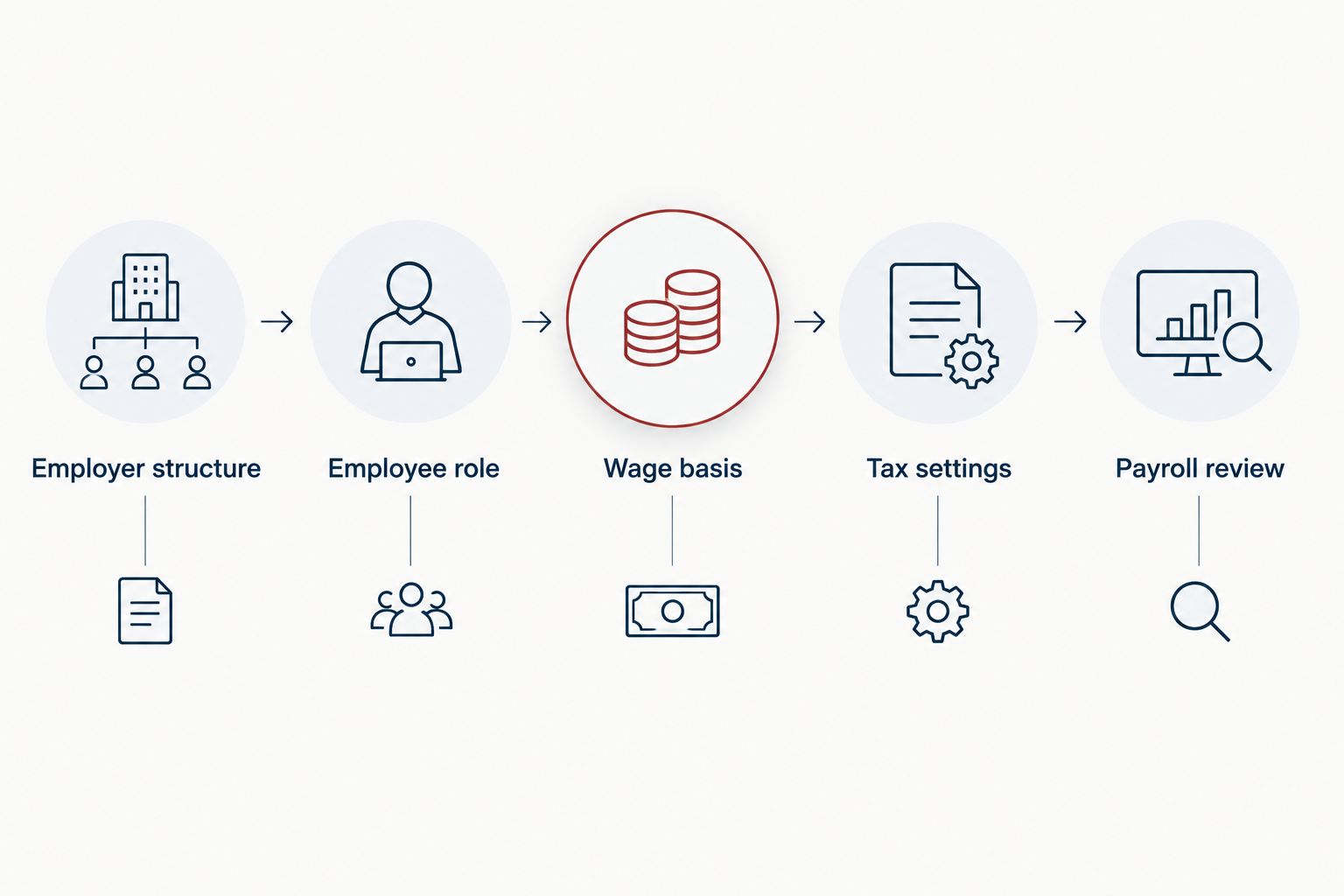
Determine the tax treatment before approving the first payroll.
Keep the supporting records with your business documentation. If you switch providers, you still need the job description, time records, wage rationale, and evidence of payment.
CEOHAVEN offers tax planning, tax preparation, and bookkeeping. Those services address a different layer from payroll processing: the business decisions and records behind the payment.
How the ranking works
This ranking prioritizes payroll-centered administration, accounting fit, and the distinction between payroll-only needs and wider HR requirements. Gusto is the default starting point; QuickBooks Payroll takes priority when the accounting connection drives your decision.
Family-employment tax configuration is a selection requirement, not a claimed exclusive feature of any provider. The final choice depends on the provider confirming your actual setup.
Which payroll provider should you choose?
Start with Gusto unless your bookkeeping or workforce requirements point elsewhere. Choose QuickBooks Payroll for a QuickBooks-centered accounting workflow, OnPay for a focused payroll comparison, ADP for broader workforce requirements, or Paychex when HR support is part of the purchase.
For 2026, settle the tax treatment before signing up. No provider wins if it processes the wrong assumptions efficiently.
FAQ
What’s the best payroll provider for paying family members?
Gusto is the default starting point for a founder-led business seeking a payroll-centered system. QuickBooks Payroll is the stronger fit when connecting payroll to existing QuickBooks bookkeeping is the main requirement. Confirm family-employee tax settings before enrolling.
Can I put my child on payroll in 2026?
Yes, you can employ your child for real, lawful business work and pay reasonable compensation. Document the duties, hours, and payments, and review child-labor rules and the employer’s tax treatment before running payroll.
Does paying my child eliminate payroll taxes?
No, paying your child does not automatically eliminate payroll taxes. Federal exemptions for certain taxes depend on age and employer structure, and income-tax withholding and state requirements need separate review.
Do the child payroll-tax exemptions apply to an S corporation?
The parental child-employment exemptions from Social Security, Medicare, and federal unemployment taxes do not apply when a corporation is the employer. Parent ownership does not turn corporate wages into sole-proprietor wages.
Is QuickBooks Payroll better than Gusto for family employees?
QuickBooks Payroll is the better fit when the connection to existing QuickBooks bookkeeping is your deciding requirement. Gusto is the default payroll-centered starting point in this shortlist. Neither choice replaces an employer-specific tax review.
Can I pay my spouse through payroll?
Yes, a spouse performing employee services can receive wages through payroll. Federal tax treatment depends on the employer structure, so do not assume the sole-proprietor rules apply to a corporation or partnership.
Does CEOHAVEN replace a payroll provider?
CEOHAVEN offers tax planning, tax preparation, and bookkeeping, rather than the payroll-platform services compared here. Use tax advice to determine the appropriate treatment, then select a payroll provider to administer employee payments and its agreed filing responsibilities.
One last thing
A relative’s birthday can change the federal payroll-tax treatment without changing the job. Review age-based exemptions when the employee crosses an applicable threshold; do not assume the original setup remains correct indefinitely.
Put the review date in your payroll process. The provider calculates from the setup you approve.