

Best overall: Monarch Money for household financial oversight. Best for investment visibility: Empower Personal Dashboard; best for deliberate budgeting: YNAB. This 2026 guide compares the best financial planning apps for high-income earners by the decisions they support—and separates personal dashboards from business books and tax planning.
TL;DR
- Monarch Money leads the best financial planning apps for high-income earners who want household budgeting and net-worth visibility.
- Empower Personal Dashboard suits investment oversight; ProjectionLab suits retirement scenarios; Tiller suits spreadsheet-based planning.
- YNAB suits deliberate cash allocation, not business accounting or tax preparation.
- CEOHAVEN provides tax planning, tax preparation, and bookkeeping; a personal finance app does not replace those services.
Why this matters: your dashboard is not your money team
A high income does not make household spending, business cash, investment assets, and tax obligations interchangeable. Your financial planning app should show the household clearly without turning business revenue into apparent spending money.
CEOHAVEN is best for entrepreneurs and high-income professionals who need tax planning, tax preparation, and bookkeeping—not another personal finance dashboard. The distinction matters: an app organizes information; professional tax work applies tax rules to your circumstances.
For 2026, choose the app around the decision you need to make. Spending visibility, investment oversight, retirement modeling, and business bookkeeping are different jobs. Trying to solve them with one attractive dashboard leaves the underlying responsibilities unchanged.
What makes the best financial planning app?
Use these criteria before comparing features. A longer feature list does not automatically produce a better financial decision.
- Decision fit: Does the app help you allocate cash, inspect investments, or compare future scenarios? Name the job first.
- Account coverage: Confirm support for your actual financial institutions. Treat an unsupported account as a maintenance task, not a minor inconvenience.
- Entity separation: Keep household transactions distinct from business records. Personal budgeting categories are not a substitute for an entity's books.
- Assumption control: Know which balances are imported, which values you enter, and which projections depend on estimates.
- Household usability: Choose a workflow you and any participating partner will maintain. Shared visibility has little value without agreed responsibilities.
- Data access and security: Review permissions, export options, and account-access practices before connecting sensitive financial information.
Financial planning apps at a glance
These recommendations give each app a distinct role. None is ranked as a replacement for business tax consulting.
| App | Best for | Standout feature | Key limitation |
|---|---|---|---|
| Monarch Money | Household financial oversight | Budgeting and net-worth tracking in one workspace | Personal reporting does not replace entity-level books |
| Empower Personal Dashboard | Investment visibility | Investment analysis and retirement planning tools | Portfolio visibility does not resolve business tax decisions |
| YNAB | Deliberate cash allocation | Assigning available money to specific jobs | Budget categories are not investment projections |
| ProjectionLab | Retirement scenario modeling | Comparing financial paths through explicit assumptions | Forecasts depend on the assumptions you supply |
| Tiller | Spreadsheet-based financial planning | Financial feeds into customizable spreadsheets | Spreadsheet flexibility requires maintenance and controls |
Start with the row that describes your immediate problem. Add another tool only when it performs a separate job; duplicating dashboards creates another reconciliation task.
1. Monarch Money: best for household financial oversight
Monarch Money combines personal budgeting, transaction organization, and net-worth tracking. Its household collaboration features make it a sensible default when you want a common view of spending and assets rather than separate financial interpretations.
The appeal is coordination. You can discuss household priorities against the same records instead of comparing disconnected account balances. For a founder, that household view still needs a firm boundary around business funds.
Monarch Money pros:
- Brings household transactions and asset balances into a common view.
- Supports budgeting alongside net-worth tracking.
- Provides household collaboration for shared financial management.
Monarch Money cons:
- Connected-account data still needs review and accurate categorization.
- A personal dashboard does not provide a complete business accounting workflow.
- Manual asset values can make net worth look more precise than the underlying estimates.
Best for: High-income households that want a central place to review spending, balances, and shared priorities.
Verdict: Buy for household oversight; skip as a substitute for business books. Before choosing Monarch Money in 2026, confirm that your essential accounts connect and decide who owns the review process.
2. Empower Personal Dashboard: best for investment visibility
Empower Personal Dashboard brings financial accounts into a consolidated view and includes investment analysis and retirement planning tools. It suits someone whose first question is about the portfolio rather than transaction-by-transaction household budgeting.
Use it to inspect your investment picture and examine retirement assumptions. Do not treat an account-level analysis as a recommendation to change holdings without considering taxes, objectives, and the rest of your circumstances.
Empower Personal Dashboard pros:
- Consolidates investment balances for portfolio oversight.
- Includes tools for examining investment allocation and fees.
- Provides retirement planning tools alongside account visibility.
Empower Personal Dashboard cons:
- Investment tools do not replace transaction-level business accounting.
- Retirement outputs depend on the inputs and assumptions behind them.
- A consolidated view cannot determine the tax consequences of every proposed investment change.
Best for: High-income earners who need a clearer picture of investments and retirement readiness.
Verdict: Skip as your business ledger; choose for investment visibility. Keep the distinction between viewing a portfolio and making a tax-sensitive portfolio decision explicit. The dashboard supports the discussion; it does not settle every issue raised by it.
3. YNAB: best for deliberate cash allocation
YNAB centers budgeting on assigning available money to specific jobs. That makes it a useful choice when income is strong but cash still moves without a clear plan.
For a household with uneven owner distributions or creator income, allocation imposes a decision before spending. You give upcoming obligations a place in the budget rather than interpreting the checking-account balance as permission to spend.
YNAB pros:
- Makes the purpose of available cash explicit.
- Supports planning for irregular household expenses.
- Creates a repeatable process for reviewing spending against priorities.
YNAB cons:
- The method requires active allocation and regular attention.
- Budget categories do not calculate the correct business tax reserve.
- Cash budgeting is a different task from investment or retirement modeling.
Best for: High-income earners who want tighter control over what current cash must accomplish.
Verdict: Buy for spending discipline; skip for portfolio forecasting. A tax category can hold an amount you have decided to reserve. It cannot determine that amount by itself. Set the tax target outside the budgeting app, then use the budget to protect the cash.
4. ProjectionLab: best for retirement scenario modeling
ProjectionLab models financial paths using assumptions about income, spending, assets, and future events. It is the right type of tool when the question is not what happened last month, but what changes if you retire earlier or reduce earned income.
Compare scenarios instead of searching for one reassuring forecast. A model earns its place by exposing the consequences of different assumptions, not by presenting a polished outcome as a promise.
ProjectionLab pros:
- Supports comparisons between different financial paths.
- Makes planning assumptions central to the exercise.
- Helps organize questions about retirement timing and future spending.
ProjectionLab cons:
- Incorrect inputs produce misleading comparisons.
- Scenario modeling does not maintain business transaction records.
- A modeled tax result still needs review against the rules that apply to your circumstances.
Best for: High-income earners evaluating work optionality, retirement timing, or a change in future income.
Verdict: Buy for scenario comparison; skip for daily bookkeeping. For a 2026 planning decision, change the important assumptions deliberately. If a modest change in spending or returns reverses the result, the decision deserves closer review before you act.
5. Tiller: best for spreadsheet-based financial planning
Tiller brings financial data into spreadsheets, where you can build and maintain your own reports. It suits someone who wants control over the structure of the analysis rather than an app's fixed presentation.
That flexibility is useful when your questions require custom calculations or a familiar spreadsheet workflow. It also makes you responsible for formulas, classifications, and the boundary between source data and interpretation.
Tiller pros:
- Combines financial data feeds with spreadsheet-based analysis.
- Allows reporting organized around your own questions.
- Keeps calculations visible for someone comfortable reviewing formulas.
Tiller cons:
- Formula mistakes can distort the resulting report.
- Custom workbooks require maintenance as accounts and needs change.
- A personal spreadsheet does not automatically become a complete business ledger.
Best for: Spreadsheet-confident earners who want direct control over financial reporting.
Verdict: Buy for spreadsheet control; skip if you will not maintain the workbook. Keep imported records separate from calculations, document important assumptions, and avoid silently overwriting source data. A sophisticated workbook is only useful when you can explain how its conclusions were produced.
Build the workflow before connecting every account
A good 2026 setup starts with boundaries, not integrations. Decide which records support household decisions, which belong to business accounting, and which need professional tax review.
- Reconcile accounts: Check balances and recent transactions against the underlying statements. Resolve missing or duplicated records before trusting totals.
- Separate entities: Keep each business's records distinct from household spending. Owner transfers need an explanation in the books, not just a personal category.
- Review assumptions: Identify manually entered property values, projected income, and future spending. Separate estimates from recorded balances.
- Plan taxes: Bring reconciled records and upcoming decisions into tax planning. Translate the resulting payment plan into a protected cash allocation.
The sequence matters because a forecast built on unreconciled records only adds sophistication to an unreliable starting point.
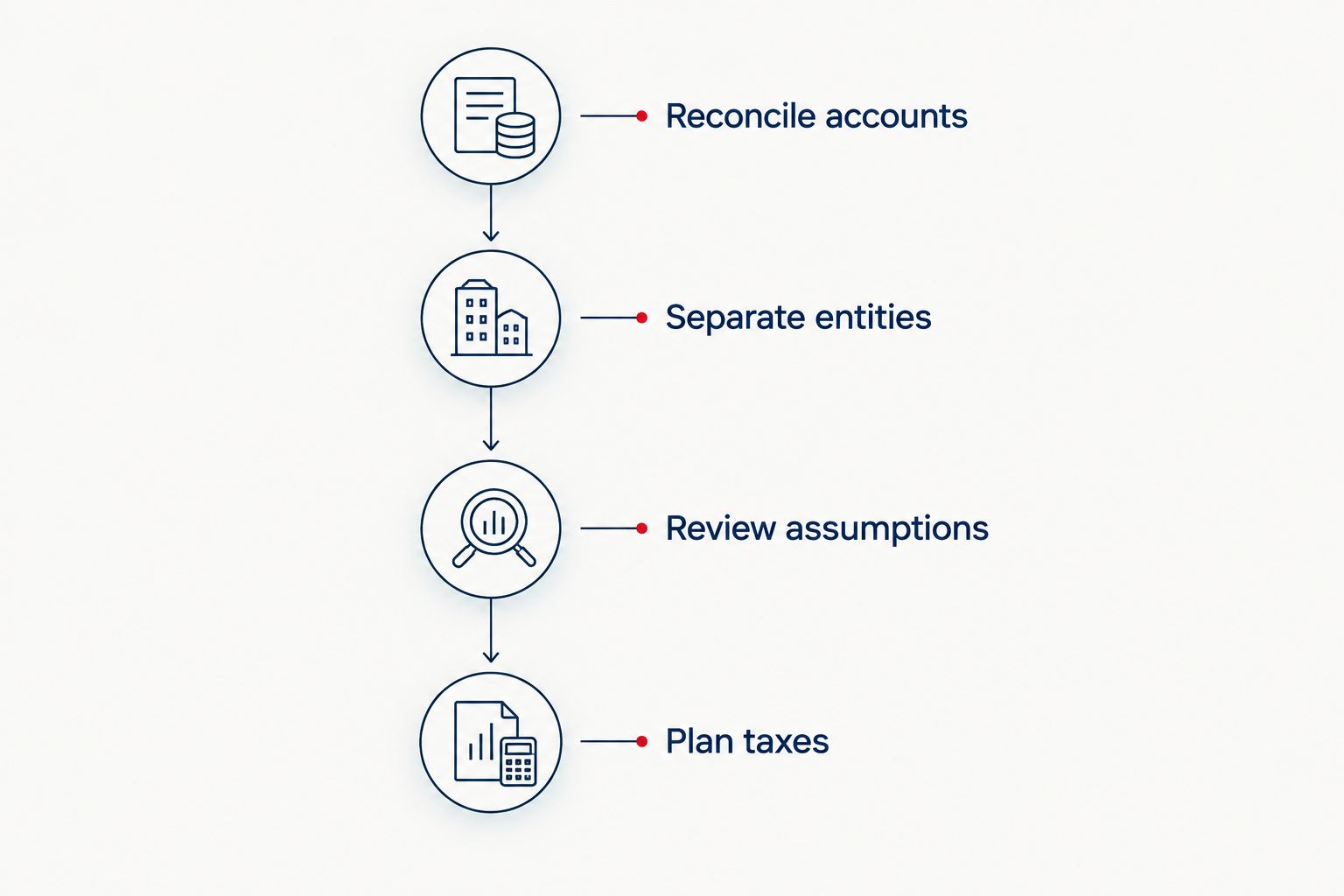
Establish reliable records before using projections to make tax-sensitive decisions.
Tax reserves need a calculation, not a guess
Personal finance apps can show cash and track a reserve. They do not make federal estimated-tax rules disappear.
IRS Publication 505 explains the general federal estimated-tax safe-harbor framework. For 2026 planning, the general required-payment comparison uses 90% of current-year tax or 100% of prior-year tax, whichever is smaller. The prior-year percentage generally becomes 110% when prior-year adjusted gross income exceeds $150,000, or $75,000 for married filing separately.
These percentages address an underpayment-penalty framework, not a promise that nothing remains due when you file. Prior-year rules include eligibility conditions, payment timing matters, and special rules apply in certain circumstances. State requirements need separate review.
The practical move is precise: establish the payment requirement, account for withholding and payment timing, and then reserve cash. Do not ask a spending dashboard to infer the answer from revenue.
CEOHAVEN offers tax planning, tax preparation, and bookkeeping for entrepreneurs, real estate investors, content creators, and high-income professionals. Pair personal financial planning apps with that separate tax and accounting work rather than expecting one tool to perform all three jobs.
Put tax planning beside your dashboard
Connect personal financial visibility with business tax planning, tax preparation, and bookkeeping.
How the apps are ranked
This ranking prioritizes decision fit, account visibility, assumption control, and the maintenance required from you. Monarch Money takes the default household slot; the other recommendations address investment oversight, cash allocation, scenario modeling, and spreadsheet control.
The ranking does not claim a universal winner for every financial institution or tax situation. Confirm current features and account support before committing. An app that cannot represent your essential accounts accurately fails the first practical requirement, regardless of its position here.
Which financial planning app should you choose?
Choose Monarch Money if you want a default household dashboard and have not identified a more specific need. Choose Empower Personal Dashboard for investment visibility, YNAB for deliberate cash allocation, ProjectionLab for scenario modeling, or Tiller for spreadsheet control.
Do not assemble the entire list simply because your finances are complex. Start with the unresolved decision, give each tool a defined role, and keep one authoritative set of business books. For 2026, the stronger system is the one you can reconcile and explain—not the one with the most dashboards.
FAQ
What's the best financial planning app for high-income earners in 2026?
Monarch Money is the default recommendation for high-income earners who want household budgeting and net-worth visibility. Empower Personal Dashboard, YNAB, ProjectionLab, and Tiller fit more specific investment, cash-allocation, modeling, or spreadsheet needs.
Is Monarch Money better than Empower Personal Dashboard?
Monarch Money is the better fit for household budgeting and shared financial oversight; Empower Personal Dashboard is the better fit for investment visibility. Choose around the decision you need to make rather than treating either app as a complete financial service.
Is YNAB useful if I already earn a high income?
YNAB is useful when you want to assign available cash to specific obligations and priorities. High income does not eliminate the need to distinguish spending money from reserves and upcoming expenses.
Can a financial planning app replace a tax consultant?
A personal financial planning app does not replace tax consulting. CEOHAVEN provides tax planning, tax preparation, and bookkeeping, while the apps in this guide support personal financial visibility and planning workflows.
Which app is best for comparing early-retirement scenarios?
ProjectionLab is the recommendation for comparing retirement scenarios built from explicit assumptions. Review income, spending, asset values, and tax assumptions before using a projection to support a decision.
Can I use a personal finance app for business bookkeeping?
A personal finance dashboard is not a substitute for complete business books. Keep entity records separate and reconcile them before using household summaries to make spending or planning decisions.
How should I set my tax reserve in a budgeting app?
Set the reserve from a tax calculation, then use the budgeting app to protect that cash. Federal payment requirements, withholding, timing, and state rules need review outside the spending dashboard.
One last thing
Do not count the same money twice. If your personal dashboard includes business cash, separate that balance from cash genuinely available for household spending. A transfer between accounts does not create new income or remove an obligation.
Give every balance a role: household liquidity, business operating cash, investment assets, or a tax reserve. That simple boundary makes the rest of your financial planning easier to interpret.