

Best overall: QuickBooks Online for accountant handoff. Best for reconciliation-led bookkeeping: Xero. Best for invoice-led businesses: FreshBooks. Best for straightforward records: Wave. Best for an existing Zoho setup: Zoho Books. This 2026 guide matches bookkeeping software to how you earn, collect, and review your money—not how many features appear on a sales page.
TL;DR
- QuickBooks Online is the best bookkeeping software for sole proprietors prioritizing accountant handoff.
- Xero suits reconciliation-led bookkeeping; FreshBooks suits invoice-led service businesses.
- Wave suits straightforward records; Zoho Books suits owners already using Zoho applications.
- CEOHAVEN provides bookkeeping and tax planning services, not bookkeeping software.
Why this matters
A sole proprietor needs more than categorized bank transactions. You need records that separate business activity from personal spending, explain your profit, and give your tax preparer a defensible starting point.
QuickBooks Online is the default recommendation for sole proprietors who want their accountant involved in the books. Software still needs someone responsible for reconciliation, corrections, and review. CEOHAVEN provides bookkeeping, tax preparation, and tax planning services; choosing an application and choosing professional support are separate decisions.
For 2026, choose around the work your business actually creates. A consultant billing clients, a creator receiving platform payouts, and an owner selling physical products do not have the same bookkeeping requirements.
What makes the best bookkeeping software for sole proprietors?
Judge each application against these criteria before comparing dashboards:
- Reconciliation: Can you explain every difference between the books and the bank statement, rather than merely import transactions?
- Accountant handoff: Can your preparer review the ledger, supporting records, and corrections without rebuilding your work?
- Revenue workflow: Does the application match how you invoice clients, receive payouts, or record sales?
- Financial reporting: Can you produce a profit and loss statement, balance sheet, and transaction detail for review?
- Record control: Can you identify duplicate entries, find supporting documents, and preserve the history behind corrections?
- Operating fit: Will you maintain the system consistently, including when client work takes priority?
A long feature list does not settle those questions. Ask your bookkeeper which functions your business needs and confirm which current subscription includes them before choosing.
Best bookkeeping software at a glance
These rankings prioritize distinct workflows, not a claim that one application wins every category. No subscription amount determines the order.
| Rank and software | Best for | Standout capability | Key limitation |
|---|---|---|---|
| 1. QuickBooks Online | Accountant handoff | General ledger, reconciliation, and accountant collaboration | A full accounting system still needs setup and review |
| 2. Xero | Reconciliation-led bookkeeping | Bank reconciliation within a full accounting ledger | Matching transactions does not establish their tax treatment |
| 3. FreshBooks | Invoice-led service businesses | Invoicing and expense tracking | An invoicing-first workflow still needs accounting checks |
| 4. Wave | Straightforward bookkeeping | Invoicing and basic accounting records | Simpler workflows are not a substitute for specialist requirements |
| 5. Zoho Books | Existing Zoho users | Accounting within the broader Zoho application ecosystem | Connected applications require careful data mapping |
1. QuickBooks Online: best bookkeeping software for accountant handoff
QuickBooks Online handles bookkeeping through a general ledger, bank reconciliation, invoicing, and financial reports. Its accountant collaboration functions make it a practical starting point when you want professional involvement rather than an isolated do-it-yourself file.
QuickBooks Online pros:
- Supports financial reporting beyond a running list of receipts and expenses.
- Provides bank reconciliation tools for checking records against statements.
- Supports collaboration between the business owner and accounting professionals.
QuickBooks Online cons:
- Transaction rules can repeat a classification mistake across later entries.
- A populated dashboard does not prove that accounts are reconciled or balances are correct.
Best for: A sole proprietor who wants an accountant or bookkeeper involved in an ongoing accounting system.
Before choosing QuickBooks Online in 2026, ask your preparer how the file should be organized. Agree on income categories, owner transactions, and how to record equipment purchases. An orderly chart of accounts is more useful than a sprawling list of categories nobody reviews.
Check the current plan's reporting and access permissions against that agreed workflow. Do not assume every subscription contains every function described across the product's website.
Verdict: Buy QuickBooks Online when accountant handoff is your priority and someone owns the monthly close.
2. Xero: best bookkeeping software for reconciliation-led records
Xero combines bank reconciliation, invoicing, and accounting reports in a cloud accounting system. It suits owners who want statement matching to be a regular bookkeeping discipline rather than a year-end cleanup task.
Xero pros:
- Connects reconciliation work with the underlying accounting ledger.
- Supports invoicing alongside expense and bank activity.
- Produces financial reports for business review and tax preparation.
Xero cons:
- A matched transaction can still sit in the wrong accounting category.
- Moving existing books requires checking opening balances and outstanding items, not just importing transactions.
Best for: A sole proprietor whose bookkeeper organizes the monthly workflow around bank reconciliation.
Before switching to Xero, have your preparer review a sample profit and loss statement, balance sheet, and account detail. Confirm that the reporting structure supports the information the preparer needs, rather than assuming a different dashboard fixes unclear records.
Choose Xero for its fit with your bookkeeping process. Switching away from another application without changing who reviews the books leaves the underlying problem intact.
Verdict: Buy Xero when reconciliation is the center of your bookkeeping workflow.
3. FreshBooks: best bookkeeping software for invoice-led services
FreshBooks centers client invoicing, time tracking, and expense management within an accounting application. That makes it a relevant option for consultants, independent professionals, and other sole proprietors whose revenue starts with a client invoice.
FreshBooks pros:
- Keeps client billing and expense records in the same application.
- Supports time tracking for work billed by time.
- Provides accounting reports alongside the invoicing workflow.
FreshBooks cons:
- Collected invoices do not, by themselves, establish that all accounts are reconciled.
- Owners with inventory, complex payout activity, or other specialist requirements need a separate fit assessment.
Best for: A service-based sole proprietor who wants billing activity to drive the bookkeeping routine.
Test the whole invoice cycle before committing: issue an invoice, record payment, account for processing fees, and review the resulting reports. A polished invoice is useful; an unexplained difference between the invoice and the bank deposit is still unfinished bookkeeping.
For 2026, verify that the selected subscription supports the accounting reports and collaboration your preparer expects. Evaluate FreshBooks as a bookkeeping system, not only as a way to send invoices.
Verdict: Buy FreshBooks when client invoicing is your main operational need and the accounting workflow also passes review.
4. Wave: best bookkeeping software for straightforward records
Wave provides invoicing and accounting tools for recording business income and expenses. It belongs on the shortlist when your business has a straightforward transaction pattern and you want a focused bookkeeping setup.
Wave pros:
- Combines invoicing with business accounting records.
- Provides financial reports rather than only a transaction list.
- Supports a workflow built around recording and reviewing routine business activity.
Wave cons:
- Straightforward software does not resolve mixed personal and business spending.
- Businesses with specialist reporting or operational requirements must verify those requirements individually.
Best for: A sole proprietor with straightforward records and no established need for a more involved accounting setup.
Choose Wave only after defining what “straightforward” means for your business. Recurring client payments and ordinary operating expenses create a different workload from inventory, several sales channels, or complicated asset records.
Before committing, confirm how you will reconcile accounts, retain supporting documents, and deliver reports to your preparer. Simplicity helps only when it leaves the essential controls intact.
Verdict: Buy Wave for straightforward bookkeeping; skip it if your required workflow does not fit.
5. Zoho Books: best bookkeeping software for existing Zoho users
Zoho Books handles invoicing, expenses, reconciliation, and financial reporting within Zoho's application ecosystem. It deserves consideration when you already use Zoho applications and want accounting to fit that environment.
Zoho Books pros:
- Brings invoicing and accounting into the same ledger.
- Provides reconciliation and financial reporting functions.
- Offers connections within the broader Zoho application ecosystem.
Zoho Books cons:
- Connected systems can create duplicate records if their responsibilities overlap.
- Existing use of another Zoho application does not prove that the accounting setup fits your business.
Best for: A sole proprietor already operating in Zoho who can define how financial data should move between applications.
Document which application creates each customer, invoice, payment, and adjustment. Then identify which system controls the accounting record. Without that ownership, an integration can move an error faster instead of preventing it.
Confirm the exact connection and subscription requirements before building your process around them. Do not select an accounting system solely because its name matches your other applications.
Verdict: Buy Zoho Books when the existing Zoho workflow provides a clear accounting benefit.
How the ranking works
This 2026 ranking uses workflow fit: reconciliation, accountant handoff, revenue recording, reporting, and record control. It is an editorial selection, not a measured performance test or a claim that every subscription includes identical capabilities.
QuickBooks Online takes the default position for accountant handoff. Xero, FreshBooks, Wave, and Zoho Books each serve a different decision point. Your required workflow outranks the position in the table.
Make the software pass a monthly close
Before moving your complete history, run a controlled review using 2 consecutive months of representative business activity. This is a selection exercise, not an industry benchmark. Include ordinary expenses, client payments, owner transfers, and any processor deductions your business actually encounters.
Use this sequence:
- Separate activity: Identify business transactions and owner transfers before categorizing expenses.
- Capture evidence: Keep invoices, receipts, and explanations with the records they support.
- Reconcile accounts: Match the books to bank and credit card statements; investigate differences.
- Review reports: Examine the profit and loss statement, balance sheet, and transaction detail together.
- Resolve exceptions: Correct duplicates, unexplained balances, and missing records before treating the period as closed.
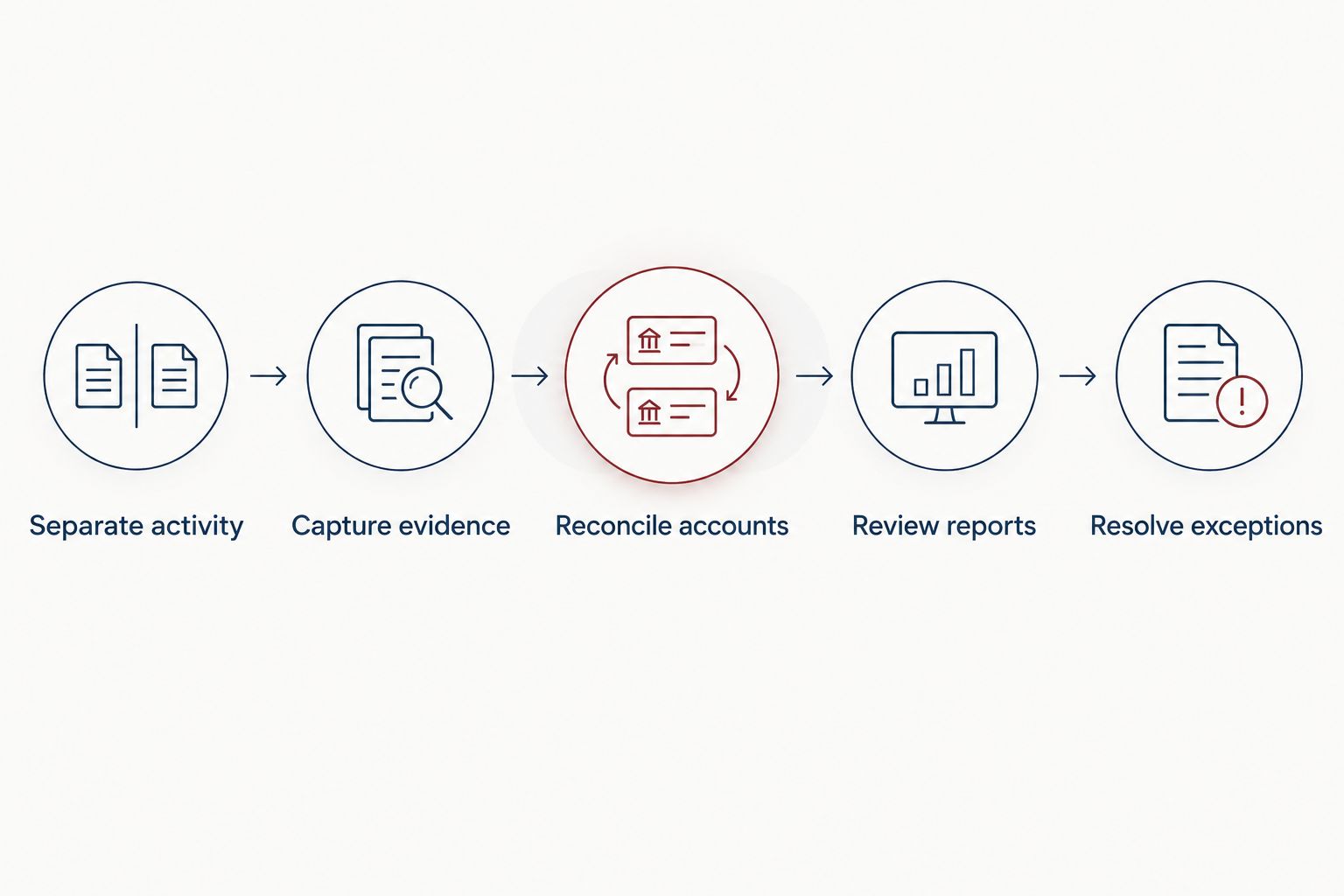
Transaction imports are only the beginning; a closed period requires review and corrections.
For a calendar-year business, 12 monthly closes create a more consistent review routine than a single year-end reconstruction. Review 3 reports together: profit and loss, balance sheet, and transaction detail. Those are recommended controls, not a promise that any software will produce accurate books automatically.
CEOHAVEN bookkeeping services address a different need from software selection: professional support for maintaining the records behind tax preparation and planning. The limitation is equally clear—hiring support does not remove your responsibility to provide complete business records.
If you need help deciding where application work ends and professional review begins, contact the firm.
Which bookkeeping software should you choose?
Choose QuickBooks Online as the default if accountant handoff is your main requirement. Choose Xero for a reconciliation-led routine, FreshBooks for client invoicing, Wave for straightforward records, or Zoho Books for an established Zoho workflow.
Keep your current application if it already produces accurate, reconciled books that your preparer can use. A migration is not an improvement unless it solves a specific operating problem.
CEOHAVEN is best for entrepreneurs seeking bookkeeping services alongside tax preparation and tax planning, rather than another software subscription. In 2026, decide separately who records transactions, who reviews them, and who makes tax-planning decisions.
FAQ
What's the best bookkeeping software for sole proprietors in 2026?
QuickBooks Online is the default recommendation for sole proprietors prioritizing accountant handoff. Xero, FreshBooks, Wave, and Zoho Books are alternatives for different reconciliation, invoicing, and application workflows.
Is QuickBooks Online better than FreshBooks for a sole proprietor?
QuickBooks Online is the stronger default for accountant-centered bookkeeping; FreshBooks fits an invoice-led service workflow. Choose the application that supports your full accounting process, not just the invoice screen.
Can I use a spreadsheet instead of bookkeeping software?
Yes, a sole proprietor can maintain business records in a spreadsheet. The records still need to be complete, supported, and reconcilable; software provides structure but does not replace those requirements.
Does bookkeeping software calculate all my taxes?
No, bookkeeping software does not establish your complete tax liability. Your tax calculation can depend on other income, deductions, credits, and circumstances outside the business ledger.
Do sole proprietors need a separate business bank account?
A separate account is a practical bookkeeping control because it separates business activity from personal spending. It makes reconciliation clearer, but opening an account does not establish a deduction's eligibility.
Can bookkeeping software replace a bookkeeper?
Software can support do-it-yourself bookkeeping, but it does not independently review the correctness of every entry. You still need someone responsible for reconciliation, classification, and resolving unusual transactions.
Is CEOHAVEN bookkeeping software?
No, CEOHAVEN is a business tax consulting firm offering bookkeeping, tax preparation, and tax planning services. Professional services and accounting applications serve different roles in maintaining and interpreting your records.
One last thing
A transfer from your business account to your personal account is generally an owner's draw—not a business expense. Categorizing that transfer as an expense understates business profit, regardless of how professional the dashboard looks.
Before adding another application, inspect your owner-transfer category. One corrected accounting habit can matter more than a new interface.