

Best overall: QuickBooks Online. Best for integrated restaurant operations: Restaurant365. Best for collaboration-focused bookkeeping: Xero. Best for invoice and food-cost workflows: MarginEdge, paired with an accounting ledger. This 2026 guide compares the best bookkeeping software for restaurant owners by accounting scope, reconciliation needs, and operational complexity.
TL;DR
- QuickBooks Online is the best bookkeeping software for restaurant owners who need a general-purpose accounting ledger.
- Restaurant365 fits operators who want restaurant accounting and operational information in one platform.
- Xero suits owners prioritizing shared bookkeeping workflows; verify restaurant integrations before choosing.
- MarginEdge supports invoice processing and food-cost management but does not replace a complete accounting ledger.
Why this matters
Your restaurant’s bank deposits are not its sales report. Card fees, sales tax, tips, refunds, and settlement timing create differences that a bank feed alone cannot explain.
QuickBooks Online is the best default for restaurant owners who need a general-purpose accounting ledger rather than an integrated operations platform. The right setup still needs a person responsible for reconciliation, inventory adjustments, and the monthly close.
CEOHAVEN provides bookkeeping, tax preparation, and tax planning for entrepreneurs. Software organizes the records; those services address the work and decisions surrounding them.
For your 2026 selection, start with the books you need to produce—not the dashboard you prefer looking at.
What makes the best restaurant bookkeeping software?
Judge each option against these criteria before comparing features:
- Sales reconciliation: You need a clear path from point-of-sale activity to processor settlements and bank deposits.
- Accounting completeness: A full ledger must account for assets, liabilities, income, expenses, and equity—not just spending.
- Food-cost visibility: Decide whether you need accounting inventory balances, detailed ingredient tracking, or both.
- Payroll and tips: Your workflow must distinguish wages, employer taxes, tips payable, and payroll liabilities.
- Location reporting: Owners managing separate locations or legal entities need reporting that preserves those distinctions.
- Close ownership: Someone must review exceptions, reconcile balances, and approve the finished books.
No product wins every category. A restaurant operations platform and a general-purpose ledger solve different problems, while an invoice tool can support either without replacing it.
Restaurant bookkeeping software at a glance
The 2026 shortlist separates complete accounting systems from supporting software. Check the current edition, implementation requirements, and integration scope directly with each provider before committing.
| Rank | Software | Best for | Standout capability | Key limitation |
|---|---|---|---|---|
| 1 | QuickBooks Online | General-purpose restaurant bookkeeping | Accounting ledger with bank reconciliation and financial reporting | Restaurant-specific operational detail requires additional workflows or tools |
| 2 | Restaurant365 | Integrated restaurant operations | Restaurant accounting alongside inventory and operational management | Broader implementation scope than a standalone ledger |
| 3 | Xero | Collaboration-focused bookkeeping | Cloud accounting with reconciliation and adviser access | Restaurant workflows depend on configuration and connected applications |
| 4 | MarginEdge | Invoice processing and food-cost workflows | Restaurant invoice and food-cost management | Supporting platform, not a replacement for a complete accounting ledger |
1. QuickBooks Online: best for general-purpose restaurant bookkeeping
QuickBooks Online provides a cloud accounting ledger, bank reconciliation, accounts payable, and financial reports. For a restaurant owner, its job is to produce reliable books—not to replace the point-of-sale system or manage every kitchen process.
Choose it when your main requirement is an organized balance sheet and profit-and-loss statement. Build the sales, payroll, and inventory workflows around that accounting foundation.
QuickBooks Online pros:
- Provides a complete accounting foundation rather than an expense-only record.
- Supports bank and credit-card reconciliation.
- Offers financial reporting for reviewing business performance.
- Supports shared work with an accountant or bookkeeper.
QuickBooks Online cons:
- A bank feed does not explain gross sales, tips, fees, and tax by itself.
- Restaurant-specific food-cost detail requires a separate process or application.
- Reporting dimensions and other capabilities depend on the selected edition.
Best for: An owner who wants a general-purpose ledger and a clearly defined bookkeeping process.
During a demonstration, require a walkthrough of a processor payout from the sales report through the clearing account to the bank. That example reveals more than a tour of reporting screens.
Verdict: Buy QuickBooks Online when the accounting ledger is your main requirement.
2. Restaurant365: best for integrated restaurant operations
Restaurant365 combines restaurant accounting with operational capabilities, including inventory management. It belongs on your shortlist when accounting and restaurant operations need to share more information within the same platform.
The decision is organizational as much as technical. Inventory records still depend on how your team records purchases, counts stock, and maintains operating data.
Restaurant365 pros:
- Combines accounting and restaurant operational functions.
- Supports inventory management alongside financial records.
- Provides a restaurant-specific alternative to assembling separate general-purpose tools.
Restaurant365 cons:
- A broader platform brings a broader implementation project.
- Operational reporting depends on consistent inputs from restaurant staff.
- Buyers must confirm the scope of their POS, payroll, and other connections.
Best for: Operators who need accounting and operational management together, rather than a ledger alone.
Ask the provider to demonstrate your actual location and entity structure. A consolidated dashboard is not enough if you cannot distinguish each legal entity’s balances and obligations.
Verdict: Buy Restaurant365 when integrated operations justify the implementation work.
3. Xero: best for collaboration-focused restaurant bookkeeping
Xero provides cloud accounting, bank reconciliation, bills, and financial reporting. It is a candidate for restaurants whose owners and advisers want to work from a shared accounting record.
Its place in this ranking is distinct: choose the ledger around your bookkeeping team’s workflow, then validate the restaurant connections. Do not assume that an application listing proves that every transaction arrives correctly.
Xero pros:
- Supports collaboration between business owners and accounting advisers.
- Includes bank reconciliation and core financial reporting.
- Connects with third-party applications for additional workflows.
Xero cons:
- Restaurant-specific operational detail is not the purpose of the core ledger.
- Connected applications add configuration and exception-management work.
- Plan scope and integration behavior need checking against your requirements.
Best for: Owners whose bookkeeping team prefers Xero and can demonstrate a complete restaurant close within it.
Require a sample month-end package, including reconciled bank accounts and explained clearing balances. Familiarity with the software matters only when it produces finished, reviewable books.
Verdict: Buy Xero when your bookkeeping team can support the complete workflow.
4. MarginEdge: best for restaurant invoice and food-cost workflows
MarginEdge focuses on restaurant back-office work, including invoice processing and food-cost management. Treat it as a supporting operational layer, not as an interchangeable substitute for QuickBooks Online, Xero, or another full ledger.
This distinction prevents a common purchasing mistake: solving invoice entry while leaving accounting ownership unresolved. You still need reconciled cash, payroll liabilities, debt balances, and equity records.
MarginEdge pros:
- Focuses on restaurant purchasing and invoice workflows.
- Supports food-cost visibility beyond a basic bank transaction list.
- Connects operational purchasing information with supported accounting systems.
MarginEdge cons:
- Does not replace the complete accounting ledger.
- Adds another connection that someone must monitor.
- Purchasing information alone does not establish accurate ending inventory.
Best for: Restaurants with an existing accounting foundation and a specific invoice-processing or food-cost reporting problem.
Ask how corrections move between systems. A corrected supplier invoice must not leave the operational report and accounting ledger showing different amounts.
Verdict: Buy MarginEdge as a supporting tool; skip it as a standalone bookkeeping replacement.
How the ranking works
This ranking prioritizes accounting completeness first, then restaurant-specific scope and workflow fit. QuickBooks Online takes the default position because the core recommendation is a general-purpose ledger; Restaurant365 takes the integrated-operations slot.
Xero is the collaboration-focused alternative. MarginEdge appears separately because its supporting role matters more than a direct feature comparison with complete accounting systems.
The ranking is a decision framework, not a claim that every integration or edition has been tested. Your 2026 purchase should depend on a demonstration using your transaction types.
Build the workflow before you migrate
A restaurant bookkeeping setup needs a documented path from operating activity to finished financial statements. The process should remain understandable even if you later change software.
Use these stages:
- Sales capture: Separate sales, refunds, discounts, sales tax, and tips from the source reports.
- Settlement matching: Match processor payouts to the activity they settle, identifying fees and timing differences.
- Expense review: Review supplier invoices, payroll entries, and other spending for classification and duplicates.
- Balance reconciliation: Reconcile bank accounts, credit cards, clearing accounts, and other material balances.
- Close approval: Review adjustments and approve the completed reporting period.
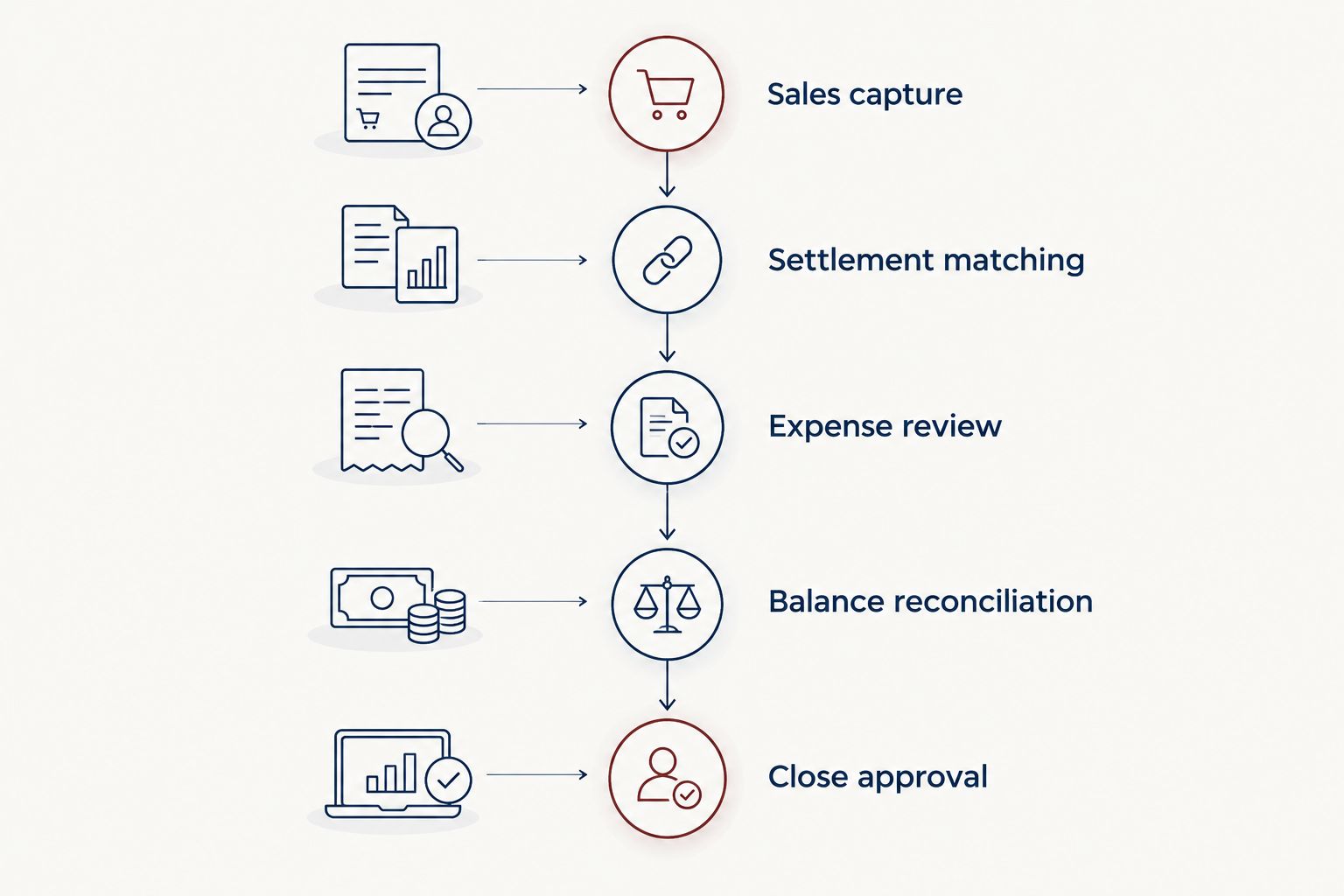
A connected bank feed is one input, not the finished bookkeeping process.
For your 2026 evaluation, request 7 consecutive days of sample activity covering cash, card payments, refunds, and tips. Then require 1 full month of reconciliation before accepting the setup. These are acceptance-test recommendations, not claims about implementation time.
The restaurant bookkeeping guide addresses the broader accounting process. Your software decision should support that process rather than dictate which controls you abandon.
Automation does not own your accounting decisions
Automated imports reduce manual entry. They do not determine whether a payout contains sales tax, whether a payment reduces loan principal, or whether an inventory adjustment reflects an actual count.
The distinction behind bookkeeping software limitations matters here: transaction processing and professional accounting judgment are different responsibilities. That discussion concerns the UAE; your U.S. restaurant’s tax treatment requires U.S.-specific analysis.
Keep these responsibilities assigned to a named person:
- Resolve unmatched deposits and stale clearing balances.
- Review payroll postings and tip liabilities.
- Separate owner transactions from business expenses.
- Approve inventory and other closing adjustments.
- Explain unusual changes in reported results.
CEOHAVEN’s bookkeeping, tax preparation, and tax planning services are separate from the software purchase. Buying an application does not appoint anyone to perform those services, and a completed import is not a completed close.
If nobody owns the exceptions, nobody owns the books.
A purchase test for your 2026 shortlist
Before switching, ask each finalist to process the same sample records. Comparing identical activity exposes differences that feature lists conceal.
Require 3 financial reports: a profit-and-loss statement, balance sheet, and cash-flow statement. Review the underlying reconciliations as well; attractive reports cannot repair unsupported balances.
Ask these questions during the demonstration:
- Where do card-processing fees appear?
- How are tips and sales tax separated from revenue?
- What happens when a refund occurs after the original payout?
- Who notices a failed connection or duplicated import?
- Can you trace a reported expense to its source document?
- What records can you export if you leave?
Keep the old records accessible during the transition. Confirm opening balances before relying on the new system, and document which system owns each transaction stream so that overlapping imports do not create duplicates.
Which restaurant bookkeeping software should you choose?
Choose QuickBooks Online if you are undecided and need a general-purpose accounting ledger. Choose Restaurant365 when integrated restaurant operations are the requirement, not an optional extra.
Choose Xero when your bookkeeping team can demonstrate the full restaurant workflow in it. Add MarginEdge when invoice processing and food-cost information are the specific gaps in an otherwise functioning accounting setup.
For 2026, the deciding question is not which platform has the longest feature list. It is which setup gives you reconciled books, clear responsibilities, and financial information you can act on.
FAQ
What's the best bookkeeping software for restaurant owners in 2026?
QuickBooks Online is the best default for restaurant owners who need a general-purpose accounting ledger. Restaurant365 fits integrated restaurant operations, while Xero is an alternative for collaboration-focused bookkeeping.
Is QuickBooks Online enough for a restaurant?
QuickBooks Online can serve as a restaurant’s accounting ledger, but it does not replace every operational workflow. You still need a process for sales reconciliation, payroll, tips, inventory adjustments, and month-end review.
Is Restaurant365 better than QuickBooks Online?
Restaurant365 is the better fit when integrated restaurant accounting and operational management are the requirement. QuickBooks Online is the default choice in this guide when the primary need is a general-purpose ledger.
Can MarginEdge replace restaurant accounting software?
MarginEdge does not replace a complete accounting ledger. It supports restaurant invoice and food-cost workflows alongside an accounting system.
Can I use Xero for restaurant bookkeeping?
Xero can serve as a restaurant’s accounting ledger. Confirm how your POS, payroll, purchasing records, and processor settlements reach the ledger before choosing it.
Does connecting my POS eliminate bookkeeping work?
Connecting your POS does not eliminate reconciliation or review. Someone must still resolve timing differences, fees, duplicates, refunds, and incorrect account mappings.
Should I hire a bookkeeper if I already have software?
You need a qualified person responsible for the books, whether that person is internal or external. CEOHAVEN offers bookkeeping, tax preparation, and tax planning; the software itself does not perform that professional role.
One last thing
Inspect a clearing account before you admire a dashboard. An unexplained balance can reveal that sales activity and bank settlements have not been fully matched, even when the bank feed looks current.
Ask your prospective bookkeeper to explain that balance in plain language. A clear answer tells you more about accounting control than another automated report.