

Best overall: CosmoLex for integrated legal bookkeeping. Best for an accountant-led setup: QuickBooks Online. Best for firms retaining a separate legal system: Xero. The best bookkeeping software for law firms in 2026 depends on where you manage client money, billing, and the general ledger—not which dashboard looks simplest.
TL;DR
- CosmoLex is the best bookkeeping software for law firms seeking legal billing, trust accounting, and general accounting together.
- QuickBooks Online fits accountant-led bookkeeping; a general ledger alone does not replace client-level trust controls.
- Xero fits firms keeping legal billing and trust workflows separate from their general accounting system.
- CEOHAVEN provides bookkeeping and tax planning services, not legal accounting software.
Why this matters
Your operating bank balance does not tell you how much your firm has earned. Client funds, unpaid invoices, reimbursable costs, payroll, and owner distributions belong in different accounting categories. Confusing them makes both management reporting and tax preparation harder.
The software decision also sits upstream of your personal finances. A clean ledger supports tax planning for law firm owners; a bank feed full of unexplained transfers does not.
Choose the system around your trust-accounting obligations first, then your reporting preferences. State bar rules govern the details. Software features do not establish compliance by themselves.
What makes the best bookkeeping software for law firms?
Use these criteria to evaluate your 2026 shortlist before looking at extra features:
- Trust separation: Keep client funds distinct from operating revenue and preserve client-level records. Ask how the system handles transfers, corrections, and reconciliation.
- Matter-level detail: Trace fees, expenses, receipts, and balances to the correct client or matter without rebuilding the history in spreadsheets.
- Complete accounting: Require a general ledger, balance sheet, income statement, and bank reconciliation—not just invoices and payment collection.
- Review controls: Inspect permissions, transaction history, and the process for correcting closed periods. Your bookkeeper needs access without unrestricted authority over every function.
- Advisor handoff: Confirm that your accountant can review the books, obtain supporting reports, and identify unresolved transactions without a separate reconstruction project.
- Migration discipline: Decide who validates opening balances and client ledgers. A clean-looking import is not proof that the underlying balances agree.
Law firm bookkeeping software at a glance
| Software | Best for | Standout feature | Key limitation |
|---|---|---|---|
| CosmoLex | Firms seeking integrated legal accounting | Legal billing, trust accounting, and general accounting in one system | Requires alignment across legal workflows and bookkeeping |
| QuickBooks Online | Firms whose accountant directs the general ledger | General business accounting with accountant collaboration | Not a complete legal trust-accounting system by itself |
| Xero | Firms preserving a separate legal operations system | Cloud general ledger with bank reconciliation and advisor access | Legal billing and client trust controls require a separate workflow |
These are different operating models, not interchangeable substitutes. Start with whether you want legal operations and accounting together, then decide who owns the connection between them.
1. CosmoLex: best law firm bookkeeping software for integration
CosmoLex combines legal practice functions with billing, trust accounting, and general accounting. That makes it the clearest starting point for a firm that wants its legal and financial records inside the same system rather than divided between a practice platform and a separate ledger.
The advantage is structural. Your evaluation can focus on how one system handles the full transaction rather than how several systems exchange pieces of it. Integration still requires careful setup: client balances, operating receipts, and trust transfers must follow the correct workflow.
CosmoLex pros:
- Combines legal billing and general accounting rather than stopping at invoice creation.
- Includes trust-accounting functions built around legal practice needs.
- Supports evaluating matter activity and financial records within the same product.
CosmoLex cons:
- Moving to an integrated system affects more than the bookkeeping team.
- Your accountant must be comfortable reviewing its ledger and reports.
- Incorrect opening client balances remain incorrect after migration unless someone validates them.
Best for: Firms willing to align billing, trust administration, and bookkeeping around one platform.
Ask for a demonstration using a client deposit, an earned-fee transfer, an expense, and a correction. Do not accept a tour that stops at the invoice screen. Have the person responsible for reconciliation follow the transaction through the reports.
Verdict: Buy CosmoLex when integrated legal accounting is the priority and your team accepts the workflow.
2. QuickBooks Online: best for accountant-led law firm bookkeeping
QuickBooks Online is a general business accounting system, not a legal practice-management platform. It handles the general ledger, bank reconciliation, financial reporting, and collaboration with accounting professionals. Legal billing and client trust administration require deliberate treatment beyond ordinary income-and-expense categorization.
This is the strongest fit when your accountant owns the bookkeeping design and your firm already has a workable legal operations system. The key question is not whether transactions reach QuickBooks Online. It is whether they arrive with enough detail to reconcile without duplicating revenue or obscuring liabilities.
QuickBooks Online pros:
- Provides general-ledger accounting and core financial statements.
- Supports collaboration between a firm and its accounting advisor.
- Keeps the accounting-system decision separate from the practice-management decision.
QuickBooks Online cons:
- Does not replace a dedicated client trust ledger and related legal controls by itself.
- Separate billing and payment workflows create reconciliation responsibilities.
- Bank-feed categorization cannot decide whether a receipt is earned revenue or client money.
Best for: Firms with an accountant-directed ledger and an established legal billing or trust workflow.
Before choosing QuickBooks Online in 2026, map every transfer between the legal system, payment processor, and bank. Specify which system creates invoices and which records payments. Two systems posting the same receipt is an accounting problem, not an integration success.
Verdict: Buy QuickBooks Online when your accountant controls the ledger design; skip it as a standalone answer to trust accounting.
3. Xero: best for firms keeping legal operations separate
Xero is a cloud accounting platform with bank reconciliation, invoicing, financial reporting, and advisor collaboration. Its role on this shortlist is the general ledger. It is not a substitute for a legal system that maintains matter records and the client-level controls your practice requires.
Choose Xero when you deliberately want separate legal and accounting systems. That separation works only when you assign responsibility for the handoff. Someone must reconcile legal billing activity to accounting records and explain differences rather than treating imported totals as final.
Xero pros:
- Provides cloud-based general accounting and bank reconciliation.
- Supports financial reporting and collaboration with an accounting advisor.
- Lets you retain a separate system for legal practice operations.
Xero cons:
- Legal trust administration needs a separate, properly controlled workflow.
- Disconnected client, billing, and ledger records require reconciliation.
- Your bookkeeper must understand the boundary between the legal system and Xero.
Best for: Firms retaining a legal operations platform while selecting a separate cloud ledger.
Request the exact reports your accountant needs before approving the setup. Then walk through a correction that starts in the legal system and ends in Xero. If nobody can explain which record changes first, the workflow is not ready.
Verdict: Buy Xero when separation is intentional and reconciliation ownership is explicit.
How the ranking works
This 2026 ranking prioritizes legal-accounting fit, followed by ledger completeness, advisor handoff, and migration control. CosmoLex takes the integrated slot because it combines legal functions with accounting. QuickBooks Online takes the accountant-led slot; Xero takes the separate-cloud-ledger slot.
The ranking does not treat a longer feature list as proof of a better fit. Your firm's trust obligations, current systems, and assigned reviewer determine whether any option belongs on your final shortlist.
Test the trust workflow before signing
For a firm holding client funds, request a demonstration of a three-way reconciliation: 3 balances must agree—the trust bank statement balance, the trust book balance, and the total of individual client ledger balances. Resolve reconciling items rather than forcing the totals to match.
Use your jurisdiction's requirements to determine the required process and frequency. As an internal control, schedule a monthly review and assign both a preparer and a reviewer. Do not confuse a bank connection with a completed reconciliation.
Ask the demonstrator to show:
- Bank balance: The statement balance and outstanding transactions.
- Book balance: The trust-account records and documented adjustments.
- Client balances: Individual client ledgers that support the aggregate balance.
- Review evidence: The reports and sign-off retained after reconciliation.
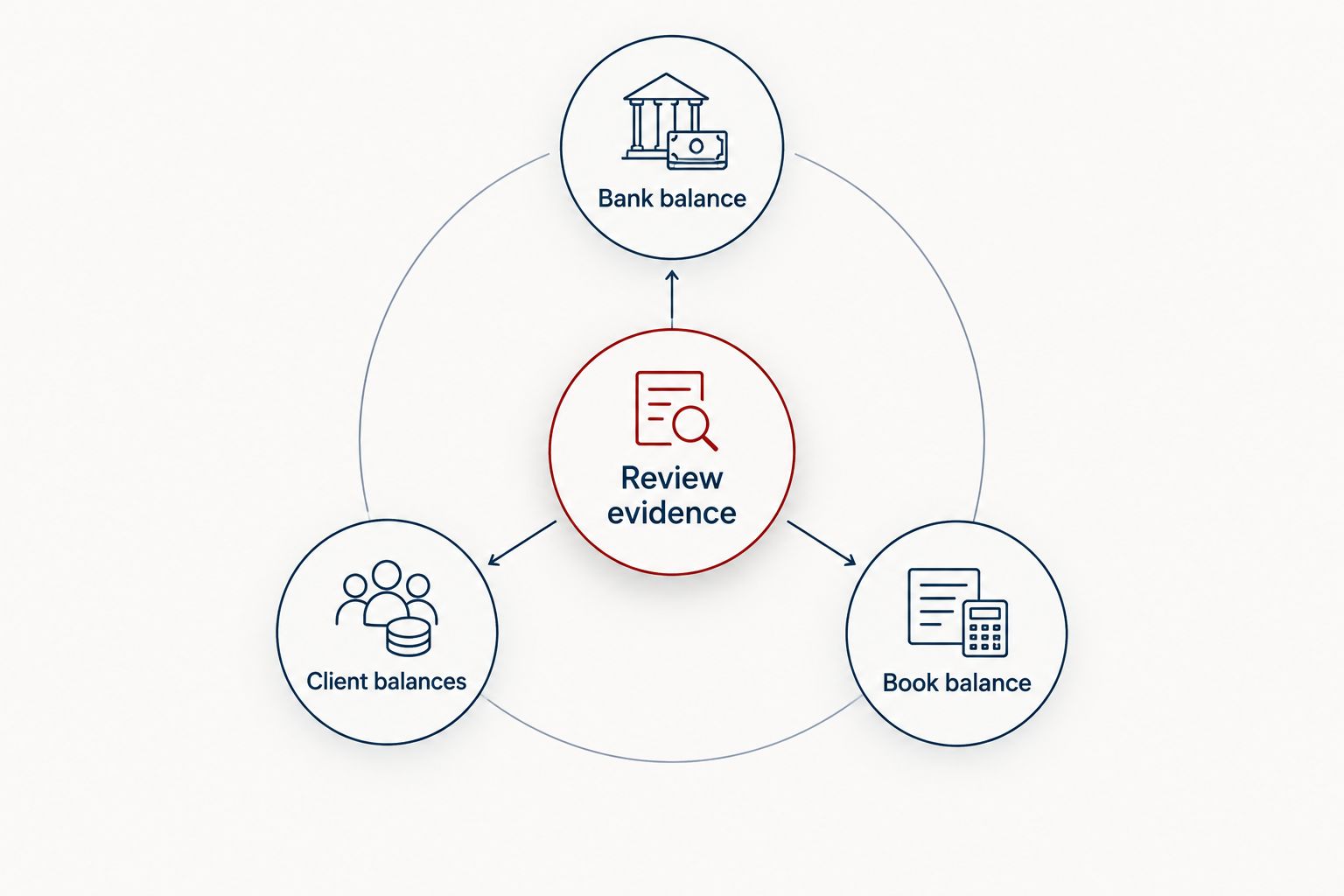
A completed reconciliation needs supporting client records, not just a matched bank total.
Also request a correction demonstration. You need to see what happens when someone posts a payment to the wrong matter, reverses a receipt, or changes a transaction after review. Clean sample data hides the work that matters.
Make expense records useful beyond the bank feed
Operating expenses deserve their own review process. A merchant name does not establish business purpose, matter allocation, or whether an item belongs on the balance sheet rather than the income statement.
For law firms, credit card expense categorization should distinguish ordinary overhead from client-related costs and personal spending; a statement total cannot make those distinctions. Preserve the receipt, business purpose, and matter reference where relevant.
Ask each software vendor to demonstrate a split transaction and a reimbursable expense. Then ask your accountant how those records should reach the tax return. The accounting treatment of client costs depends on the arrangement and applicable tax rules, not the category name someone selected.
CEOHAVEN is a bookkeeping and tax planning service option for entrepreneurial law firm owners who need support beyond software. Software selection and service selection are separate decisions: you still need someone accountable for classification, review, and tax coordination.
Build a controlled 2026 migration
Do not migrate unresolved bookkeeping problems and expect the new platform to fix them. Start with a documented cutover date, reconciled balances, and a named owner for every handoff.
Use this sequence:
- Review history. Request the previous 12 months of financial statements, reconciliations, and supporting client records. Identify unexplained balances before importing them.
- Map accounts. Separate operating revenue, client funds, liabilities, owner activity, and client-related costs. Have your accountant approve the mapping.
- Validate balances. Compare opening balances with the closing records from the old system. Check individual client balances, not only the combined total.
- Assign ownership. Name the person responsible for billing imports, bank reconciliation, trust review, payroll entries, and unresolved items.
- Review the cutover. Schedule a review within the first 30 days after migration. Compare the new reports with source records and resolve discrepancies.
Keep the old records accessible under your retention obligations. An import does not prove that every attachment, transaction history, or supporting report transferred.
Which law firm bookkeeping software should you choose?
Choose CosmoLex as the default if you are replacing both legal billing and accounting. Its integrated structure addresses the central decision on this list: whether legal activity and the ledger belong together.
Choose QuickBooks Online when an accountant-led general ledger is the priority and your legal system already handles the practice-specific workflow. Choose Xero when you intentionally retain separate legal operations and want a cloud accounting ledger with a defined handoff.
Before committing in 2026, make the responsible bookkeeper and reviewing accountant attend the same demonstration. Ask both to approve the reconciliation process. A partner's preferred interface is not enough.
If the missing piece is accountability rather than software, contact CEOHAVEN about bookkeeping, tax preparation, and tax planning. Keep the discussion grounded in your entity, existing records, and unresolved reporting needs.
FAQ
What's the best bookkeeping software for law firms in 2026?
CosmoLex is the default choice for firms seeking integrated legal billing, trust accounting, and general accounting. QuickBooks Online and Xero fit firms that deliberately maintain separate legal workflows.
Can a law firm use QuickBooks Online for bookkeeping?
Yes, a law firm can use QuickBooks Online as its general accounting ledger. The firm still needs appropriate client-level trust records, reconciliation procedures, and controls that meet its jurisdiction's rules.
Is CosmoLex better than Xero for a law firm?
CosmoLex is the better fit when integrated legal accounting is the objective. Xero fits a different model: a separate general ledger alongside legal billing and trust workflows.
Does bookkeeping software make a law firm trust account compliant?
No, software alone does not establish trust-account compliance. Your firm must apply the relevant jurisdiction's rules, maintain supporting client records, reconcile balances, and review exceptions.
What should a law firm test during a software demonstration?
Test a client deposit, earned-fee transfer, expense, reconciliation, and correction. Require the demonstrator to trace each transaction into the relevant client records and accounting reports.
Does a law firm still need a bookkeeper after buying software?
A law firm still needs someone responsible for bookkeeping, whether internal or external. Software does not assign accountability for classification, reconciliation, unresolved balances, or the accountant's review.
Does CEOHAVEN sell law firm bookkeeping software?
CEOHAVEN provides bookkeeping, tax preparation, and tax planning services rather than bookkeeping software. Evaluate those services separately from the platform your firm uses.
One last thing
Ask to see a mistake corrected—not another invoice created. A wrong-matter payment or a post-reconciliation adjustment reveals whether your team can preserve a clear record when routine work goes wrong.
The best system is the one your team can reconcile, explain, and review. Make that the final acceptance test.