

Best overall: QuickBooks Online. Best for collaborative bookkeeping: Xero. Best for invoice-led consulting: FreshBooks. Best for multi-entity reporting: Sage Intacct. This 2026 guide separates accounting software from medical billing and explains where CEOHAVEN fits: bookkeeping, tax preparation, and tax planning—not another software subscription.
TL;DR
- QuickBooks Online is the best accounting software for physicians who need a general-purpose practice ledger.
- Xero suits physicians who want collaborative bookkeeping; FreshBooks fits invoice-led consulting rather than insurance billing.
- Sage Intacct fits multi-entity reporting needs, not a straightforward solo practice.
- CEOHAVEN provides bookkeeping and tax consulting; accounting software does not replace tax planning.
Why this matters
Your practice can collect revenue and still have books that do not explain profitability. Insurance adjustments, payment-processing fees, payroll liabilities, and owner withdrawals belong in different places. A bank feed cannot decide those classifications for you.
The first decision is not which dashboard looks better. It is whether you need business accounting at all. An employed physician with only W-2 income has a different requirement from a locum tenens contractor, a practice owner, or a physician managing several entities.
Buy for the financial decisions you need to make, not the number of features advertised. For 2026, start with your entity structure, revenue sources, and reporting responsibilities. Then choose the ledger.
What makes the best accounting software for physicians?
Use these criteria before comparing products:
- Reconciliation: You need to explain differences between bank deposits, recorded revenue, processing fees, and outstanding transactions.
- Accountant access: Your bookkeeper and tax preparer need an orderly way to review and correct the books without sharing your login.
- Financial reporting: A profit-and-loss statement, balance sheet, and cash-flow statement answer different questions. You need all 3 reports reviewed together.
- Revenue workflow: Consulting invoices, patient payments, and insurance reimbursements are not interchangeable. Confirm how information moves from billing into accounting.
- Entity separation: Each legal entity needs its own accounting records. Consolidated reporting is a separate requirement, not permission to mix funds.
- Data boundaries: Keep unnecessary patient information out of the general ledger. Evaluate privacy obligations before connecting systems or importing records.
Do not confuse accounting with revenue-cycle management. General-purpose accounting software records the business's finances; a medical billing system handles workflows such as claims and payer follow-up. One does not automatically replace the other.
Physician accounting software at a glance
These recommendations match distinct operating needs. They are not a ranking of clinical systems, claims platforms, or tax preparation products.
| Software | Best for | Standout capability | Key limitation |
|---|---|---|---|
| QuickBooks Online | General-purpose practice accounting | Bank reconciliation and financial reporting in a cloud ledger | Medical claims workflows require separate systems |
| Xero | Collaborative bookkeeping | Cloud accounting with advisor access | Billing-to-ledger connections need separate evaluation |
| FreshBooks | Invoice-led physician consulting | Invoicing, expense tracking, and time tracking | Client invoicing is not insurance billing |
| Sage Intacct | Multi-entity reporting | Consolidation and dimensional reporting | Implementation is more involved than a simple bookkeeping setup |
Features depend on the selected subscription, configuration, and connected services. Confirm the exact workflow in a demonstration before moving financial records.
1. QuickBooks Online: best for general practice accounting
QuickBooks Online provides a general ledger, bank reconciliation, invoicing, and financial reporting. It is the default recommendation here for a physician-owned business that needs conventional books rather than specialized claims administration.
Best for: A physician owner who needs practice expenses, revenue, liabilities, and owner transactions organized in one accounting system.
QuickBooks Online is a sensible starting point when your financial questions are straightforward: Is the practice profitable? Are payroll liabilities correct? Do recorded deposits match the bank? The quality of those answers still depends on account mapping and reconciliation.
QuickBooks Online pros:
- Supports core bookkeeping and financial statements.
- Provides accountant access for professional review.
- Offers a foundation for connecting supporting business applications.
QuickBooks Online cons:
- Does not replace medical billing or claims management.
- Imported bank transactions still require classification and review.
Before choosing QuickBooks Online in 2026, ask your bookkeeper to demonstrate a complete reporting cycle. Include a deposit with fees, an owner transfer, a payroll entry, and an equipment purchase. Each transaction tests a different accounting judgment.
For the controls behind the dashboard, use the QuickBooks-to-audit-ready-books workflow. Software selection and recordkeeping discipline are separate decisions.
Verdict: Buy QuickBooks Online for a general-purpose practice ledger; skip the assumption that connecting your bank finishes the bookkeeping.
2. Xero: best for collaborative bookkeeping
Xero provides cloud accounting, bank reconciliation, invoicing, and financial reports. Its advisor access supports a working relationship between the physician owner and the person maintaining the books.
Best for: A physician business that wants its bookkeeper or accountant working in the same cloud ledger.
Choose Xero when the proposed bookkeeping workflow is clear and your financial team is comfortable maintaining it. The useful comparison is not whose dashboard has more tiles. It is which system supports a reliable close with clear responsibilities.
Xero pros:
- Supports shared access between the business and its accounting advisors.
- Combines reconciliation and standard financial reporting.
- Supports connections to other business applications.
Xero cons:
- Medical billing connections require separate verification.
- A new ledger does not correct inconsistent historical classifications.
Ask for a demonstration using your actual reporting needs. If you operate a practice and a separate consulting business, confirm how each entity's records will remain separate. Do not accept a single category list as a substitute for entity-level books.
For a 2026 migration, establish who owns opening balances, unresolved transactions, and the final review. Those responsibilities matter regardless of which cloud ledger you select.
Verdict: Buy Xero when collaborative bookkeeping is the priority; wait if nobody owns the monthly close.
3. FreshBooks: best for invoice-led physician consulting
FreshBooks combines invoicing, expense tracking, time tracking, and accounting functions. Its clearest fit here is a physician who bills clients for consulting or other professional services rather than submitting insurance claims through the accounting platform.
Best for: A physician consultant whose financial workflow starts with a client invoice.
A consulting engagement and a payer reimbursement have different administrative requirements. FreshBooks belongs on the shortlist when you need to document services, send invoices, track expenses, and monitor payment—not manage medical claims.
FreshBooks pros:
- Keeps client invoicing and related expenses in the same application.
- Includes time tracking for work billed by time.
- Supports financial reporting beyond an invoice list.
FreshBooks cons:
- Invoice management does not replace a medical revenue-cycle system.
- A more complex entity structure needs a separate reporting assessment.
Have your tax preparer review the reporting workflow before you commit. A system that feels convenient during invoicing still needs to produce usable year-end records, including the treatment of equipment, reimbursements, and business liabilities.
Do not choose FreshBooks simply because your business is small. Choose it because invoice-led work describes how your business earns revenue.
Verdict: Buy FreshBooks for invoice-led consulting; skip it as a substitute for insurance billing.
4. Sage Intacct: best for multi-entity reporting
Sage Intacct is a financial management system with multi-entity consolidation and dimensional reporting. It addresses reporting structures that extend beyond a straightforward standalone ledger.
Best for: A physician-owned group with separate entities and a defined need for consolidated financial reporting.
Sage Intacct deserves consideration when leadership needs both entity-level statements and an organized group view. That requirement must be specific. More entities create accounting questions about ownership, intercompany activity, and eliminations—not merely additional bank feeds.
Sage Intacct pros:
- Supports multi-entity financial management and consolidation.
- Provides dimensional reporting for different views of financial activity.
- Fits a finance function with formal reporting responsibilities.
Sage Intacct cons:
- Implementation requires more planning than a basic bookkeeping setup.
- Its reporting capabilities do not remove the need for accounting expertise.
Before selecting Sage Intacct, document the entities, reporting dimensions, approval responsibilities, and consolidation requirements. If you cannot explain the reports your leadership needs, the implementation brief is not ready.
A solo physician with straightforward contractor income should not treat enterprise financial management as an achievement badge. Complexity needs to earn its place.
Verdict: Buy Sage Intacct for defined multi-entity reporting needs; skip it for uncomplicated solo books.
How these recommendations are ranked
The ranking prioritizes reconciliation, accountant access, reporting, revenue workflow, entity separation, and data boundaries. QuickBooks Online takes the default position because the recommendation starts with a general-purpose ledger; the other selections address distinct requirements.
This is a fit-based shortlist, not a claim of hands-on product testing. It does not rank tax savings, clinical functionality, or insurance collection performance. Confirm current product capabilities and contract terms directly before purchasing.
Make the ledger work before moving everything
A clean 2026 implementation starts with a controlled trial, not a bulk import. Use 1 month of representative transactions to test the proposed accounting process before committing the entire history.
Define entities
List each business and its accounts. Separate practice operations from unrelated consulting or rental activity where those activities belong to separate entities. Confirm ownership of every opening balance.
Map revenue
Document how billing totals, adjustments, fees, refunds, and deposits reach the ledger. A net bank deposit is not automatically the same as gross revenue. Your bookkeeper needs a repeatable reconciliation method.
Reconcile accounts
Reconcile bank accounts, credit cards, loans, and relevant clearing accounts. Investigate differences instead of forcing an unexplained adjustment to make a statement match.
Review reports
Review the profit-and-loss statement, balance sheet, and cash-flow statement together. Profit does not equal cash, and a distribution to an owner is not automatically a deductible business expense.
Assign ownership
Name the person responsible for transaction review, reconciliation, corrections, and tax-preparer handoff. Set a 30-day review period after launch to catch mapping errors before they repeat.
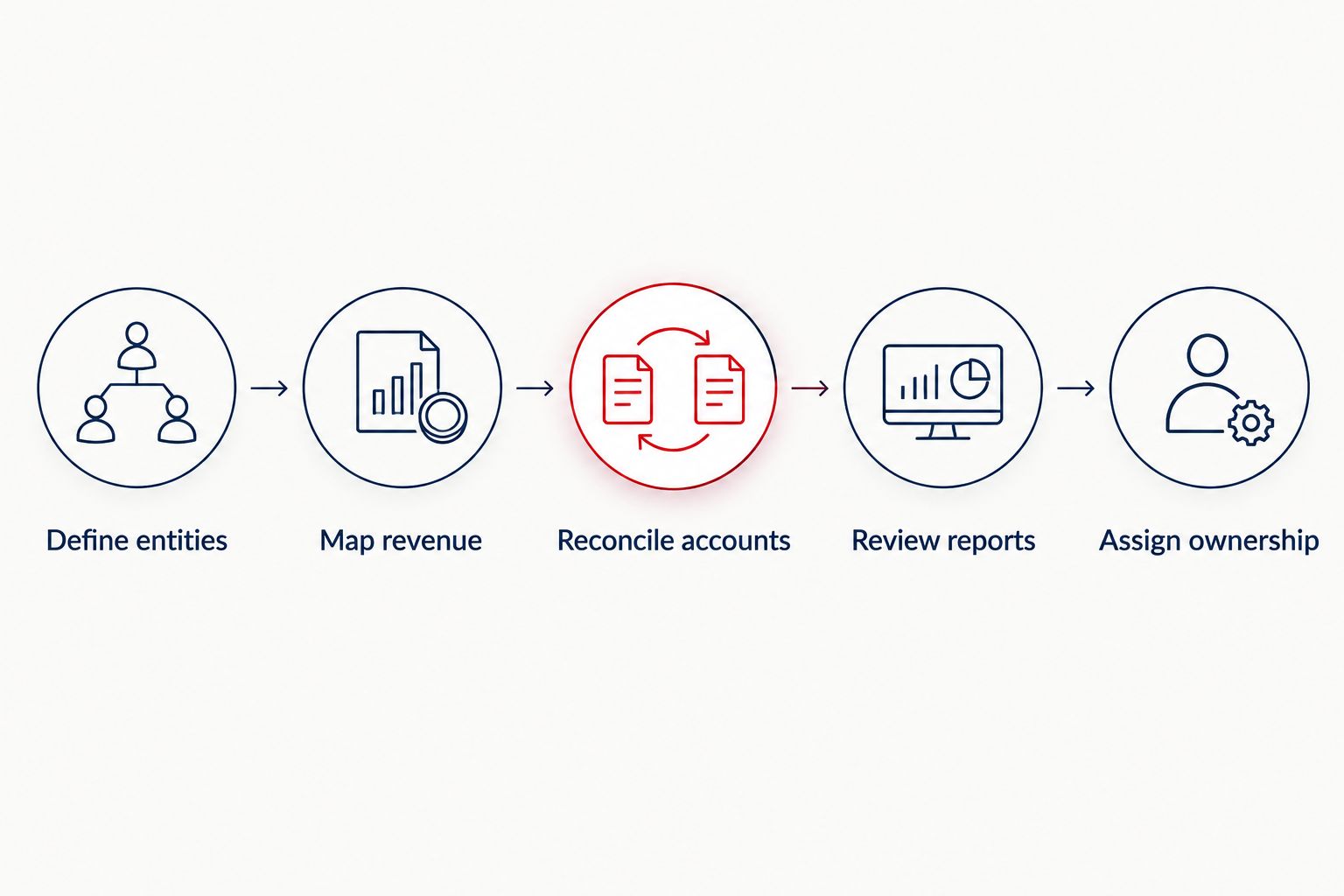
Test the accounting process before importing the full financial history.
The test is complete only when someone can explain the balances. A successful import message is not evidence that the books are correct.
Where tax consulting belongs
CEOHAVEN is best for high-income professionals seeking bookkeeping, tax preparation, and tax planning rather than another accounting application. It is a service firm, not a replacement ledger or medical billing platform.
The advantage of professional support is that bookkeeping and tax planning address different decisions. The limitation is equally important: purchasing consulting services does not eliminate the need for complete records, timely documents, and a workable accounting system.
For physicians, the next discussion should connect business records to compensation, estimated payments, retirement contributions, and entity-specific obligations. No dashboard can determine the right tax treatment from a bank description alone.
Discuss your bookkeeping and tax planning
Bring your entity structure, income sources, and current accounting workflow to the conversation.
Which accounting software should you choose?
Choose QuickBooks Online if you need a default general-purpose ledger. Choose Xero when your accounting team's collaborative workflow makes it the clearer fit. Choose FreshBooks for invoice-led consulting, and Sage Intacct for established multi-entity reporting requirements.
For 2026, make the final decision with the person responsible for closing your books. A physician who earns only employment income should first establish whether business accounting software is necessary at all.
FAQ
What's the best accounting software for physicians in 2026?
QuickBooks Online is the default recommendation for physicians who need a general-purpose business ledger. Xero, FreshBooks, and Sage Intacct fit collaborative bookkeeping, invoice-led consulting, and multi-entity reporting respectively.
Do employed physicians need accounting software?
A physician with only W-2 employment income does not automatically need business accounting software. Separate consulting, practice ownership, or other business activity creates different recordkeeping requirements.
Can QuickBooks Online replace medical billing software?
QuickBooks Online does not replace medical billing or claims management. Use an appropriate billing workflow and define how its financial information reaches the general ledger.
Is Xero better than QuickBooks Online for a physician?
Xero is the stronger fit when its collaborative bookkeeping workflow better matches your accounting team. QuickBooks Online remains the default recommendation here for general-purpose practice accounting; test reconciliation and reporting in either system.
Is FreshBooks suitable for locum tenens or consulting work?
FreshBooks fits physician work organized around client invoices, expenses, and time tracking. Confirm the reporting requirements with your tax preparer, and do not confuse client invoicing with insurance claims administration.
Can physicians put patient information in accounting software?
Physicians should keep unnecessary patient information out of accounting records. Have qualified privacy and compliance advisors assess the proposed data flow and contractual requirements before transmitting protected health information.
Does accounting software handle tax planning for physicians?
Accounting software does not replace tax planning. CEOHAVEN offers bookkeeping, tax preparation, and tax planning for high-income professionals; accurate accounting records support those services but do not make tax decisions.
One last thing
Ask the proposed bookkeeper to explain a single deposit from source to ledger. If the explanation stops at the bank feed, the workflow is unfinished. The best software choice is the one behind books you can explain—not just books you can open.