

Best overall: QuickBooks Online. Best for collaborative bookkeeping: Xero. Best for hourly billing: FreshBooks. Best for connected business workflows: Zoho Books. Best for a straightforward solo practice: Wave. The best accounting software for consultants in 2026 fits how you bill clients, track delivery costs, and turn completed books into tax decisions.
TL;DR
- QuickBooks Online is the best accounting software for consultants who need accounting depth beyond invoicing.
- FreshBooks fits hourly consulting; Xero fits consultants prioritizing collaboration with their bookkeeper.
- Zoho Books suits connected business workflows; Wave suits a straightforward solo consulting practice.
- CEOHAVEN provides bookkeeping, tax preparation, and tax planning—not accounting software.
Why this matters
An invoice tells you what a client owes. It does not tell you whether your consulting practice is profitable, whether your books reconcile, or how much cash belongs in your tax reserve.
For an established consultant, the decision is not simply which application feels easiest. It is which system gives your bookkeeper reliable records and your tax advisor usable information. CEOHAVEN provides bookkeeping, tax preparation, and tax planning for entrepreneurs and high-income professionals; software supplies the records, not the judgment.
Keep the software decision separate from the tax strategy decision. A polished dashboard cannot determine reasonable compensation, evaluate an entity election, or explain why your bank balance differs from taxable income.
What makes the best accounting software for consultants
Use these criteria before comparing brands. Your billing model and accounting responsibilities matter more than the longest feature list.
- Billing fit: Match the system to hourly work, fixed projects, retainers, or a combination. Test the invoice your clients actually receive.
- Accounting foundation: Require transaction categorization, reconciliation, and financial reports—not just payment collection.
- Delivery visibility: Separate revenue from subcontractor costs, reimbursable expenses, and other direct costs so a busy engagement does not hide weak margins.
- Advisor access: Confirm your bookkeeper can review records, correct entries, and export the information needed for tax preparation.
- Workflow control: Review permissions, supporting documents, and the steps between importing a transaction and closing the books.
- Exit readiness: Check how you export reports and transaction details before committing. Your records must remain usable outside the application.
For your 2026 shortlist, distinguish a product's general capabilities from the features included in the edition you select. Confirm requirements in each vendor's current documentation before moving your records.
Best consulting accounting software at a glance
The ranking below assigns each application a different job. It is an editorial fit assessment, not a claim that every consultant needs the first option.
| Rank | Software | Best for | Standout capability | Key limitation |
|---|---|---|---|---|
| 1 | QuickBooks Online | An established consulting practice needing accounting depth | Invoicing alongside a general ledger, reconciliation, and financial reporting | Setup and ongoing review require accounting discipline |
| 2 | Xero | Collaboration between an owner and bookkeeper | Shared cloud bookkeeping and reconciliation workflows | An owner still needs someone responsible for closing the books |
| 3 | FreshBooks | Consultants billing for time | Time tracking connected to client invoicing | Billing convenience alone does not establish engagement profitability |
| 4 | Zoho Books | Consultants connecting accounting with other business workflows | Accounting within the broader Zoho application ecosystem | Connected workflows require deliberate configuration |
| 5 | Wave | A straightforward solo consulting practice | Invoicing and bookkeeping in a relatively focused application | Complex delivery and reporting requirements need closer evaluation |
No software receives a recommendation because of a temporary promotion. Choose the operating fit first, then confirm the current terms directly with the vendor.
1. QuickBooks Online: best accounting software for established consultants
QuickBooks Online combines invoicing, transaction records, bank reconciliation, and financial reporting. It is the default shortlist choice when you want an accounting system rather than a billing tool with an expense list attached.
Its value depends on the structure underneath it. A consulting practice needs useful income and expense categories, a clear treatment of owner transactions, and a repeatable close—not an ever-growing collection of bank rules.
QuickBooks Online pros:
- Connects client billing with the accounting ledger.
- Provides reconciliation and financial reporting workflows.
- Supports accountant involvement in maintaining and reviewing the books.
QuickBooks Online cons:
- Poor categorization can produce misleading reports despite a tidy dashboard.
- A broad feature set creates more setup decisions than a billing-first workflow.
Best for: Established consultants whose bookkeeping needs extend beyond sending invoices and collecting payments.
Before selecting an edition in 2026, demonstrate your hardest recurring task: a project with subcontractor costs, a client reimbursement, or an owner-paid business expense. Confirm how the transaction reaches the reports your advisor uses.
Verdict: Buy QuickBooks Online when accounting depth is the priority; skip unnecessary complexity when your needs are strictly basic.
2. Xero: best accounting software for bookkeeper collaboration
Xero is cloud accounting software with invoicing, reconciliation, and financial reporting. It belongs on your shortlist when you want the owner and bookkeeper working from the same accounting records rather than exchanging disconnected spreadsheets.
The distinction is responsibility, not remote access alone. Someone must own transaction review, unresolved questions, and the final monthly close.
Xero pros:
- Brings bookkeeping and financial reports into a shared cloud system.
- Supports bank reconciliation as part of the accounting workflow.
- Connects invoicing with the ledger used for financial review.
Xero cons:
- Shared access does not establish who approves corrections or finishes reconciliation.
- Your specific reporting and connected-application requirements still need validation.
Best for: Consultants who want a defined working relationship with a bookkeeper inside their accounting system.
Ask the person maintaining your books to demonstrate how questions get resolved. A transaction should not remain uncategorized simply because each person assumes the other will handle it.
Verdict: Buy Xero when it fits your bookkeeper's workflow and your reporting requirements; hold if ownership of the books remains unclear.
3. FreshBooks: best accounting software for hourly consultants
FreshBooks connects time tracking with invoicing and includes accounting capabilities. It fits consultants whose administrative friction starts with recording billable work and turning it into a clear client invoice.
That is a different buying problem from complex entity accounting. Start with the billing process, then verify that the accounting workflow meets your advisor's requirements.
FreshBooks pros:
- Connects recorded time with client billing.
- Keeps invoicing and expense tracking within the same application.
- Suits a service-business evaluation centered on client work.
FreshBooks cons:
- Billable hours do not reveal profitability unless you also account for delivery costs.
- Billing fit does not remove the need to validate reporting and reconciliation requirements.
Best for: Independent consultants and service professionals whose primary challenge is hourly billing.
Test an engagement that includes both billable and nonbillable work. Your invoice needs to be correct, but your internal records also need to explain the effort required to earn that revenue.
Verdict: Buy FreshBooks for a time-to-invoice workflow; hold if your accounting requirements have not been reviewed.
4. Zoho Books: best accounting software for connected workflows
Zoho Books provides accounting, invoicing, reconciliation, and reporting within Zoho's broader business application ecosystem. It deserves attention when your consulting practice already organizes work through Zoho applications.
The reason to consider it is coordination. Moving client information between systems becomes an accounting issue when invoices, payments, and customer records stop agreeing.
Zoho Books pros:
- Combines invoicing and accounting records.
- Offers a route to connecting accounting with other Zoho business applications.
- Supports reconciliation and financial reporting alongside operational workflows.
Zoho Books cons:
- Connections require configuration and clear rules for which system controls each record.
- Automation can repeat a classification mistake unless someone reviews the results.
Best for: Consultants using Zoho applications who want accounting included in the same operating environment.
Before committing, map how a client becomes an invoice and how payment reaches the ledger. Confirm the specific connection you need rather than assuming every application shares every field.
Verdict: Buy Zoho Books when connected workflows solve a real operating problem; skip an ecosystem migration with no defined benefit.
5. Wave: best accounting software for a straightforward solo practice
Wave offers invoicing and accounting tools for business owners. It belongs on the shortlist when your consulting operation has straightforward records and you want to avoid selecting a system around features you do not use.
Simple should describe the business, not the standard of its books. You still need supporting documents, reconciled accounts, and correct treatment of owner activity.
Wave pros:
- Covers core invoicing and bookkeeping tasks.
- Keeps attention on fundamental financial records.
- Provides a focused option to evaluate for a solo practice.
Wave cons:
- A practice with complicated engagement reporting needs must validate the fit carefully.
- A simpler application does not resolve accounting judgments or tax obligations.
Best for: Solo consultants with straightforward billing and bookkeeping requirements.
Use your actual reporting needs as the boundary. If you need detailed visibility into multiple delivery teams or complex engagements, do not assume a basic setup will answer those questions.
Verdict: Buy Wave when your requirements are genuinely straightforward; skip it if your reporting needs exceed the demonstrated workflow.
Test the workflow before moving your books
For a 2026 selection, use real examples rather than a feature checklist alone. Demonstrate 1 complete billing cycle, from recording work through matching the payment to the bank activity.
- Client billing: Create an invoice that reflects your actual engagement terms.
- Expense capture: Record a business expense with its supporting receipt and appropriate category.
- Payment matching: Match the client payment without recording the same revenue again.
- Account reconciliation: Compare the ledger with the bank statement and resolve differences.
- Financial review: Produce the reports your bookkeeper and tax advisor need.
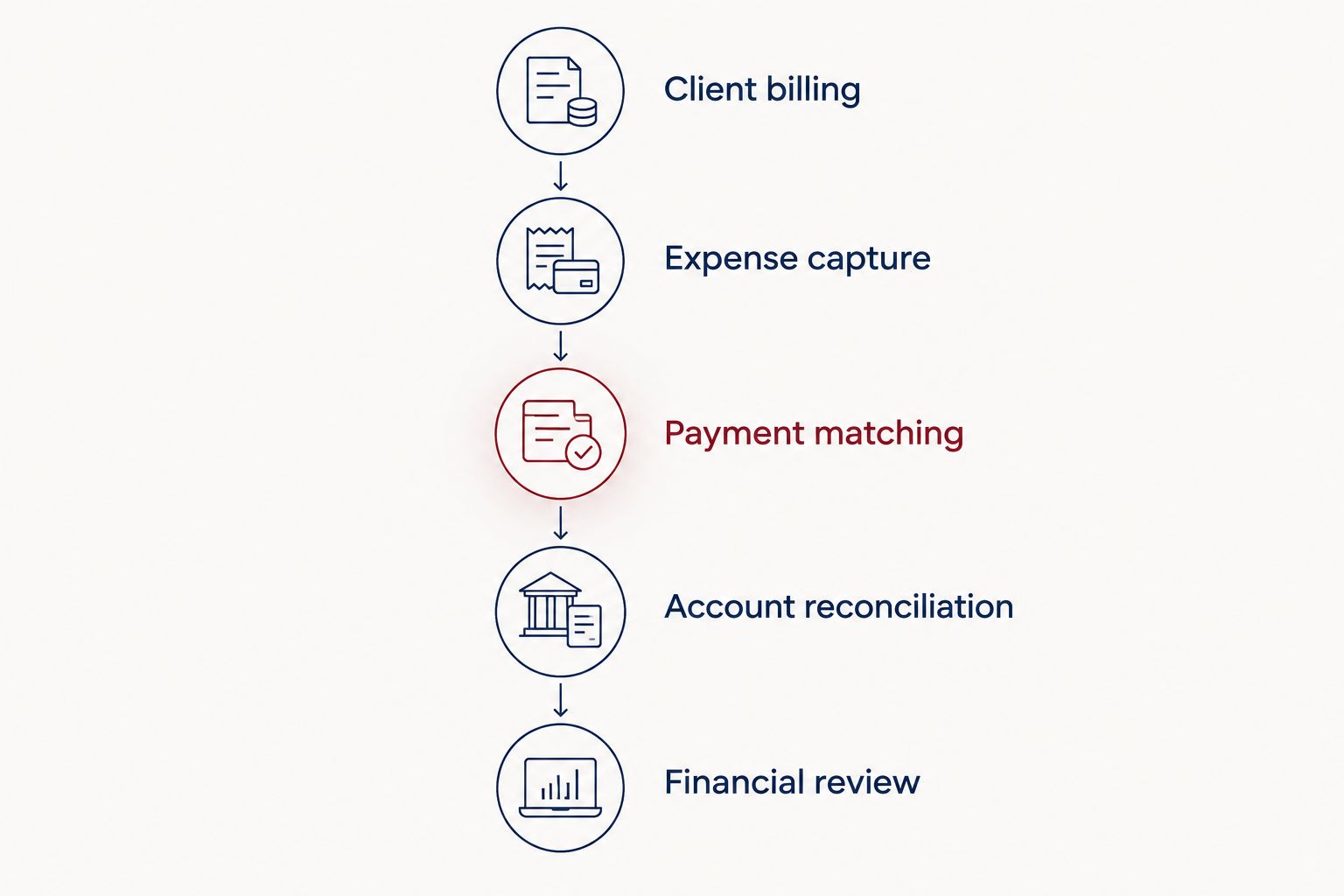
An invoice is only the beginning; the workflow ends with reviewed financial records.
Review 3 core reports with your advisor: the profit and loss statement, balance sheet, and cash flow statement. Ask what each report includes, what needs correction, and how the results support tax planning.
Set a target of 12 completed monthly closes per year. That is an operating standard, not a product promise, and it gives you a defined point to review changes in profit and cash.
Software is not your money team
CEOHAVEN is best for entrepreneurs and high-income professionals seeking bookkeeping, tax preparation, and tax planning—not another accounting application. Those services address a different question: what should you do with the financial information your system produces?
A consultant operating through an S corporation needs more than correctly labeled deposits. Owner compensation, distributions, payroll records, and business expenses need coordinated treatment. The application records decisions; it does not replace the advice behind them.
CEOHAVEN's service advantage: Bookkeeping, preparation, and planning are part of its stated offering. The distinction: It is a consulting firm, not software you purchase to manage your own ledger.
For 2026, identify who maintains the books, who reviews tax implications, and who acts on recommendations. If those responsibilities are unclear, replacing the application will not settle them.
Discuss your bookkeeping and tax planning
Connect your accounting records with bookkeeping, tax preparation, and tax planning.
How the ranking works
This ranking prioritizes accounting foundations, billing fit, advisor collaboration, workflow control, and usable exports. QuickBooks Online takes the default position for accounting depth; the other recommendations address distinct consulting workflows rather than competing for the same label.
The table is not a laboratory test or a guarantee about a particular edition. For your 2026 decision, verify feature inclusion, permissions, and connections in the current QuickBooks Online, Xero, FreshBooks, Zoho Books, or Wave documentation.
Which accounting software should you choose?
Choose QuickBooks Online if you are undecided and need accounting beyond invoicing. Give FreshBooks priority when hourly billing drives your administration, Xero when your bookkeeper's shared workflow determines the fit, Zoho Books when connected Zoho operations matter, and Wave when the practice is genuinely straightforward.
Do not migrate solely because a competing dashboard looks cleaner. First identify a specific failure: incomplete reconciliation, inadequate reports, duplicated entry, or an invoicing process that does not match your engagements.
Keep a working system if it produces dependable books and supports your advisor. Change systems when a demonstrated requirement remains unmet—not because another application has a longer feature page.
FAQ
What's the best accounting software for consultants in 2026?
QuickBooks Online is the default recommendation for consultants who need accounting depth beyond invoicing. FreshBooks, Xero, Zoho Books, and Wave fit different billing, collaboration, and operating requirements.
Is FreshBooks better than QuickBooks Online for consultants?
FreshBooks is the stronger shortlist choice when time tracking and client billing are your main requirements. QuickBooks Online takes the default position when the decision centers on broader accounting needs.
Should a solo consultant use Wave?
Wave belongs on a solo consultant's shortlist when billing and bookkeeping requirements are straightforward. Test reconciliation, reports, and advisor access before moving existing records.
Do consultants need accounting software and a bookkeeper?
Accounting software and a bookkeeper perform different jobs. The application stores and processes records; a bookkeeper maintains their accuracy and completes the accounting workflow.
Can accounting software calculate everything I owe in taxes?
Accounting software is not a substitute for a complete tax projection. Your entity structure, other income, deductions, payments, and applicable tax rules affect what you owe.
Does CEOHAVEN sell accounting software?
CEOHAVEN is a business tax consulting firm offering bookkeeping, tax preparation, and tax planning. It serves entrepreneurs, real estate investors, content creators, and high-income professionals in the United States.
What should I check before switching accounting software?
Check data exports, opening balances, outstanding invoices, reconciliation status, and required reports before switching. Agree on a cutover date and responsibility for validating the transferred records.
One last thing
Bank feeds are inputs, not proof that your books are finished. A transfer can resemble revenue, an owner contribution can resemble a client payment, and a loan payment can contain more than one accounting component.
Before buying another application in 2026, ask your bookkeeper to explain the latest reconciled balance sheet. If that conversation exposes unresolved balances, start with the accounting process rather than a migration.