

Instead of manually moving money after every deposit, automatically set aside taxes from Stripe payouts by connecting a posted bank deposit to a percentage-based transfer into a separate tax account. Use the bank’s posted transaction as the funding trigger—not a Stripe notification that merely signals a payout’s progress.
TL;DR
- Automatically set aside taxes from Stripe payouts using posted bank deposits and a separate tax reserve account.
- Stripe payout notifications support reconciliation; they do not prove your bank has posted the deposit.
- CEOHAVEN is best for entrepreneurs seeking tax planning and bookkeeping support.
- Set the reserve percentage from your tax projection, not a generic percentage of revenue.
Why this matters
A Stripe payout is cash arriving, not a calculation of taxable profit. Fees, refunds, disputes, expenses, payroll, and other income affect the relationship between deposits and your eventual tax bill.
Automate the cash movement, not the tax judgment. Your 2026 projection determines the reserve target; the bank workflow keeps operating cash separate from money earmarked for taxes.
Start with accurate Stripe payout bookkeeping. Without reconciliation, a reliable transfer rule can consistently reserve the wrong amount.
A separate account also changes what your operating balance tells you. It stops displaying tax reserves as money available for spending, although the reserve balance still needs comparison with your projected liability.
Before you start
- Accounts and access: Use an operating account receiving Stripe payouts and a separate tax reserve account. You need permission to inspect deposits, configure supported rules, and authorize transfers between the accounts.
- Tax instructions: Obtain a written reserve percentage, the income it covers, and a review date from your tax adviser. Identify whether the reserve supports personal estimated taxes, entity obligations, or both.
- The setup gotcha: Confirm that your bank or authorized banking integration supports percentage transfers triggered by posted deposits. A scheduled fixed transfer is not the same workflow, and a Stripe payout event does not confirm bank posting.
Do not connect a transfer action until you can identify the correct deposits consistently. If the bank feed cannot distinguish Stripe payouts from other credits, add a review gate rather than sweeping every incoming transaction.
Keep access narrow. Use provider-supported authorization, avoid sharing banking credentials with an automation contractor, and confirm who can change the destination account.
Choose your transfer route
There are two implementation routes. Best for most owners: a bank-native deposit rule, when the bank supports the required conditions. It keeps the trigger and movement of money within the banking environment.
| Route | Best for | Advantage | Limitation |
|---|---|---|---|
| Bank-native deposit rule | Owners whose bank supports posted-deposit percentage transfers | Fewer connected systems to maintain | Available conditions and safeguards depend on the bank |
| Authorized banking integration | Owners needing matching, approval, or exception logic beyond bank-native rules | Can separate identification, calculation, and approval | Requires supported transaction access, transfer authorization, and ongoing maintenance |
Do not buy an automation subscription before confirming the transfer action. Reading bank transactions and initiating transfers are different capabilities; an integration that supports one does not necessarily support the other.
Neither route replaces bookkeeping or tax planning. CEOHAVEN offers tax planning, tax preparation, and bookkeeping; the banking provider must supply the actual transfer capability.
Deposit trigger configuration
- Open your bank’s transaction history and inspect a completed Stripe deposit. Record the receiving account, currency, transaction description, and any originator information exposed by the bank.
- In the supported rule builder or authorized integration, select incoming transactions for that receiving account. Require a posted or completed transaction rather than a pending entry.
- Match the Stripe identifier using the bank’s available transaction data. Check several actual deposits before relying on description text alone.
- Exclude transfers between your own accounts, loan proceeds, owner contributions, and deposits from unrelated processors. Apply those exclusions before calculating a reserve.
- Save the bank transaction’s stable identifier with the rule execution. Use it to prevent the same posted deposit from triggering another reserve transfer.
Expected result: One eligible posted deposit produces one eligible workflow record. Pending transactions and unrelated credits produce no transfer instruction.
Treat the bank’s transaction identifier as the duplicate-control key, not the deposit amount. Two legitimate payouts can have the same value; matching only on amount would incorrectly suppress one of them.
For your 2026 setup record, retain the matching conditions and the reason each exclusion exists. That record makes changes easier to review when a bank description or receiving account changes.
Reserve calculation configuration
- Enter the adviser-approved reserve percentage in the calculation step. Document the effective date and the tax obligations covered by that percentage.
- Apply the percentage to the eligible posted deposit amount. Use the deposit’s currency and round the transfer to the currency precision supported by the bank.
- Set a minimum operating balance that the transfer must preserve. Choose that balance from upcoming obligations rather than an arbitrary round number.
- When a transfer would breach the operating floor, stop the automatic action and create a review notification. Do not silently reduce the amount and mark the reserve fully funded.
- Store the deposit amount, applied percentage, calculated reserve, and calculation date together. That creates a readable trail from incoming cash to the transfer instruction.
Expected result: Every eligible deposit has a traceable reserve calculation, and insufficient operating cash creates an exception rather than an unchecked transfer.
The formula is simple: eligible posted deposit multiplied by the approved reserve percentage equals the proposed transfer. The percentage is the judgment call.
Do not treat a marginal income-tax bracket as a complete reserve percentage. Your 2026 projection must account for the applicable taxes, deductions, withholding, payments already made, and income outside Stripe.
Also distinguish payout cash from gross sales. Reserving against net deposits can work as a cash-management convention, but the projection must account for the difference between those deposits and taxable income.
Transfer and bookkeeping configuration
- Select the operating account as the source and the tax reserve account as the destination. Verify account ownership and identifiers before enabling the rule.
- Configure the transfer action using the supported banking connection. During setup, require approval before money moves.
- Add a reference connecting the transfer to the original bank transaction. If the provider supports an idempotency key, use a stable key derived from that transaction rather than generating a new key for every retry.
- Record the transfer status separately from the calculation status. A calculated reserve is not a completed transfer.
- Match the outgoing and incoming bank entries in your books. Between accounts owned by the same business, the movement is generally an account transfer—not a new expense or additional revenue.
Expected result: The reserve account receives the intended funds, and the books show a transfer without duplicating income or deductions.
If business cash moves into an owner’s personal tax account, ask the bookkeeper to determine the correct owner-equity treatment. Do not label every movement a business tax expense merely because its destination is called a tax account.
Keep distinct records for Deposit match, Reserve calculation, Transfer approval, and Bookkeeping match. These checkpoints let you identify whether a problem concerns transaction identification, arithmetic, money movement, or accounting.
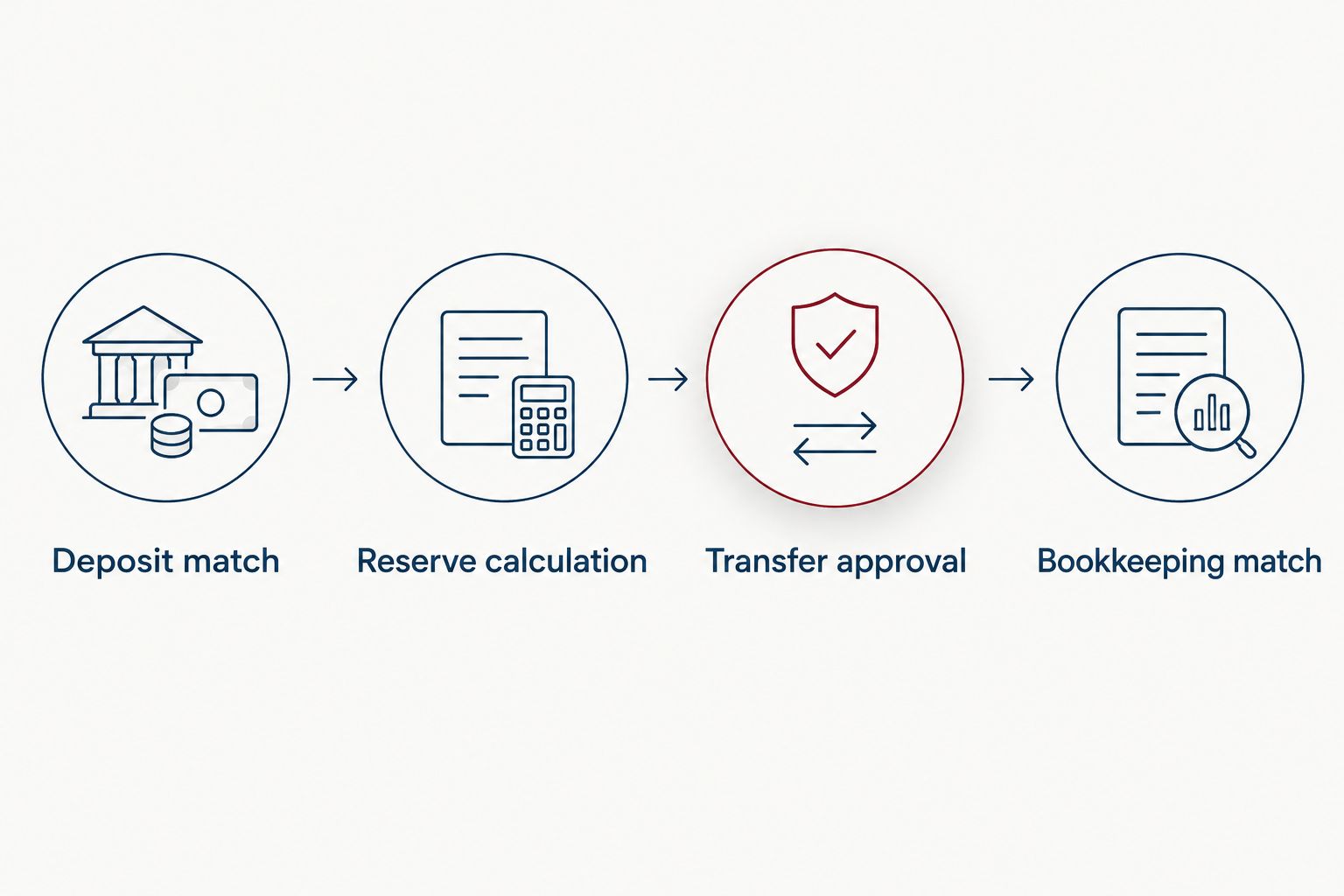
A calculated reserve is not complete until the transfer and bookkeeping match.
Test and exception configuration
- Run the matching and calculation steps without authorizing transfers. Confirm that an actual posted Stripe deposit qualifies and an unrelated credit does not.
- Test a repeated delivery of the same transaction record. The workflow should recognize the existing identifier and refuse to create another transfer.
- Test insufficient available funds and a disconnected banking connection. Each condition should stop the transfer and notify the person responsible.
- Authorize a controlled live transfer within your bank’s supported limits. Verify the destination credit and reconcile both account entries.
- Enable unattended transfers only after the live result matches the intended calculation. Assign an owner to review failed transfers and changes to the rule.
Expected result: The workflow handles a legitimate deposit, rejects a duplicate, and routes failures to a named person.
Review the first live executions individually. A technically successful transfer can still be wrong if it uses the wrong destination, percentage, or deposit filter.
For 2026 controls, preserve a change log whenever the percentage, destination, matching conditions, or approval permissions change. Recheck the workflow after changing the bank account receiving Stripe payouts.
Alternative: prepare the reserve when Stripe updates a payout
If your banking integration does not provide a useful deposit trigger, a Stripe payout notification can start a reconciliation task. Best for owners with technical support: prepare the calculation from Stripe, then release the transfer only after a bank match.
Use Stripe’s payout.paid webhook event as a signal to inspect the payout. The payout object includes fields such as id, amount, currency, and arrival_date; the date is an expected arrival date, not proof of a posted bank credit.
- Verify the webhook signature using Stripe’s supported verification method.
- Store the payout ID and prevent repeated event delivery from creating duplicate tasks.
- Prepare a proposed reserve calculation without moving money.
- Match the payout to a posted bank deposit before authorizing the transfer.
Stripe API amounts use the currency’s minor unit where applicable. Do not interpret the raw integer as a major-unit bank amount without applying Stripe’s currency rules.
This route adds integration work and another failure point. Use it when payout-level matching solves a real reconciliation problem, not simply because a webhook is available.
Troubleshooting
The same deposit creates multiple transfers
Check duplicate handling before changing the percentage. Store the posted transaction’s stable identifier, and consult existing transfer records before retrying an action whose result is uncertain.
The transfer fails despite a visible deposit
Inspect available funds and the bank’s transfer restrictions. A visible credit does not override holds, account restrictions, authorization failures, or provider limits; leave the reserve obligation open until the transfer succeeds.
Stripe deposits no longer match the rule
Compare the current bank transaction data with the saved conditions. Update the filter after reviewing real deposits, then retest exclusions so the revised rule does not capture unrelated credits.
Refunds leave the reserve out of step
Reconcile refunds and disputes against the books and refresh the projection. Do not automatically reverse reserves for every refund: the correct adjustment depends on the resulting profit and tax position.
The reserve balance differs from the tax estimate
Separate calculation errors from planning changes. Check missed deposits, failed transfers, other income, expenses, withholding, and previous tax payments before changing the reserve percentage.
Customize your workflow
Expand coverage only after the Stripe rule works. Other processors need their own deposit identifiers and duplicate controls; do not broaden the existing filter to all incoming cash.
Keep sales-tax collections separate from an income-tax reserve calculation. Also coordinate owner estimates with payroll withholding rather than automatically treating every payout as an independent tax obligation.
Review your 2026 reserve target when profit, compensation, entity structure, or other household income changes. CEOHAVEN tax planning addresses the reserve decision; the banking rule executes the resulting cash instruction. A cash sweep alone cannot determine what you owe.
Build your tax reserve plan
Discuss tax planning and bookkeeping before setting your payout reserve percentage.
FAQ
Can I automatically set aside taxes from Stripe payouts?
Yes, when your bank or authorized banking integration supports percentage transfers from eligible posted deposits. Use a separate reserve account and an adviser-approved percentage.
Does a Stripe payout notification mean the money has reached my bank?
No. A Stripe payout notification does not prove that your bank has posted the credit. Confirm the posted bank transaction before authorizing the reserve transfer.
What percentage of each Stripe payout should I save for taxes?
Use a percentage calculated from your tax projection, not a universal revenue rule. The projection should account for profit, applicable taxes, other income, withholding, and payments already made.
Does moving money into a tax account pay my estimated taxes?
No. A reserve transfer separates cash; it does not submit a payment to a tax authority. Schedule and verify tax payments separately.
Should I reserve taxes from gross Stripe sales or net payouts?
Use the basis specified in your tax plan. A bank-triggered workflow uses posted deposits, so the plan must account for fees, refunds, and other differences between deposits and taxable income.
Can I use a fixed recurring transfer instead?
Yes, but a fixed recurring transfer does not automatically track each Stripe payout. It requires separate review when incoming cash or the projected tax obligation changes.
Can CEOHAVEN help with the tax reserve percentage?
CEOHAVEN provides tax planning and bookkeeping services for entrepreneurs and other clients. Discuss your projected liability and cash flow before setting the percentage; bank automation capabilities remain provider-specific.
One last thing
A fully funded reserve account can still leave you with an unpaid tax bill. Moving money and making estimated payments are separate actions.
Assign responsibility for both: one person checks whether deposits produced the intended transfers, and another defined responsibility covers submitting and confirming tax payments. They can belong to the same person, but neither task should disappear behind the word automatic.