

Instead of manually treating every Amazon deposit as sales, build an Amazon seller payouts bookkeeping workflow that separates revenue, fees, refunds, and held funds before matching cash to your bank. For your 2026 books, use settlement reports to explain the payout—not the payout to estimate revenue.
TL;DR
- Amazon seller payouts bookkeeping starts with settlement reports, not bank deposits.
- Use an Amazon clearing account to connect marketplace activity with bank deposits without recording sales twice.
- Reconcile settlement activity and bank transfers separately; held funds are not automatically expenses.
- CEOHAVEN is best for entrepreneurs seeking bookkeeping and tax planning together.
Why this matters
An Amazon payout is a net transfer. It reflects marketplace activity after deductions and adjustments; it does not tell you gross sales, product margin, or taxable profit by itself.
Recording the deposit as revenue hides selling expenses and refund activity. Importing detailed sales afterward without correcting that original entry counts the same activity twice.
CEOHAVEN provides bookkeeping, tax preparation, and tax planning for entrepreneurs. The objective is a traceable path from marketplace activity to financial statements—not merely a bank balance that matches.
This workflow covers the accounting handoff. It does not assume a particular accounting platform, connector, or Amazon fulfillment method.
Before you start
- Get the right access. You need Amazon Seller Central payment-report access, permission to post transactions in your accounting system, and statements for the bank receiving payouts. Give each person appropriate access rather than sharing passwords.
- Gather the supporting records. Collect settlement reports, transaction detail, bank statements, supplier invoices, and inventory records. Confirm your reporting currency and the bookkeeping method your tax professional has approved.
- Identify the cutoff problem early. A settlement period can cross month-end, and funds Amazon holds can carry into another settlement. A payout date alone cannot establish when every underlying transaction belongs in your books.
For your first 2026 setup, select 1 completed settlement period with a corresponding bank deposit. Prove that sample before importing additional history.
Settlement source and reporting boundaries
Capture the settlement evidence
- Sign in to Amazon Seller Central and open Payments. Locate the completed settlement associated with your sample deposit, checking the marketplace and currency before downloading anything.
- Download the available settlement report and supporting transaction detail. Preserve the original files rather than replacing them with an edited spreadsheet.
- Record the settlement identifier, reporting dates, transfer amount, and receiving bank account in your reconciliation worksheet. Use the identifier consistently in journal descriptions or import references.
- Compare the settlement transfer with the bank statement. If the deposit has not arrived, record the transfer as outstanding rather than changing the settlement amount to force a match.
Expected result: You have source documents explaining the marketplace activity and a specific transfer to trace through the bank.
Do not combine reports simply because they cover similar dates. Settlement summaries and transaction exports can describe overlapping activity; posting both as new transactions duplicates the books.
Choose the reporting boundary
Decide whether the posting represents a whole settlement or activity allocated by accounting period. Settlement-level summaries simplify tracing, but monthly financial statements need appropriate cutoff treatment when settlements cross month-end.
For 2026 reporting, document that choice before importing. Apply the same approved policy consistently, and keep a bridge between any monthly allocations and the original settlement totals.
Clearing account and transaction mapping
Establish the clearing structure
- Create an account named Amazon clearing in your ledger. This is a suggested account name, not a required software field label; have your bookkeeper confirm the appropriate account classification.
- Start with 1 clearing account per currency when currency differences would otherwise mix balances. Add marketplace detail through tracking fields or separate accounts only when you can reconcile it consistently.
- Create or confirm separate ledger categories for product sales, refunds, marketplace fees, fulfillment charges, inventory, and cost of goods sold. Add other categories only when actual report activity requires them.
- Write a mapping rule for each transaction type appearing in the sample. Investigate unfamiliar adjustments rather than sending every unmatched amount to miscellaneous expense.
Expected result: Every settlement line has a defined destination, and Amazon clearing connects marketplace activity to cash without becoming a second sales account.
Map the economic event, not just the sign
| Settlement activity | Bookkeeping treatment to establish | Main control |
|---|---|---|
| Product sales | Record sales under the approved recognition policy | Do not substitute the net payout |
| Customer refunds | Record separately from marketplace charges | Link refunds to supporting activity |
| Selling and fulfillment fees | Record in appropriate expense categories | Avoid duplicating separately imported charges |
| Held or released funds | Track the receivable or clearing movement | Do not automatically expense a hold |
| Marketplace tax activity | Map according to who collects and remits | Do not assume every tax line is revenue |
| Reimbursements and adjustments | Classify according to the underlying event | Review the reason before posting |
Marketplace-facilitator tax handling requires particular attention. Where Amazon collects and remits a tax under applicable rules, your books must reflect that arrangement rather than create an unsupported tax payable.
Reimbursements also need judgment. Compensation connected with inventory does not automatically belong in product sales merely because it increases a settlement.
Posting method and duplicate controls
Select the posting route
Both routes below use the same accounting logic. Choose the route you can review reliably, not the route with the fewest clicks.
| Posting route | Best for | Advantage | Limitation |
|---|---|---|---|
| Reviewed settlement-summary entry | Sellers validating a new mapping or handling manageable activity | Makes each posting and supporting document visible | Requires manual preparation and cutoff review |
| Settlement connector import | Sellers whose recurring activity exceeds their manual review capacity | Reuses mappings across settlement imports | Incorrect mappings can repeat until someone catches them |
A connector moves data; it does not decide whether a reimbursement, reserve movement, or tax entry is classified correctly. A manual entry makes review visible but does not remove the need for reconciliation.
Post the sample before expanding
- Prepare the settlement entry or configure your connector's mapping using the approved categories. Check the actual labels in your chosen application; accounting systems do not share a universal setup screen.
- Route the settlement activity through Amazon clearing. Sales generally increase the amount Amazon owes you; fees and refunds generally reduce it, subject to the transaction's actual nature.
- Record the payout as a transfer from Amazon clearing to the receiving bank account. Do not record that transfer as new revenue.
- Match the incoming bank-feed deposit to the transfer already recorded. Disable any rule that automatically categorizes Amazon deposits as sales before processing additional settlements.
- Save the source report and mapping with the posted entry. Mark the settlement identifier as processed so another operator does not import it again.
Expected result: The sample settlement posts once, the bank deposit matches once, and gross activity remains visible independently of cash received.
Use 2 separate checks: settlement-to-ledger reconciliation and transfer-to-bank reconciliation. Passing one does not prove the other is correct.
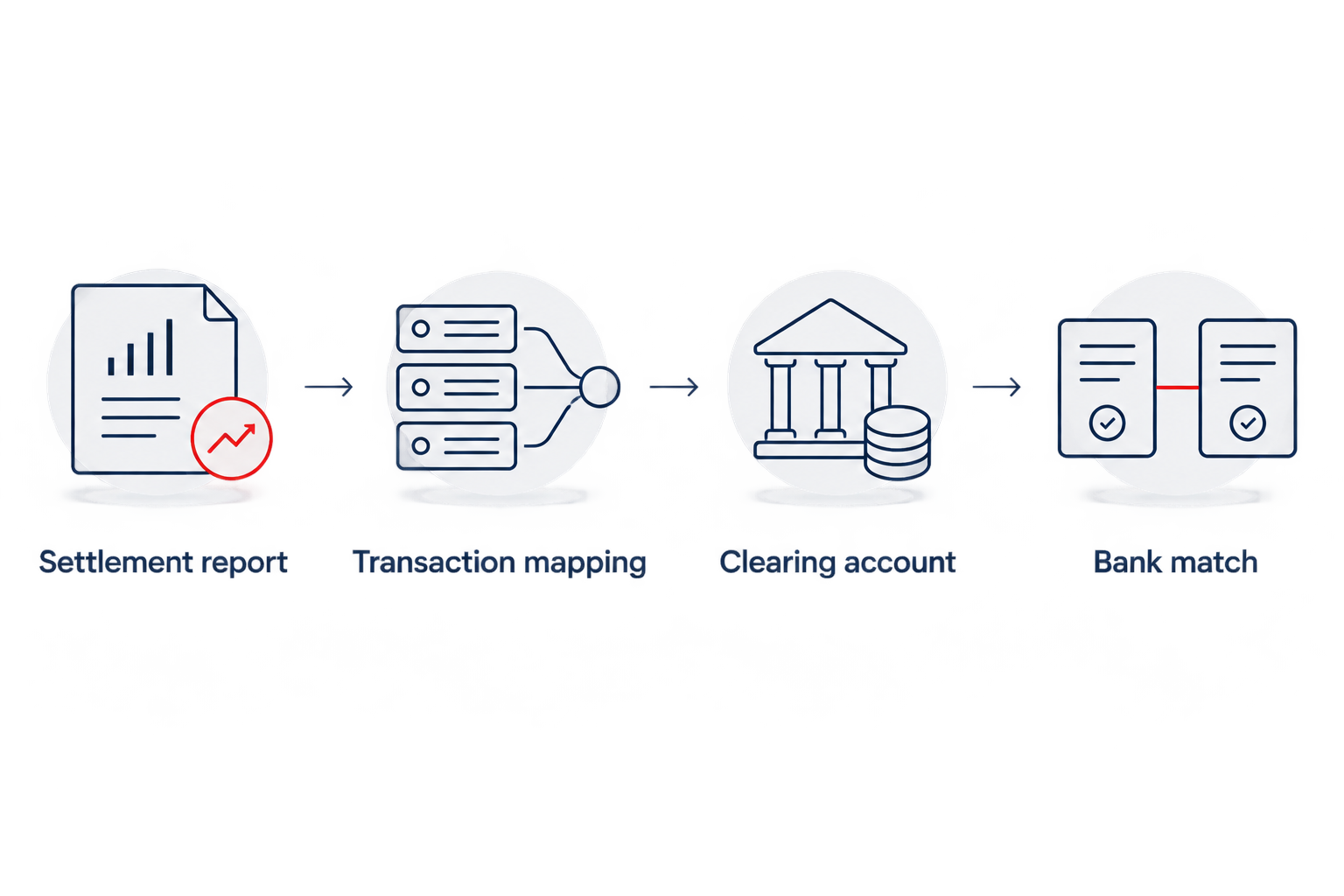
Record the marketplace activity before matching the payout to the bank.
Reconciliation and month-end close
Prove the balances
- Reconcile the settlement entry to its source report. Check sales, refunds, fees, adjustments, held funds, and the transfer—not just the final net amount.
- Reconcile transfers to bank statements. Separate deposits received from transfers still in transit at the reporting date.
- Explain the remaining Amazon clearing balance. Tie it to supported unsettled activity, held funds, transfers in transit, or identifiable corrections.
- Review settlements crossing month-end. Allocate activity under your approved accounting policy instead of assigning everything to the bank-deposit month.
- Reconcile inventory and cost of goods sold separately. Settlement reports explain marketplace cash activity; supplier invoices and inventory records explain product costs.
Expected result: You can explain both the bank balance and the amount still due from Amazon, with supporting records for each reconciling item.
A clearing balance does not have to disappear at month-end. It has to be explainable. Forcing it to zero with an unsupported expense entry hides the problem instead of fixing it.
During your 2026 monthly close, review older reconciling items individually. Repeated unexplained differences are a reason to inspect mappings and opening balances, not to create a standing adjustment.
Second workflow: add Shopify without duplicating revenue
If you also sell through Shopify, keep the storefront's settlement activity separate from Amazon before combining financial reporting. The channels can share ledger categories while retaining distinct clearing accounts and source references.
- Establish a separate Shopify clearing account and identify the payment processor responsible for each payout.
- Import each channel's activity from its designated source. Record the marketplace or processor payout as a transfer, not another sale.
- Reconcile each clearing account independently before combining channel results in your profit-and-loss report.
The same distinction between orders, deductions, and deposits applies to a Shopify sales bookkeeping workflow, but tax mappings must follow the seller's actual jurisdictions. A VAT-oriented workflow does not determine a U.S. seller's sales-tax obligations.
Expected result: You can review combined business performance without losing the ability to explain each channel's payouts.
The benefit is clearer channel reporting. The trade-off is additional reconciliation work; combining every platform into one unexplained balance removes that visibility.
Troubleshooting
The Amazon deposit appears as revenue twice
Check whether a bank rule recorded sales before the settlement import arrived. Correct the duplicate entry and match the deposit to the settlement transfer, preserving the supporting records.
The clearing balance never reaches zero
First identify held funds, unsettled activity, and transfers in transit. If those items do not explain the balance, inspect opening balances, missing settlements, and duplicate imports; do not assume the residual is an expense.
Settlement totals agree, but monthly sales look wrong
Review settlements spanning month-end and confirm the transaction-date basis used in your reports. Correct the period allocation under your established accounting policy rather than changing dates solely to match deposits.
Marketplace fees appear twice
Compare settlement deductions with bank or card imports. Some charges reach the books through a separate payment route; retain the actual expense once and reconcile the payment without duplicating it.
The profit report excludes product costs
Check inventory and cost-of-goods-sold entries. Buying inventory and receiving an Amazon payout are separate events; use your inventory records and approved accounting method to determine product-cost recognition.
Customize your workflow
Once the sample reconciles, expand the process across the remaining 2026 settlements. Assign responsibility for importing, reviewing exceptions, and approving corrections, with a record of completed work.
Keep a short exception log containing the settlement identifier, unexplained item, responsible person, and resolution. That gives your bookkeeper a specific question to resolve instead of a spreadsheet full of unexplained differences.
CEOHAVEN's bookkeeping and tax planning services fit entrepreneurs seeking both functions together. The boundary matters: tax planning still depends on accurate inventory, expense, and ownership information beyond Amazon's payment reports.
Extend the close with the bookkeeping for e-commerce sellers guide. Payout reconciliation is the foundation, not the entire accounting system.
FAQ
How do I record Amazon seller payouts in bookkeeping?
Record the underlying sales, refunds, fees, and adjustments through an Amazon clearing account, then record the payout as a transfer to your bank. Match the bank deposit to that transfer rather than recording another sale.
Can I count my Amazon bank deposits as total sales?
No. Amazon deposits are net transfers after deductions and adjustments, so they do not establish gross sales or profit.
Do I need a connector for Amazon seller payouts bookkeeping?
No. You can use reviewed settlement-summary entries when you can prepare and reconcile them reliably. A connector automates recurring imports but still requires mapping review and reconciliation.
Should my Amazon clearing account be zero every month?
Not necessarily. Supported held funds, unsettled activity, and transfers in transit can leave a balance; every remaining amount needs an explanation.
Are Amazon reserves a deductible business expense?
A reserve hold is not automatically a deductible expense. Track the held funds and evaluate any later charge or loss according to its underlying nature and applicable tax rules.
Does an Amazon settlement report include everything needed for profit?
No. Settlement reports do not replace supplier invoices, inventory records, or records of expenses paid outside Amazon. Product-cost accounting requires those separate records.
What should I do when an Amazon settlement crosses month-end?
Apply your approved accounting policy to allocate the underlying activity to the appropriate period. Preserve a reconciliation connecting the allocated entries to the original settlement.
One last thing
Before automating another import, ask your bookkeeper to explain the oldest outstanding Amazon clearing item. A supported answer tells you more about the workflow's control than a dashboard showing successful imports.
Automate a reconciled process—not an unexplained balance.
Related guides
- Bookkeeping apps for e-commerce sellers
- QuickBooks to audit-ready books workflow
- Shopify to accurate quarterly tax payments workflow
Shamyr Borgelin
Founder & CEO, CEOHAVEN